Moz Q&A is closed.
After more than 13 years, and tens of thousands of questions, Moz Q&A closed on 12th December 2024. Whilst we’re not completely removing the content - many posts will still be possible to view - we have locked both new posts and new replies. More details here.
Improve Google Business ranking
-
While my client's websites have been ranking well in SERP for their keyterms I'm at a lost on what I can do to improve their Google business/map presence. I'm referring to their listing where the top three come up or when you search on Google Maps.
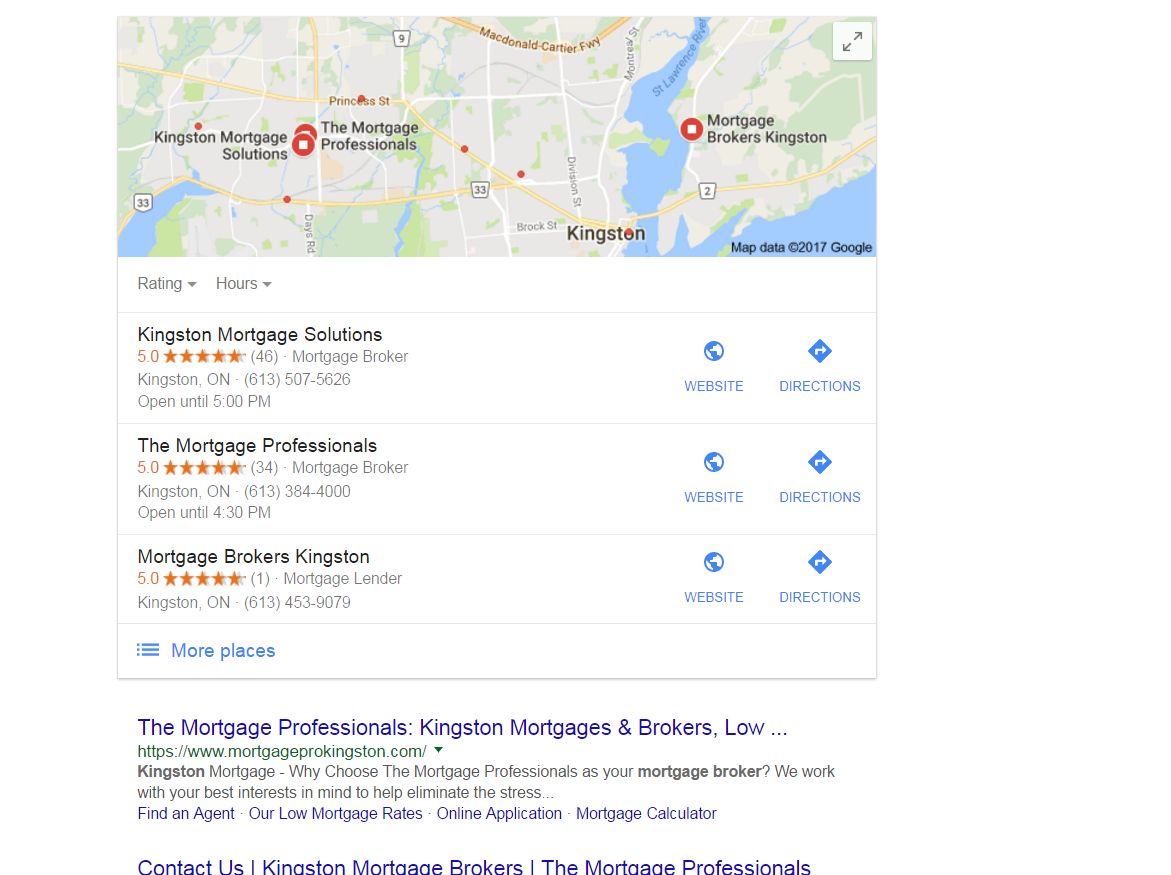
https://gyazo.com/26ec78ed7f712157ec72492199545431Ex 1. Several months ago my client was ranked #1 both for SERP and maps until they dropped to 2nd on maps. Now they're ranked 1st in search yet 2nd for local business rankings as you can see from the screenshot above. At one point my client's business did have more reviews than the 1st ranking business yet they still weren't 1st.
Ex. 2. Client(s) is ranked 4th in search and doesn't show in the top 3 map listings for their search term. If you click on More places to view Google Maps they're listed all the way down as the 15th listing or worse can't even be found when searching by their main SEO key term . Of course they are found by searching for their business name so it's not like there is a problem with the listing.
I make sure to:
-
Completely fill out their Google Business profile(NAP, hours and add pictures)
-
Have my client try to gain positive reviews
-
Manage and respond to reviews(mainly the negative ones)
-
Add map and Google business link to their website
Can anyone offer any other insight on what else can be done to improve their local presence on maps that I might be missing?
-
-
Those pesky duplicate, Joy!
FPK - has our community helped you? Do you have any further questions?
-
Hey There.
I actually see something different than you but I'm searching from the Toronto area which is 3-4 hours from Kingston. I actually see this which shows the duplicate Miriam mentioned as ranking 4th and the listing you showed is actually filtered because it's using the exact same phone # and address.
Having this duplicate is doing you a huge injustice because it's not linking to the website that is ranking high organically like you mentioned and it's splitting their reviews which just results in 2 profiles not ranking as well as they would if all the reviews were on 1 listing. Plus, since it's a violation of Google's guidelines, one of them could get removed and then you would lose the reviews on it.
I'd suggest consolidating them. This duplicate is verified so if you don't know who created it, you'll need to get access to the listing first. The naming convention it's using on the listing is also a violation of the guidelines.
The listing that ranks 2nd is doing some serious keyword stuffing so I would suggest you level the playing field by editing the listing and removing the keywords.
The listing that ranks 3rd and is above you should also look into as the name is keyword-stuffed, she already has another listing with her name, and the address she used on this listing actually belongs to a Re/Max agent as seen here and in Street View.
As for your 2nd question, it's hard to offer suggestions without knowing specifics

-
Hi FPK,
Glad to have you here. So, your client is #2 in the screenshot (I believe I'm understanding that correctly, but please let me know if I've misunderstood). If I'm correct, here are a few things to remember:
-
Local rankings are not static. What you see is not what your client or his customers will necessarily see, depending on your and their locations at the time of making the search. For more on this, read Phil Rozek's recent article: http://www.localvisibilitysystem.com/2017/05/24/did-your-local-rankings-really-sink-or-are-you-just-looking-at-them-wrong/
-
Reviews are just one factor of several hundred. To do a complete audit for any client, we recommend assessing all of the top Local Search Ranking Factors mentioned here: https://a-moz.groupbuyseo.org/local-search-ranking-factors. You need to audit both your client and any competitor who is outranking him to discover what the higher ranking businesses are getting right that your client may not be excelling at. The breadth of factors is wide: age of domain, age of listing, links, domain authority, topical authority, citation accuracy, authority and scope ... there is so much to consider here, so it's important to avoid oversimplifying this to something like "X is outranking Y because X has more reviews."
-
Definitely dive deep into the effects of Google's Possum filter, which has caused many businesses that share a category and building or street with competitors to experience extreme ranking changes. It looks like Kingston Mortgage Solutions is right across the street from you. To see if Possum may be at work in what your client is experiencing, read Joy Hawkins' article: http://searchengineland.com/everything-need-know-googles-possum-algorithm-update-258900
-
It looks like the client is well within Google's borders for the city of Kingston, so no worries on that score.
-
I'm concerned that I'm seeing duplicate GMB listings for your client. They appear to have listed themselves twice with the identical address and phone number but with two different names: The Mortgage Professionals and Mortgage Pro Team (The Mortgage Professionals). This would be a violation of Google's guidelines (see: <cite class="_Rm">https://support.google.com/business/answer/3038177?hl=en</cite>) and needs to be investigated swiftly. I am also seeing at least 3 practitioner listings at this same address that need to be investigated to ensure that they are guideline-compliant and not being viewed by Google as duplicates. None of the names on these listings meet Google's guidelines, unfortunately. So, we've hit on a real problem here and one that your agency will want to research fully and make every effort to resolve for the client.
-
Moz Local now supports Canada, and a good thing to do would be to look up the client in our free Check Listing tool to begin to assess how widespread this issue is with duplicates. With the full, paid version of the tool, you'll be able to add alternate info, as well, to find as many duplicates as possible.
This is a start, but isn't a genuine substitute for a professional audit, which it looks like this client definitely needs. I hope this quick glance of mine provides a good starting point!
-
Browse Questions
Explore more categories
-
Moz Tools
Chat with the community about the Moz tools.
-
SEO Tactics
Discuss the SEO process with fellow marketers
-
Community
Discuss industry events, jobs, and news!
-
Digital Marketing
Chat about tactics outside of SEO
-
Research & Trends
Dive into research and trends in the search industry.
-
Support
Connect on product support and feature requests.
Related Questions
-
Bingplaces.com wanting access to google account
Hello, we have a google my business account. On bingplaces.com it is saying they would like access to our google account. Is that normal for bing to share access with the google my business account? Thanks.
Local Listings | | MeritInsuranceGroup0 -
How to Have Multiple Listings appear on Google maps
Hi my client has two locations for his restaurants: Me Gusta Tacos He wants to have both his locations show up in the map pack, which they currently do when you type in Restaurants, Dinner, food near me etc... However, when you google Me Gusta Tacos the Google listing shows up on the right for one of his locations, but there isn't a Map Pack for his two locations. I wasn't sure if a map pack only shows up when there are 3 or more locations, for instance, a chipotle which I added an image below to compare too. HGOgln5 Jgdoi4Y
Local Listings | | Sociable_Bistro0 -
How do you fix a Google My Business Location Issue if the road doesn't yet exist on Google Maps?
My core question is just: How do you fix a Google My Business Location Issue if the road doesn't yet exist on Google Maps? Do I have any other options other than to just wait on Google to catch up with reality? Here's the background: I work for a hospital. We just opened a clinic on a street that is real and has a U.S. Postal Address, but Google Maps doesn't recognize it, and redirects people to a house . This is our postal address: 8343 S 168th Ave Omaha NE 68136-1677 If a patient enters the following into google maps, 8343 S 168th Ave, the location the map autofills the wrong zip code, and sends them to a home that is on S 168th Ave. (where in theory a home would exist if it had that home number). The road does exist in that portion of town. If a patient enters 8343 S 168th Ave, Omaha NE 68136, google maps takes you to the correct location, but it automatically changes Ave to St. The verified Google My Business listing also lists it as Street, even though on the back end I've put in the word Avenue, and it shows up in the right place. If however someone just searches by name "Chalco Clinic" the right Google My Business comes up. This is the Google My Business page I'm referring to: https://www.google.com/maps/place/Nebraska+Medicine+-+Chalco/@41.1754796,-96.1787153,15z/data=!4m5!3m4!1s0x0:0xf77aefb4e27f865!8m2!3d41.1754796!4d-96.1787153 And even though it says it's on a Street, on the back end of the claimed listing I've used "Avenue". In case it matters, this is the landing page for the location: https://www.nebraskamed.com/chalco
Local Listings | | Patrick_at_Nebraska_Medicine0 -
Issue in "Suggest an Edit" feature of Google My Business
"Suggest an Edit" feature of Google My Business is allowing the competitors to change your business details, that too without your prior permission! I have put together a piece on the issue we faced and you can review the same here: https://www.kvrwebtech.com/blog/issue-in-suggest-an-edit-in-google-my-business-is-it-a-bug-or-a-major-pitfall/ What are your thoughts on the same and what should be the right solution?
Local Listings | | varun18001 -
Local SEO Tasks When Closing One Branch of Multilocation Business
I would appreciate the opinions of my fellow SEOs on this one. I haven’t seen any other threads on this exact subject and others that touch on it are somewhat older so I am hoping this also proves to be a good resource for others going forward. I have an existing client that I did local SEO for about a year ago. They are a propane service provider and they had multiple locations. So we did local SEO for the company primarily by updating NAPs and creating more individual content for each of the branches such as specific landing page for each branch on their website and individual listings in citations for each branch. Now they have sold one of the branches to a competitor and they need to remove all listings for it. I am trying to develop a comprehensive list of actions to take and I would appreciate any feedback on the best way to go about accomplishing this task. Here is what I have so far: Remove all mention of sold branch on client website, including specific landing page Delete any branch-specific social media accounts Some specific areas I have questions about are: What do I do with Google My Business listings for the sold branch? Do I try to delete/unregister/close them? Or should I just leave them be with an updated link to our website homepage? Should I even bother contacting the main NAP listing sites to remove the old listing or just leave it to fall off on its own? Thank you again for all your help!
Local Listings | | Ayres-SEO0 -
Google My Business for 2 Websites With the Same Location
Hi,
Local Listings | | alihus
My client has two separate websites with different business names but under one location and phone number. The websites are for two separate services that he offers.
My question is that if creating two Google+ for business pages for the two businesses bad for their SEO or local ranks?
And what about creating local listings for both?(This does not seem logical to me personally!!)
Thank you for the kind answers in advance.0 -
My Evernote Notes showing up on Google Search page ?
I may just be living under a rock here in Reno, but tonight while doing a search (on desktop) for a phone number of a restaurant in Tahoe, Google served me a bunch of my Evernote notes along with my SERPS After the initial "WTFriday" moment, I realized that there was an "Evernote" bar above a series of images of what Google must think are related notes --- for example in a few weeks I am planning to take friends to Bliss & Rubicon - and I had saved the map in Evernote. Next to the map image were two notes related to daughters upcoming swim meet in South Tahoe. I did a similar search and this time a listing for hours at a local pool (near Tahoe) and two other documents came up. Since I live in Reno I thought it was odd to get all those Tahoe activities - but the fact that my Evernote on "Tahoe" things was there caught me off guard. The results were locate on the right hand where local business maps usually are -- the map and business info about the restaurant I was looking for appeared below that. ... while the left hand column features traditionals SERPs. . I am just trying to find out if I am late to the party on this ... or if serving data saved in my Evernote files is new... If anyone else has seen this, let me know. I could just be late to this. ...
Local Listings | | AJFanter0 -
How long until an address changes after verification on Google My Business?
Started working with a company recently that had a Google My Business with an old address. I went ahead and claimed it and verified it with the postcard, but it still shows the old address if search. How long will that be?
Local Listings | | EcommerceSite0