Moz Q&A is closed.
After more than 13 years, and tens of thousands of questions, Moz Q&A closed on 12th December 2024. Whilst we’re not completely removing the content - many posts will still be possible to view - we have locked both new posts and new replies. More details here.
How do I find http backlinks to my domain?
-
Hi,
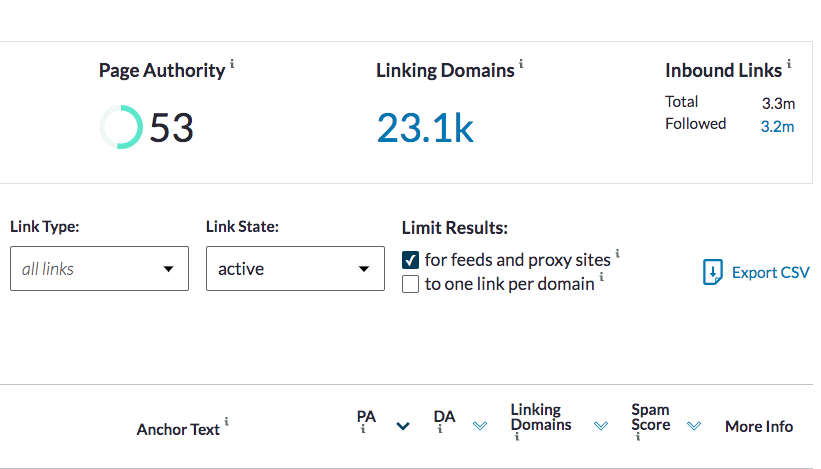
We spotted a number of sites linking to us from http sites, not https sites. How can I use backlink tools to find just those from http sites?
Right now I'm looking at exporting a spreadsheet with 3.3 million entries and filtering - and there's not one person here who wants to do that!
Thanks in advance.
-
How can i find? this is the problem in my website.
-
You can use Moz SEO tools, to see how may backlinks yoru business has. We don’t this for our SEO agency Cardiff, it helped get our business high on page one of Google, as we built quality links.
-
@mark_seomoz1 If i understand you want to see who is linking to you and if HTTP vs htts? don't forget you can use Search engine console too! Wouldnt a sort in e.g. Google sheets work for this? just sort via HTTP then split via text to collum to get domains and de-dupe and it will roughly show you domains doing that in a few min.
Unless you are chasing some hypostasis as long as your site is https it really isn't much to worry about nor much you can do.
-
Hi webmaster,
When exporting links from Moz Link Explorer, they come without http part.
You can try using tools like http response header checker.
-
https://httpstatus.io/ - can check 100 URLs at a time. Very fast
-
https://www.bulkseotools.com/bulk-http-header-code-checker.php - 500 at a time. A bit slow
-
Screaming frog - you should know how to use this tool.
PROCESS
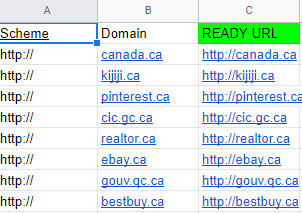
You will need Google Sheets for it.
-
Export Linking Domains from MOZ
-
Add "http://" to every domain
-
CONCATENATE strings A and B = Write this formula in C column "=a2&b2"
-
Crawl the http URLs
5. Check which URLS contain 200 status codes, filter out REDIRECTED URLS containing https. Here they are http domain backlinks. This is how I would solve your task.
I hope it helps. If you have questions, you are welcome.
-
Got a burning SEO question?
Subscribe to Moz Pro to gain full access to Q&A, answer questions, and ask your own.
Browse Questions
Explore more categories
-
Moz Tools
Chat with the community about the Moz tools.
-
SEO Tactics
Discuss the SEO process with fellow marketers
-
Community
Discuss industry events, jobs, and news!
-
Digital Marketing
Chat about tactics outside of SEO
-
Research & Trends
Dive into research and trends in the search industry.
-
Support
Connect on product support and feature requests.
Related Questions
-
GoogleBot still crawling HTTP/1.1 years after website moved to HTTP/2
Whole website moved to https://www. HTTP/2 version 3 years ago. When we review log files, it is clear that - for the home page - GoogleBot continues to only access via HTTP/1.1 protocol Robots file is correct (simply allowing all and referring to https://www. sitemap Sitemap is referencing https://www. pages including homepage Hosting provider has confirmed server is correctly configured to support HTTP/2 and provided evidence of accessing via HTTP/2 working 301 redirects set up for non-secure and non-www versions of website all to https://www. version Not using a CDN or proxy GSC reports home page as correctly indexed (with https://www. version canonicalised) but does still have the non-secure version of website as the referring page in the Discovery section. GSC also reports homepage as being crawled every day or so. Totally understand it can take time to update index, but we are at a complete loss to understand why GoogleBot continues to only go through HTTP/1.1 version not 2 Possibly related issue - and of course what is causing concern - is that new pages of site seem to index and perform well in SERP ... except home page. This never makes it to page 1 (other than for brand name) despite rating multiples higher in terms of content, speed etc than other pages which still get indexed in preference to home page. Any thoughts, further tests, ideas, direction or anything will be much appreciated!
Technical SEO | | AKCAC1 -
Unsolved How to Fix Inappropriate Backlink Anchor Text?
Moz Pro is telling me that "get free high quality hd wallpapers designed home" is one of the top anchor texts in backlinks to my website, larrybohenwebsolutions.com. This anchor text has nothing to do with my website. How do I find out where this anchor text is used and how to fix?
Link Explorer | | LarryBohen0 -
How does indexing backlinks affect SEO and search engine rankings?
Indexing backlinks plays a crucial role in the overall SEO strategy and search engine rankings. When search engines like Google crawl and index a website, they also consider the quality and relevance of the backlinks pointing to that site. Here's why indexing backlinks is important: Visibility in Search Results: Indexing ensures that search engines recognize and attribute value to the backlinks you have acquired. When indexed, these backlinks contribute to the overall link profile of your website and can positively impact your visibility in search results. Faster Indexation: By submitting your backlinks for indexing, you can speed up the process of search engines discovering and recognizing those links. This helps search engines recognize the relevance and authority of your website sooner. Enhanced Crawling and Ranking: Indexing allows search engines to crawl and evaluate the backlinks pointing to your site. These backlinks are considered as signals of trust and authority, which can influence your search engine rankings. Improved Domain Authority: When high-quality backlinks pointing to your site are indexed, they contribute to your website's Domain Authority (DA). A higher DA indicates a more authoritative and reputable website, which can positively impact your rankings and organic search visibility. Competitive Advantage: Indexing your backlinks gives you a competitive edge by ensuring that the value and authority of those links are properly recognized and taken into account by search engines. This can help you outrank competitors who may have unindexed or low-quality backlinks. It's important to note that not all backlinks may require manual indexing, as search engines can discover and index them naturally. However, for specific or newly acquired backlinks that may not be indexed quickly, manual submission or using indexing services can help ensure they are recognized by search engines and contribute to your overall SEO efforts.
Link Building | | Morries88880 -
How To Bulk Check Linking Domain
helo sir i want to know are moz can bulk check linking domain maybe like ahrefs batch analysis? if can , can somebody tell me how to do it thanks sir
Link Explorer | | MonsterIklan122 -
Does Moz register backlinks from Twitter/Facebook/LinkedIn?
I've noticed that on sites with decent social presence and regular content posts that Moz isn't showing/recording any inbound links from Twitter, Facebook or LinkedIn. Posts are regularly shared via these three channels but no inbound links ever seem to show up. Does Moz not record such inbound links, or are they all disguised using JavaScript or some other trick?
Link Explorer | | JCN-SBWD0 -
How to index backlinks in moz?
hello my website has some backlinks from high authority website that has been indexed by google but moz is not indexing my backlinks and also my pages so what should i do?
Link Explorer | | yuewiioweiwjksa38320 -
MOZ can't find internal links on my website while Google search console finds thousands of them
When using open site explorer MOZ finds 0 internal links on https://www.glassesgallery.com while Google search console finds thousands of internal links. What could the issue be? Cr8Wk14 oGOf1gb
Link Explorer | | NathanPetralia0 -
Not existing domains linking to my website (spam)
Hello, When i run my platform www.taobao.nl through https://a-moz.groupbuyseo.org/researchtools/ose/ i see a lot of nasty adult domains that link to my platform. These give a very negative (spam)score to my platform. I already disavowed quite a few via Webmastertools, but they keep coming. When i check the names in the Whois, they don't even seem to exist! (anymore) What could cause this and how can i end it?? Thanks for your help! Sander
Link Explorer | | benhond1