• BBgmoro

        See all notifications

        Skip to content
        Moz logo Menu open Menu close
        • Products
          • Moz Pro
          • Moz Pro Home
          • Moz Local
          • Moz Local Home
          • STAT
          • Moz API
          • Moz API Home
          • Compare SEO Products
          • Moz Data
        • Free SEO Tools
          • Domain Analysis
          • Keyword Explorer
          • Link Explorer
          • Competitive Research
          • MozBar
          • More Free SEO Tools
        • Learn SEO
          • Beginner's Guide to SEO
          • SEO Learning Center
          • Moz Academy
          • MozCon
          • Webinars, Whitepapers, & Guides
        • Blog
        • Why Moz
          • Digital Marketers
          • Agency Solutions
          • Enterprise Solutions
          • Small Business Solutions
          • The Moz Story
          • New Releases
        • Log in
        • Log out
        • Products
          • Moz Pro

            Your all-in-one suite of SEO essentials.

          • Moz Local

            Raise your local SEO visibility with complete local SEO management.

          • STAT

            SERP tracking and analytics for enterprise SEO experts.

          • Moz API

            Power your SEO with our index of over 44 trillion links.

          • Compare SEO Products

            See which Moz SEO solution best meets your business needs.

          • Moz Data

            Power your SEO strategy & AI models with custom data solutions.

          Turn SEO data into actionable content briefs

          Turn SEO data into actionable content briefs

          Learn more
        • Free SEO Tools
          • Domain Analysis

            Get top competitive SEO metrics like DA, top pages and more.

          • Keyword Explorer

            Find traffic-driving keywords with our 1.25 billion+ keyword index.

          • Link Explorer

            Explore over 40 trillion links for powerful backlink data.

          • Competitive Research

            Uncover valuable insights on your organic search competitors.

          • MozBar

            See top SEO metrics for free as you browse the web.

          • More Free SEO Tools

            Explore all the free SEO tools Moz has to offer.

          Let your business shine with Listings AI

          Let your business shine with Listings AI

          Get found
        • Learn SEO
          • Beginner's Guide to SEO

            The #1 most popular introduction to SEO, trusted by millions.

          • SEO Learning Center

            Broaden your knowledge with SEO resources for all skill levels.

          • On-Demand Webinars

            Learn modern SEO best practices from industry experts.

          • How-To Guides

            Step-by-step guides to search success from the authority on SEO.

          • Moz Academy

            Upskill and get certified with on-demand courses & certifications.

          • MozCon

            Save on Early Bird tickets and join us in London or New York City

          Access 20 years of data with flexible pricing
          Moz API

          Access 20 years of data with flexible pricing

          Find your plan
        • Blog
        • Why Moz
          • Digital Marketers

            Simplify SEO tasks to save time and grow your traffic.

          • Small Business Solutions

            Uncover insights to make smarter marketing decisions in less time.

          • Agency Solutions

            Earn & keep valuable clients with unparalleled data & insights.

          • Enterprise Solutions

            Gain a competitive edge in the ever-changing world of search.

          • The Moz Story

            Moz was the first & remains the most trusted SEO company.

          • New Releases

            Get the scoop on the latest and greatest from Moz.

          Surface actionable competitive intel
          New Feature

          Surface actionable competitive intel

          Learn More
        • Log in
          • Moz Pro
          • Moz Local
          • Moz Local Dashboard
          • Moz API
          • Moz API Dashboard
          • Moz Academy
        • Avatar
          • Moz Home
          • Notifications
          • Account & Billing
          • Manage Users
          • Community Profile
          • My Q&A
          • My Videos
          • Log Out

        The Moz Q&A Forum

        • Forum
        • Questions
        • My Q&A
        • Users
        • Ask the Community

        Welcome to the Q&A Forum

        Browse the forum for helpful insights and fresh discussions about all things SEO.

        1. Home
        2. SEO Tactics
        3. On-Page Optimization
        4. Solve Redirect Chains

        Moz Q&A is closed.

        After more than 13 years, and tens of thousands of questions, Moz Q&A closed on 12th December 2024. Whilst we’re not completely removing the content - many posts will still be possible to view - we have locked both new posts and new replies. More details here.

        Solve Redirect Chains

        On-Page Optimization
        redirect help http
        2
        2
        3324
        Loading More Posts
        • Watching

          Notify me of new replies.
          Show question in unread.

        • Not Watching

          Do not notify me of new replies.
          Show question in unread if category is not ignored.

        • Ignoring

          Do not notify me of new replies.
          Do not show question in unread.

        • Oldest to Newest
        • Newest to Oldest
        • Most Votes
        Reply
        • Reply as question
        Locked
        This topic has been deleted. Only users with question management privileges can see it.
        • Billywig
          Billywig Subscriber last edited by

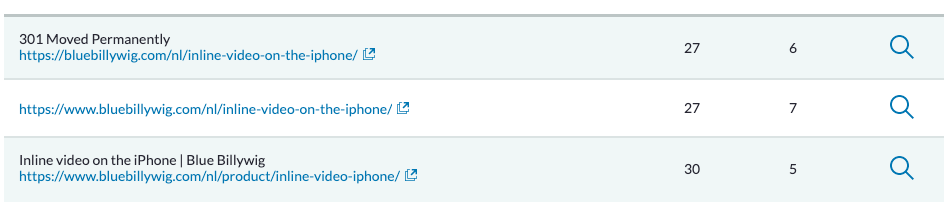
          I've gotten a few Redirect Issues that involve Redirect Chains, with the https:// version redirecting to the www. version and then redirecting to the right URL.

          Here is an example:
          Schermafbeelding 2021-12-07 om 11.04.32.png

          I've tried setting a direct redirect between the first and the last URL, but WordPress doesn't seem to allow that (it's overwritten). I've also tried checking the internal links to make sure that none of the links are the first one. They don't seem to be there.

          Does anyone have any tips on solving these Redirect Chains?

          Tom.Capper 1 Reply Last reply Reply Quote 0
          • Tom.Capper
            Tom.Capper Subject Expert @Billywig last edited by

            @billywig

            Even if you've fixed the internal link, the old URL will still be periodically crawled by Google and other crawlers (including Moz!), so it's worth fixing.

            The issue may be that you're using WordPress to handle a redirect between two different subdomains, where WordPress is hosted in just one of them. Ideally you would address this at server level.

            1 Reply Last reply Reply Quote 0
            • 1 / 1
            • First post
              Last post

            Browse Questions

            Explore more categories

            • Moz Tools

              Chat with the community about the Moz tools.

            • SEO Tactics

              Discuss the SEO process with fellow marketers

            • Community

              Discuss industry events, jobs, and news!

            • Digital Marketing

              Chat about tactics outside of SEO

            • Research & Trends

              Dive into research and trends in the search industry.

            • Support

              Connect on product support and feature requests.

            • See all categories

            Related Questions

            • DanielDL

              Unsolved No replies from [email protected] - one of our IPs is blocked by Cloudflare so we cannot access Moz Community from there

              error access denied help

              Hi all,
              I am a bit at my wits end trying to get some acknowledgement from MOZ. Have had no replies, no ticket auto-replies, no updates on any of the messages I have sent via the Moz Help Form on the website. Literally nothing. I wanted to avoid having to post publicly, but does anyone know how to raise a "technical problem" ticket with MOZ? [email protected] never replies and the Help Form doesn't generate any kind of ticket. From our main office we get an "Access denied" Error (via Cloudflare) specifically for the Moz Community area. This happened to us in February of this year and has been happening again all through May. After testing ourselves with our IT, we determine that MOZ's Cloudflare account has incorrectly blocked the dedicated IP address specific to the internet connection at our head office. This means that none of our Moz User accounts can access anything related to the Community area in our account when working at the studio. We can only do so when working remotely (ie. some other IP address). This is incredibly frustrating, particularly as we've been on a proper paid MOZ account for many years. And I have sent numerous email requests, messages via the Form, etc., and have never heard back from anyone at all. The problem has been on-going for some time and I guess it is my fault because I tried to politely wait a fair amount of time between each follow-up. Only to realize that, actually, I don't think anyone is monitoring [email protected] or even the Form submissions, or are even looking into the issue for me. Am hoping this message is seen by someone at Moz so they can let me know what is going on please? Guys..... c'mon.....

              Product Support | | DanielDL
              0
            • fJ66doneOIdDpj

              Multilang site: Auto redirect 301 or 302?

              redirect 301 redirect 302 international seo

              We need to establish if 301 or 302 response code is to be used for our auto redirects based on Accept-Language header. https://domain.com
              30x > https://domain.com/en
              30x > https://domain.com/ru
              30x > https://domain.com/de The site architecture is set up with proper inline HREFLANG.
              We have read different opinions about this, Ahrefs says 302 is the correct one:
              https://ahrefs.com/blog/301-vs-302-redirects/
              302 redirect:
              "You want to redirect users to the right version of the site for them (based on location/language)." You could argue that the root redirect is never permanent as it varies based on user language settings (302)
              On the other hand, the lang specific redirects are permanent per language: IF Accept-Language header = en
              https://domain.com > 301 > https://domain.com/en
              IF Accept-Language header = ru
              https://domain.com > 301 > https://domain.com/ru So each of these is 'permanent'. So which is the correct?

              International SEO | | fJ66doneOIdDpj
              0
            • crichardson1992

              Should I redirect a popular but irrelevant blog post to the home page?

              Hi. I'm trying to get my website; www.ciphr.com , to rank for keywords relevant to "HR Software" in the UK.  It's a highly competitive industry and we rank ~mid to low on page one for some of our ideal keywords that are highly relevant and high volume. Years ago we took the decision to blog about topics more loosely related to the world of work. One of our blog posts, about plants in the office https://www.ciphr.com/advice/plants-in-the-office/   is popular. It gets decent traffic and consistently builds backlinks to the post without any further effort on our part. The specific page has a PA of 46 and DA of 55 with >500 domains linking to it.  This compares to our home page with a PA of 47 and 700 linking domains. It is typically the home page that ranks for our money keywords "HR Software" "HR Systems" in the UK. Because this blog post is so loosely related to our actual business, the traffic it generates is highly unlikely to  turn into a customer of ours. I am considering redirecting the blog post to the home page to pass link juice to the home page. The concern I have is that, based on the anchor text and contextual signals from linking pages, Google might then infer that our home page is less relevant for our money keywords and more relevant for "plants". Are my concerns unfounded? What are your thoughts? Should I redirect the blog post to the home page? Another internal page?  Keep the blog post live? Thanks

              On-Page Optimization | | crichardson1992
              2
            • jcgoodrich

              What is the best way to execute a geo redirect?

              Based on what I've read, it seems like everyone agrees an IP-based, server side redirect is fine for SEO if you have content that is "geo" in nature. What I don't understand is how to actually do this. It seems like after a bit of research there are 3 options: You can do a 301 which it seems like most sites do, but that basically means if google crawls you in different US areas (which it may or may not) it essentially thinks you have multiple homepages. Does google only crawl from SF-based IPs? 302 passes no juice, so probably don't want to do that. Yelp does a 303 redirect, which it seems like nobody else does, but Yelp is obviously very SEO-savvy. Is this perhaps a better way that solves for the above issues? Thoughts on what is best approach here?

              On-Page Optimization | | jcgoodrich
              0
            • OVJ

              Redirecting deleted posts 301 vs 302

              There is a category on WP where job ads are posted. when a post got deleted I would like to pass 404 error page and redirect all those deleted posts to specific category. I found WP plugin Auto Redirect 404 in 301 for Trashed Posts which does redirect deleted post to specific URL. But posts which are in the trash (not permanently deleted) will get 302 redirects. Those deleted permanently will get 301 redirects. Should I try editing this plugin or find another why? Maybe there is similar way with Redirection plugin?  

              On-Page Optimization | | OVJ
              0
            • odegi

              301 Redirect to product page or category?

              We manage an ecommerce website that sells health products. A few products have now been discontinued. I’m just wondering what would be the best practice in this case. Should we 301 redirect to a similar product or to a similar category page? ANY HELP IS GREATLY APPRECIATED!

              On-Page Optimization | | odegi
              0
            • MarieA

              301 redirects from several sub-pages to one sub-page

              Hi! I have 14 sub-pages i deleted earlier today. But ofcourse Google can still find them, and gives everyone that gives them a go a 404 error. I have come to the understading that this wil hurt the rest of my site, at least as long as Google have them indexed. These sub-pages lies in 3 different folders, and i want to redirect them to a sub-page in a folder number 4. I have already an htaccess file, but i just simply cant get it to work! It is the same file as i use for redirecting trafic from mydomain.no to www.mydomain.no, and i have tried every kind of variation i can think of with the sub-pages. Has anyone perhaps had the same problem before, or for any other reason has the solution, and can help me with how to compose the htaccess file? 🙂 You have to excuse me if i'm using the wrong terms, missing something i should have seen under water while wearing a blindfold, or i am misspelling anything. I am neither very experienced with anything surrounding seo or anything else that has with internet to do, nor am i from an englishspeaking country. Hope someone here can light up my path 🙂 Thats at least something you can say in norwegian...

              On-Page Optimization | | MarieA
              1
            • MeghanPrudencio

              Would it be bad to change the canonical URL to the most recent page that has duplicate content, or should we just 301 redirect to the new page?

              Is it bad to change the canonical URL in the tag, meaning does it lose it's stats? If we add a new page that may have duplicate content, but we want that page to be indexed over the older pages, should we just change the canonical page or redirect from the original canonical page? Thanks so much! -Amy

              On-Page Optimization | | MeghanPrudencio
              0

            Get started with Moz Pro!

            Unlock the power of advanced SEO tools and data-driven insights.

            Start my free trial
            Products
            • Moz Pro
            • Moz Local
            • Moz API
            • Moz Data
            • STAT
            • Product Updates
            Moz Solutions
            • SMB Solutions
            • Agency Solutions
            • Enterprise Solutions
            • Digital Marketers
            Free SEO Tools
            • Domain Authority Checker
            • Link Explorer
            • Keyword Explorer
            • Competitive Research
            • Brand Authority Checker
            • Local Citation Checker
            • MozBar Extension
            • MozCast
            Resources
            • Blog
            • SEO Learning Center
            • Help Hub
            • Beginner's Guide to SEO
            • How-to Guides
            • Moz Academy
            • API Docs
            About Moz
            • About
            • Team
            • Careers
            • Contact
            Why Moz
            • Case Studies
            • Testimonials
            Get Involved
            • Become an Affiliate
            • MozCon
            • Webinars
            • Practical Marketer Series
            • MozPod
            Connect with us

            Contact the Help team

            Join our newsletter
            Moz logo
            © 2021 - 2026 SEOMoz, Inc., a Ziff Davis company. All rights reserved. Moz is a registered trademark of SEOMoz, Inc.
            • Accessibility
            • Terms of Use
            • Privacy

            Looks like your connection to Moz was lost, please wait while we try to reconnect.