Moz Q&A is closed.
After more than 13 years, and tens of thousands of questions, Moz Q&A closed on 12th December 2024. Whilst we’re not completely removing the content - many posts will still be possible to view - we have locked both new posts and new replies. More details here.
What is the safest way to redirect for best SEO benefits?
-
What is the safest way to redirect for best SEO benefits? Example:
loodgieter-aanhuis.nl -> loodgieters-ambacht.nl
Does someone have any technical information on how to (root) redirect for best SEO practices?
-
@brandvision_ I just want to thank you for the post I've been looking for for a long time)
-
If you want to change your domain from:
loodgieter-aanhuis.nl -> loodgieters-ambacht.nl
follow these steps:-
Implement a thorough 301 redirect strategy, mapping each URL from the old domain to the equivalent URL on the new domain.
-
Update internal links across the site to ensure visitors and search engines find relevant content quickly.
-
Run a crawl of the new website to ensure 301 redirects have been implemented successfully.
-
Set up and verify a new Search Console account for the new domain.
-
Submit a sitemap for the new domain to help Google crawl the new website.
-
Submit a change of address in Google Search Console to inform Google that your old domain has been migrated to your new domain.
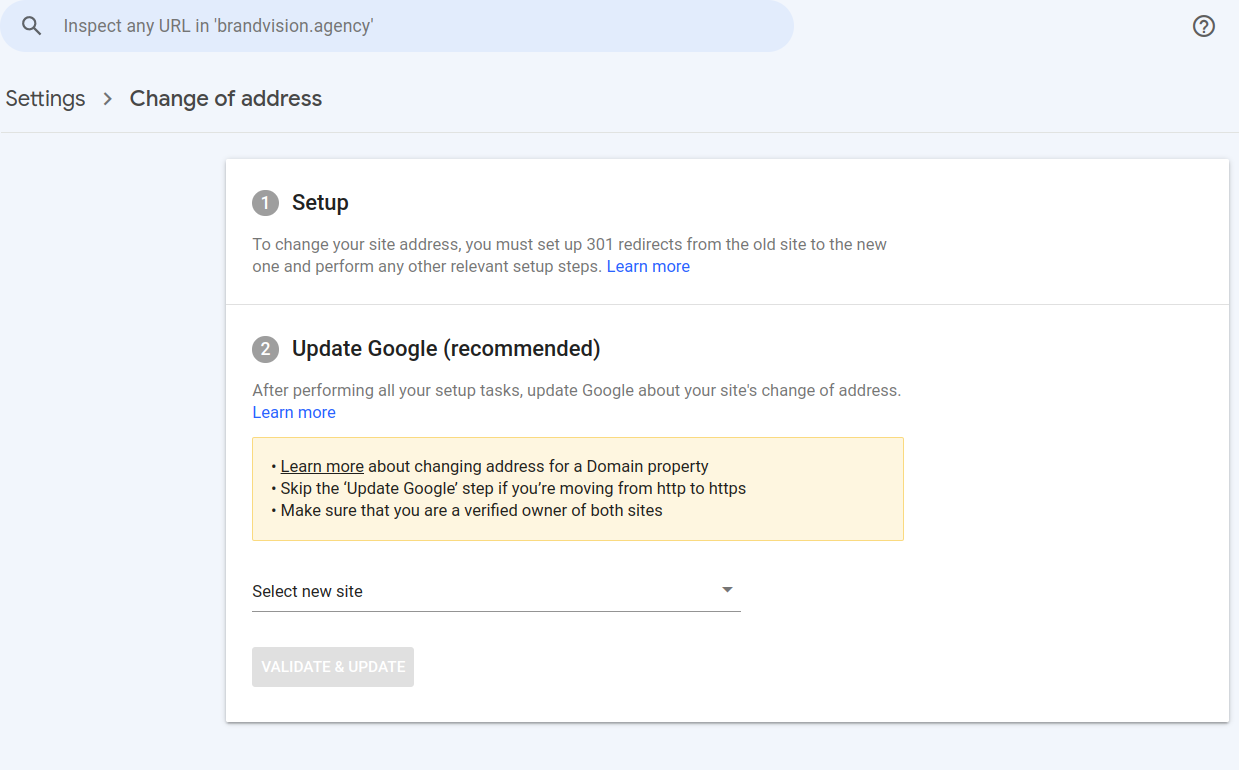
Create 301 redirections to new pages
-
Got a burning SEO question?
Subscribe to Moz Pro to gain full access to Q&A, answer questions, and ask your own.
Browse Questions
Explore more categories
-
Moz Tools
Chat with the community about the Moz tools.
-
SEO Tactics
Discuss the SEO process with fellow marketers
-
Community
Discuss industry events, jobs, and news!
-
Digital Marketing
Chat about tactics outside of SEO
-
Research & Trends
Dive into research and trends in the search industry.
-
Support
Connect on product support and feature requests.
Related Questions
-
Is domain forwarding the same as a 301 redirect?
Hi, I have an older domain with some SEO auth for varying pages and a newer domain that is for the brand. Right now there are some 301s for about 13 pages and we are currently moving servers. I was wondering if domain forwarding is the same as writing 301 redirects for each page or is it something different (302)?
SEO Tactics | | BrandonDebison0 -
Is Wix still terrible for SEO?
In Australia, I hear it over and over again that Wix is literally the worst site builder you can use due to it's poor site build for SEO. Has anyone here got some tangible reasons for why this is? As I am constantly getting asked this by clients who are using Wix and want me to help with their SEO.
On-Page Optimization | | UndergrndMarketing0 -
Phone number for SEO
We have had an interesting question from a client. They have asked if removing their phone number from their website would have an affect on their rankings. Our immediate answer was 'No' but it may affect the Brand, Usability and Customer experience by restricting the methods of contact. This then made us think that perhaps then it could have an effect in the long term. This situation is also complicated by the fact that they do not have a Google Local Plus account for operational, sensitivity reasons (they don't want to openly publicise their address) We believe that there shouldn't be any negative affect but thought we would open a discussion. Thanks in advance for any comments/ideas.
On-Page Optimization | | vital_hike0 -
Image naming best practices?
While I have found many good sources of information for naming images for SEO purposes, I'm having trouble finding an up-to-date, exhaustive and authoritative source for image names, alt tags, etc. For instance... Max characters for image name? Max hyphens? How descriptive should you be? "ice-cream-flavors-icon_._jpg" or "ice-cream-flavors.jpg" or simply "ice-cream.jpg" How similar should the image name, alt text and page title be? At what point are you overusing a keyword? Rules to follow? So much more, but you get the idea! Anyone have a good reference or an answer to all things related to images and SEO? Thanks!
On-Page Optimization | | OSD0 -
Best way to separate blogs, media coverage, and press releases on WordPress?
I'm curious what some of your thoughts are on the best way to handle the separation of blog posts, from press releases stories, from media coverage. With 1 WordPress installation, we're obviously utilizing the Posts for these types of content. It seems obvious to put press releases into a "press release" category and media coverage into a "media coverage" category.... but then what about blog posts? We could put blog posts into a "blog" category, but I hate that. And what about actual blog categories? I tried making sub-categories for the blog category which seemed like it was going to work, until the breadcrumbs looked all crazy. Example: Homepage > Blog > Blog > Sub-Category Homepage = http://www.example.com First 'Blog' = http://www.example.com/blog Second 'Blog' = http://www.example.com/category/blog Sub-Category = http://www.example.com/category/blog/sub-category This just doesn't seem very clean and I feel like there has to be a better solution to this. What about post types? I've never really worked with them. Is that the solution to my woes? All suggestions are welcome! EDIT: I should add that we would like the URL to contain /blog/ for blog posts /media-coverage/ for media coverage, and /press-releases/ for press releases. For blog posts, we don't want the sub-category to be in the URL.
On-Page Optimization | | Philip-DiPatrizio0 -
Should I redirect mobile traffic to a different url? Will it hurt SEO?
I'm working on a site that has lots of great content and ranks well but essentially the money is generated by affiliate links. I don't have a mobile version of the site but the company I'm affiliated with does offer a mobile redirect to their domain. Will redirecting mobile traffic to a different url hurt my SEO? I think the user will get a better experience by landing on a mobile page but I don't know if google will see it like that. Any thoughts?
On-Page Optimization | | SamCUK0 -
How do Maximize WordPress with 2 SEO Plugins
I have 2 WordPress SEO Plugins, Yoast and All-in-One SEO. I have tried like heck to make them work together, but every time I crawl my site here, I get multiple error messages. My question is, how can I tweak the title settings to avoid having multiple meta desctiptions, titles etc.
On-Page Optimization | | TheSportsDaddy0