Moz Q&A is closed.
After more than 13 years, and tens of thousands of questions, Moz Q&A closed on 12th December 2024. Whilst we’re not completely removing the content - many posts will still be possible to view - we have locked both new posts and new replies. More details here.
Screaming From occurences and canonicals what does it all mean
-
Bonjourno from Wetherby UK...
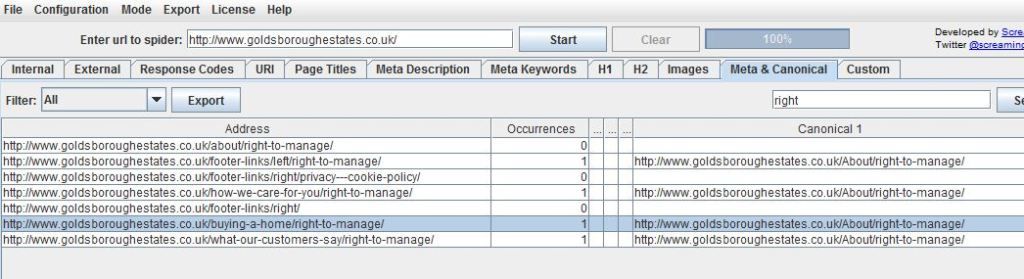
Ive used a package called screamong frog to diagnose canonical errors but can anyone tell me what this means? http://i216.photobucket.com/albums/cc53/zymurgy_bucket/understand-occurances-canonical.jpg
Thanks in advance.
David
-
Thank you for all your replies this was bugging me but the pain of not knowing has vanished like the morning mist as the warming glow of sunshine illumunates truth

-
David
Looks like you may have an issue there. The "address" and "canonical 1" should match about 99% of the time. Right now you're telling Google to index all those different address pages as a single URL (About/right-to-manage)... something to look at - and the suggestions below are both good as well.
-Dan
-
I agree with what Streamline Metrics said, I just want to add to this by linking you to a great SEOmoz post on canonicalization which may help you clear things up more.
In your case, having 1 rel="canonical" tag per page is what you want, so you should be fine with that, just make sure that the canonical tags (listed under canonical 1 in Screaming Frog) is the actual URL that you want.
Hope this helps
Zach -
It simply means how many canonical tags are found on that specific page. So if you had two rel=canonical tags on a page, it would say 2 occurrences. For more info, check out http://www.screamingfrog.co.uk/seo-spider/user-guide/tabs/
Browse Questions
Explore more categories
-
Moz Tools
Chat with the community about the Moz tools.
-
SEO Tactics
Discuss the SEO process with fellow marketers
-
Community
Discuss industry events, jobs, and news!
-
Digital Marketing
Chat about tactics outside of SEO
-
Research & Trends
Dive into research and trends in the search industry.
-
Support
Connect on product support and feature requests.
Related Questions
-
Unsolved Question about a Screaming Frog crawling issue
Hello, I have a very peculiar question about an issue I'm having when working on a website. It's a WordPress site and I'm using a generic plug in for title and meta updates. When I go to crawl the site through screaming frog, however, there seems to be a hard coded title tag that I can't find anywhere and the plug in updates don't get crawled. If anyone has any suggestions, thatd be great. Thanks!
Technical SEO | | KyleSennikoff0 -
Do you need a canonical tag for search and filter pages?
Hi Moz Community, We've been implementing new canonical tags for our category pages but I have a question about pages that are found via search and our filtering options. Would we still need a canonical tag for pages that show up in search + a filter option if it only lists one page of items? Example below. www.uncommongoods.com/search.html/find/?q=dog&exclusive=1 Thanks!
Technical SEO | | znotes0 -
Can I set a canonical tag to an anchor link?
I have a client who is moving to a one page website design. So, content from the inner pages is being condensed in to sections on the 'home' page. There will be a navigation that anchor links to each relevant section. I am wondering if I should leave the old pages and use rel=canonical to point them to their relevant sections on the new 'home' page rather than 301 them. Thoughts?
Technical SEO | | Vizergy0 -
Do I have a problem with missing pages in Screaming Frog?
We have category pages and some of those pages have pagination due to us having additional items. Screaming Frog could not find the items that were after page 1. Is this a problem for Google? These item pages are still in the sitemap. I am sure they can find them to index them but does it hurt rankings at all.
Technical SEO | | EcommerceSite0 -
Rel="Follow"? What the &#@? does that mean?
I've written a guest blog post for a site. In the link back to my site they've put a rel="follow" attribute. Is that valid HTML? I've Googled it but the answers are inconclusive, to say the least.
Technical SEO | | Jeepster0 -
The Mysterious Case of Pagination, Canonical Tags
Hey guys, My head explodes when I think of this problem. So I will leave it to you guys to find a solution... My root domain (xxx.com) runs on WordPress platform. I use Yoast SEO plugin. The next page of root domain -- page/2/ -- has been canonicalized to the same page -- page/2/ points to page/2/ for example. The page/2/ and remaining pages also have this rel tags: I have also added "noindex,follow" to page/2/ and further -- Yoast does this automatically. Note: Yoast plugin also adds canonical to page/2/...page/3/ automatically. Same is the case with category pages and tag pages. Oh, and the author pages too -- they all have self-canonicalization, rel prev & rel next tags, and have been "noindex, followed." Problem: Am I doing this the way it should be done? I asked a Google Webmaster employee on rel next and prev tags, and this is what she said: "We do not recommend noindexing later pages, nor rel="canonical"izing everything to the first page." (My bad, last year I was canonicalizing pages to first page). One of the popular blog, a competitor, uses none of these tags. Yet they rank higher. Others following this format have been hit with every kind of Google algorithm I could think of. I want to leave it to Google to decide what's better, but then again, Yoast SEO plugin rules my blog -- okay, let's say I am a bad coder. Any help, suggestions, and thoughts are highly appreciated. 🙂 Update 1: Paginated pages -- including category pages and tag pages -- have unique snippets; no full-length posts. Thought I'd make that clear.
Technical SEO | | sidstar0 -
Rel=Canonical, WWW vs non WWW and SEO
Okay so I'm a bit of a loss here. For what ever reason just about every single Wordpress site I has will turn www.mysite.com into mysite.com in the browser bar. I assume this is the rel=canonical tag at work, there are no 301s on my site. When I use the Open Site Explorer and type in www.mysite.com it shows a domain authority of around 40 and a few hundred backlinks... and then I get the message. Oh Hey! It looks like that URL redirects to XXXXXX. Would you like to see data for <a class="clickable redirects">that URL instead</a>? So if I click to see this data instead I have less than half of that domain authority and about 2 backlinks. *** Does this make a difference SEO wise? Should my non WWW be redirecting to my WWW instead because that's where the domain authority and backlinks are? Why am I getting two different domain authority and backlink counts if they are essentially the same? Or am I wrong and all that link juice and authority passes just the same?
Technical SEO | | twilightofidols0 -
Internal search : rel=canonical vs noindex vs robots.txt
Hi everyone, I have a website with a lot of internal search results pages indexed. I'm not asking if they should be indexed or not, I know they should not according to Google's guidelines. And they make a bunch of duplicated pages so I want to solve this problem. The thing is, if I noindex them, the site is gonna lose a non-negligible chunk of traffic : nearly 13% according to google analytics !!! I thought of blocking them in robots.txt. This solution would not keep them out of the index. But the pages appearing in GG SERPS would then look empty (no title, no description), thus their CTR would plummet and I would lose a bit of traffic too... The last idea I had was to use a rel=canonical tag pointing to the original search page (that is empty, without results), but it would probably have the same effect as noindexing them, wouldn't it ? (never tried so I'm not sure of this) Of course I did some research on the subject, but each of my finding recommanded one of the 3 methods only ! One even recommanded noindex+robots.txt block which is stupid because the noindex would then be useless... Is there somebody who can tell me which option is the best to keep this traffic ? Thanks a million
Technical SEO | | JohannCR0