Moz Q&A is closed.
After more than 13 years, and tens of thousands of questions, Moz Q&A closed on 12th December 2024. Whilst we’re not completely removing the content - many posts will still be possible to view - we have locked both new posts and new replies. More details here.
Are we actually getting accurate data on keyword volumes from Moz (or other sources)?
-
I have a client who does patio furniture repair and restoration. When performing keyword research in Moz for terms like "patio furniture repair" I see that only 11-50 people in the entire US are searching for this term according to the Moz data. However, running an Adwords campaign currently and our top keyword is the phrase match for "patio furniture repair" which has generated over 100 clicks in just a couple of months in ONE county.
Is there a better way to research more accurate results on search volume estimates? This makes organic SEO and keyword targeting hard!
Thanks,
Ricky
-
I feel that the search volume shown in MOZ is generally low compared to other sources. I feel it is more accurate with search terms that have a lot of volume, but in search terms that are under 1000 searches a month, I start to have a lot of problems with the data. Many times there is no search volume data at all for lower volume keywords which get just a few hundred searches per month or less.
Problems with the volume data effect almost everything else in Moz so I hope MOZ sees this and tries very hard to correct these issues.
-
Hey there, Ricky! Tawny from Moz's Help Team here.
We use several different sources for our search volume data, including Keyword Planner and anonymized clickstream data. From there, we built a model that predicts the search volume range a keyword is likely to have with ~95% accuracy. For the nitty gritty details explaining how the model works, check out this article: https://a-moz.groupbuyseo.org/blog/sweating-details-google-keyword-tool-volume
You can read more about the Keyword Explorer Metrics in our Guide.
I've also got a few resources about keyword research and keyword strategy that might be helpful:- The Keyword Research guide is a really good place to start if you need a refresher course!
- There's a great post in the Moz Blog about creative free keyword research
- If you're looking for insight into competitor keywords, try heading over to Open Site Explorer, pop in your competitor's URL, and take a look at the anchor text associated with their links. This can be a huge indicator of targeted keywords, which you might now decide to compete for!
- If you're curious how well you (or a competitor) is ranking for a certain keyword, or how well a certain page on your site ranks, hop on over to the Rank Tracker
- Use the Keyword Explorer tool to check how hard or easy it will be to rank for a certain keyword. Words with a higher difficulty score are harder to achieve rankings for, so some users will target lower difficulty words first and later tackle the hard ones. Something different works for everyone, though!
- When you've got your keywords and are ready to optimize your pages for them, check out the On-Page Grader. This will check a particular URL for optimization with a particular keyword or keyword phrase, and offer a grade based on how well it fares, as well as suggestions for improvement.
I hope that helps! If you've still got questions about the volumes you're seeing, feel free to shoot us a note at [email protected] and we'll do our best to answer all your questions in more depth.
-
Kris beat me to it! I was coming here to say basically the same thing.
-
Something that has tricked me up a few times in the past is the difference between broad and exact search volume. Every time you compare MOZ keyword volume to Google, just know there is a slight +/- in volume. Plus, its never an exact science, rather than an estimation based on historical data from Google...and subsequently, MOZ.
If ever in doubt, I would utilize Google's data over any other source of data.
-
Hi Martijn,
Yep noticed that with Google the keyword data is much different than Moz, but I've read (I believe here on Moz) that the GOOGLE data is apparently unreliable. Seems a lot more accurate than the Moz data at this point.
Guess I'll go back to using Google Keyword Planner for keyword research

-
Hi Ricky,
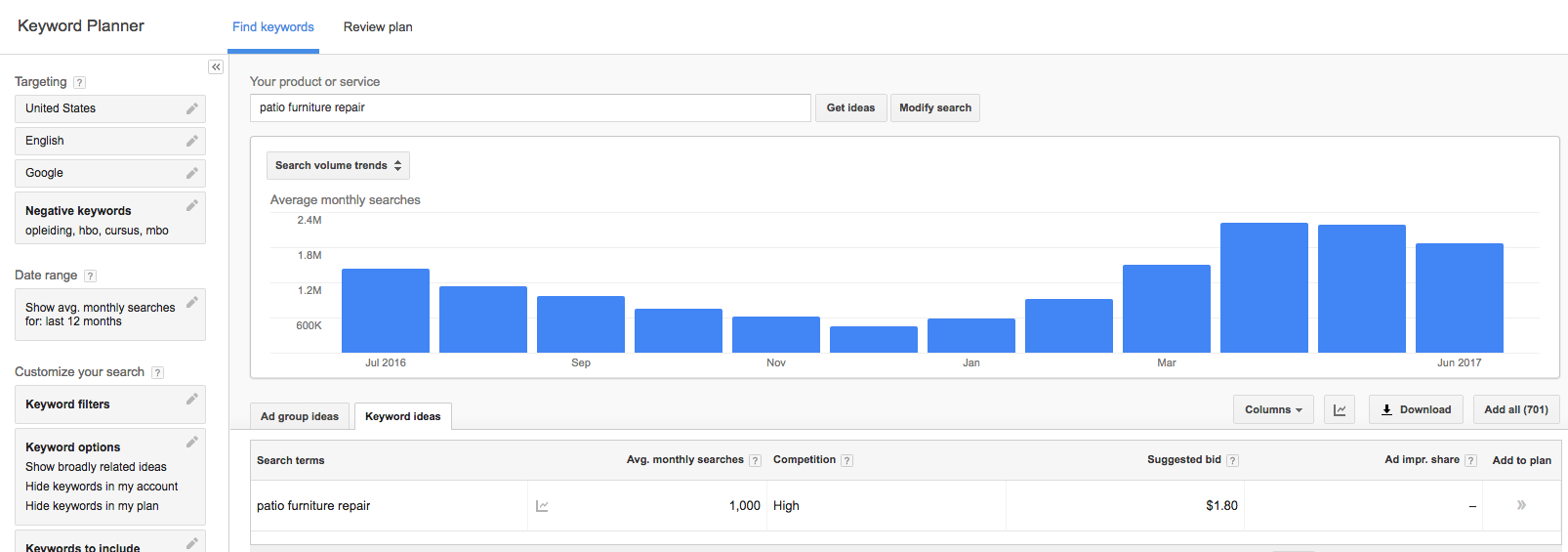
That's weird. If I put the same keyword in the Google Adwords Keyword Tool it comes up with an Average Monthly Searches of 1000, see: https://monosnap-m.s3.amazonaws.com/Keyword_Planner__Google_AdWords_2017-08-04_09-41-28.png . While it could be that some other keywords have been grouped in that it seems that the data you've seen before is far off.
Martijn.

Browse Questions
Explore more categories
-
Moz Tools
Chat with the community about the Moz tools.
-
SEO Tactics
Discuss the SEO process with fellow marketers
-
Community
Discuss industry events, jobs, and news!
-
Digital Marketing
Chat about tactics outside of SEO
-
Research & Trends
Dive into research and trends in the search industry.
-
Support
Connect on product support and feature requests.
Related Questions
-
Limit MOZ crawl rate on Shopify or when you don't have access to robots.txt
Hello. I'm wondering if there is a way to control the crawl rate of MOZ on our site. It is hosted on Shopify which does not allow any kind of control over the robots.txt file to add a rule like this: User-Agent: rogerbot Crawl-Delay: 5 Due to this, we get a lot of 430 error codes -mainly on our products- and this certainly would prevent MOZ from getting the full picture of our shop. Can we rely on MOZ's data when critical pages are not being crawled due to 430 errors? Is there any alternative to fix this? Thanks
Moz Bar | | AllAboutShapewear2 -
Keyword Ranking Report is Different than Real Result on Google
Hi Guys,
Moz Bar | | KanikaG
I am getting MOZ reports on a few keywords and that is good But when My client search for the same keywords he doesn't get the same rank, not even on that page. Let me explain in more details:
I have a keyword that shows on rank #5 in Google Mobile for a Local location for the current week. The client is from the same location as well. But when client search for that keyword from his mobile he doesn't get the keyword listed on that page, not even on other pages. I checked with other online keyword rank checker tool and all are showing the result similar to the Moz ranking report. It's really frustrating for my client. Google analytics shows that mobile users and organic reach are increasing so I am sure MOZ and other tools are showing us correct result. What could be the possible reason that he is not getting the same result as showing by MOZ? I am not from his location so how can I check the keyword result for the selected city using MOZ that is accurate? Any help would be highly appreciated. Please help. Thanks1 -
MozBar Issues? Can't get info even logged in
Anyone having issues with the Moz bar? Lately no matter how many times I log in, getting data is difficult as it keeps asking me to create an acct. or log in. Even logged into Moz and on Q&A it is asking me to log in. THanks
Moz Bar | | RobertFisher0 -
Crawling Problem : No-data Of My Site
Hey, Folks!! So It's Been More than a Month.And Moz is not crawling my website http://www.trickypedia.com/.I have seen Moz Last update I thought they will crawl my site but No results Disappointing. My Sites Domain Authority and Page Authority is still 1. But In other Seo Tools, they are Perfectly Crawling My Website. What Would Be the reason? Can anyone Please Explain.
Moz Bar | | seothatworks010 -
Keywords Score Meter
Hi Moz, I am using the keywords difficulty tool from your site and find it is quite useful 🙂 I research the community and find the data should be interpreted in the following way. But when I did a quick research for one keyword. The tool bar gives me a data of 22% showing in Yellow and says the keyword is competitive when I hover my mouse. Should this be **Blue **and easy to rank keyword based on the score? Which one should I believe? Sub 30 - (Blue) Low hanging fruit you can take advantage of. 30 - 35 (Green) Fairly easy with good on page and some quality anchored links. 35 - 40 - (Yellow) Will take a bit more work but still in reach may require, good on-site SEO and a solid link profile. 40 - 50 (Orange) Domain authority plays a much more pivotal role so it may take longer to rank for. 50+ (Red) All about resources. Onsite SEO needs to be totally nailed, including internal linking/ topic modelling etc. a strong & diverse link profile with good social signals and ... time. Thanks in advance. ThAqoa5.png OC8xIzP.png
Moz Bar | | russellbrown0 -
Moz Bar Not Showing DA?
Hello all, This could be something to do with our site or the Moz bar on Chrome, I just need to know which it is so if it is our website we can look into it further. On certain sections of our website the Moz bar doesn't display any Domain Authority, not even zero, the bar just isn't present. These types of pages are php which pull in data through a feed daily. Speaking to an SEO expert they said it could be where the page is being updated so frequently, or it could be something more sinister and technically not quite right. Does anyone have any ideas? Is the Moz bar just not working for these types os pages or is it more likely something to do with my site? Ironically it's these pages which I'm having trouble with that are not showing in SERPs! Thanks! 3Foorka
Moz Bar | | HB177 -
Link to hotels on http://a-moz.groupbuyseo.org/mozcon doesn't work
Hi The link to the hotel for Mozcon 2015 doesn't work - seems like its the 2014 link still in place. Thanks Andy
Moz Bar | | Andy-Halliday0 -
Checking Do-follow using Moz Bar
Does anyone know how to check if a link is a do-follow or no-follow using the Moz bar? I believe there's a function that highlights and color codes the link so as to tell? Can't seem to turn this function on in my Moz Bar settings. Am I missing something completely obvious?
Moz Bar | | Gavo0