Moz Q&A is closed.
After more than 13 years, and tens of thousands of questions, Moz Q&A closed on 12th December 2024. Whilst we’re not completely removing the content - many posts will still be possible to view - we have locked both new posts and new replies. More details here.
How to stop Google crawling after 301 redirect?
-
I have removed all pages from my old website and set 301 redirect to new website. But, I have verified old website with Google webmaster tools' HTML verification file which enable me to track all data and existence of pages in Google search for my old website. I was assumed that, Google will stop crawling and DE-indexed all pages after 301 redirect. Because, I have set 301 redirect before 3 months.
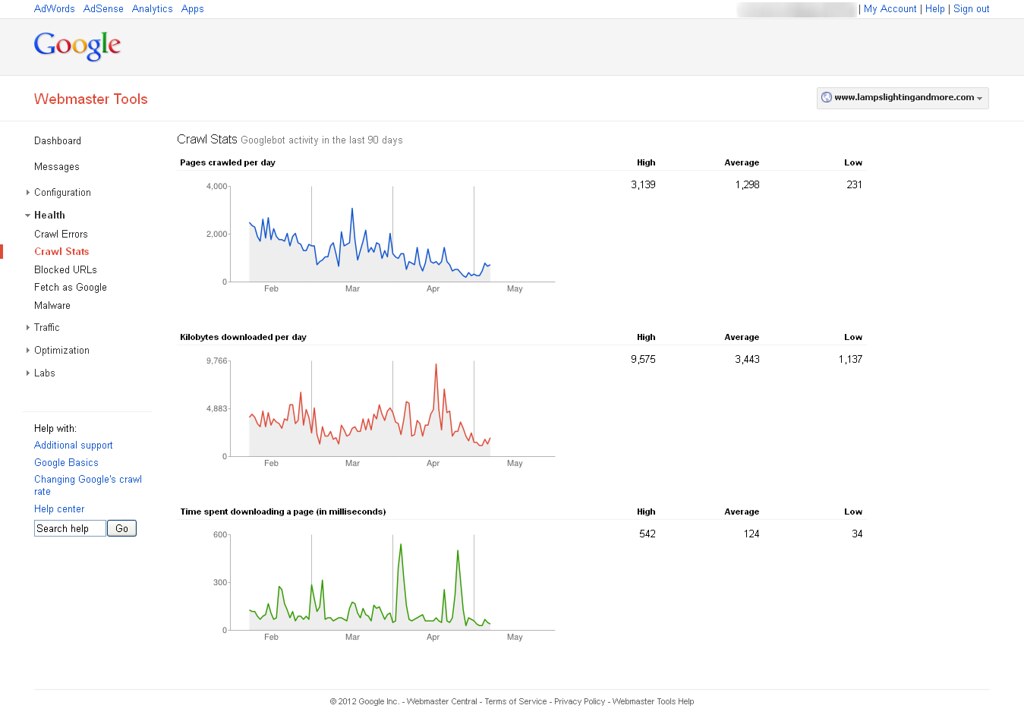
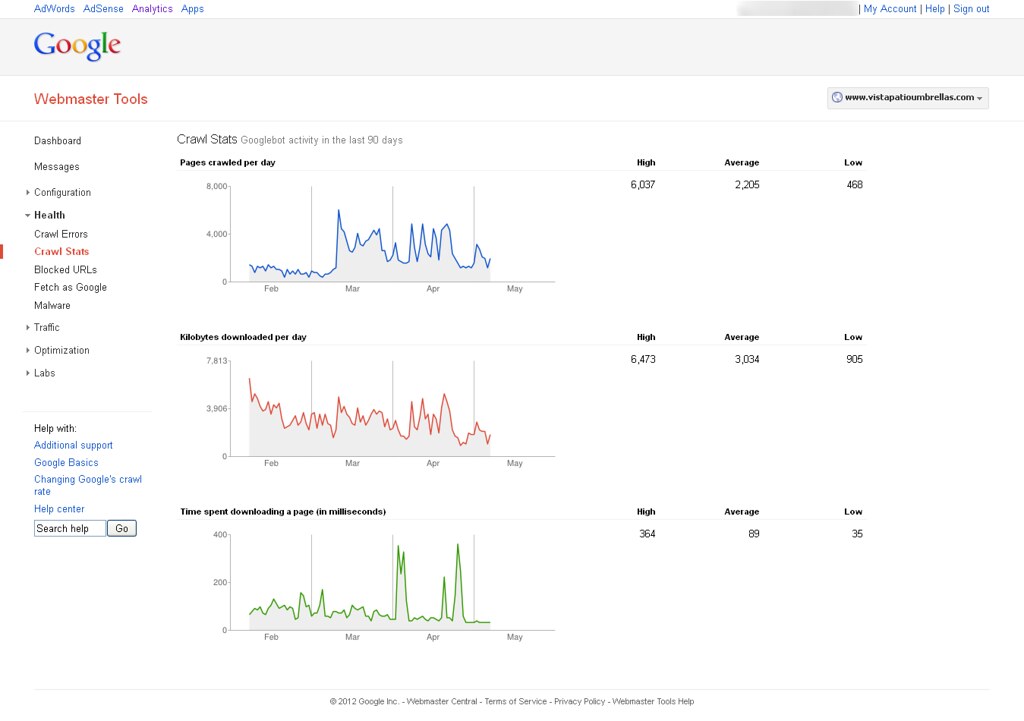
Now, I'm able to see Google bot activity on my website with help of Google webmaster tools. You can find out attachment to know more about it. How can it possible & How Google can crawl removed pages?
You can see following image to know more about it.
&
-
Google is most likely following links on other sites pointing to your old site and then 301'ing to the new site so you're seeing activity in WMT
looking here is still see two pages in the index:
you can go in and remove the site in WMT using the remove URL tool and see if that stops activity in that old WMT account. Crawling or not crawling, reporting or not reporting, there is not an issue here though - the 301's appear to be properly set up.
Browse Questions
Explore more categories
-
Moz Tools
Chat with the community about the Moz tools.
-
SEO Tactics
Discuss the SEO process with fellow marketers
-
Community
Discuss industry events, jobs, and news!
-
Digital Marketing
Chat about tactics outside of SEO
-
Research & Trends
Dive into research and trends in the search industry.
-
Support
Connect on product support and feature requests.
Related Questions
-
Using a Reverse Proxy and 301 redirect to appear Sub Domain as Sub Directory - what are the SEO Risks?
We’re in process to move WordPress blog URLs from subdomains to sub-directory. We aren’t moving blog physically, but using reverse proxy and 301 redirection to do this. Blog subdomain URL is https://blog.example.com/ and destination sub-directory URL is https://www.example.com/blog/ Our main website is e-commerce marketplace which is YMYL site. This is on Windows server. Due to technical reasons, we can’t physically move our WordPress blog to the main website. Following is our Technical Setup Setup a reverse proxy at https://www.example.com/blog/ pointing to https://blog.example.com/ Use a 301 redirection from https://blog.example.com/ to https://www.example.com/blog/ with an exception if a traffic is coming from main WWW domain then it won’t redirect. Thus, we can eliminate infinite loop. Change all absolute URLs to relative URLs on blog Change the sitemap URL from https://blog.example.com/sitemap.xml to https://www.example.com/blog/sitemap.xml and update all URLs mentioned within the sitemap. SEO Risk Evaluation We have individual GA Tracking ID and individual Google Search Console Properties for main website and blog. We will not merge them. Keep them separate as they are. Keeping this in mind, I am evaluating SEO Risks factors Right now when we receive traffic from main website to blog (or vice versa) then it is considered as referral traffic and new cookies are set for Google Analytics. What’s going to happen when its on the same domain? Which type of settings change should I do in Blog’s Google Search Console? (A). Do I need to request “Change of Address” in the Blog’s search console property? (B). Should I re-submit the sitemap? Do I need to re-submit the blog sitemap from the https://www.example.com/ Google Search Console Property? Main website is e-commerce marketplace which is YMYL website, and blog is all about content. So does that impact SEO? Will this dilute SEO link juice or impact on the main website ranking because following are the key SEO Metrices. (A). Main website’s Avg Session Duration is about 10 minutes and bounce rate is around 30% (B). Blog’s Avg Session Duration is 33 seconds and bounce rate is over 92%
Intermediate & Advanced SEO | | joshibhargav_200 -
301 Redirecting from domain to subdomain
We're taking on a redesign of our corporate site on our main domain. We also have a number of well established, product based subdomains. There are a number of content pages that currently live on the corporate site that rank well, and bring in a great deal of traffic, though we are considering placing 301 redirects in place to point that traffic to the appropriate pages on the subdomains. If redirected correctly, can we expect the SEO value of the content pages currently living on the corporate site to transfer to the subdomains, or will we be negatively impacting our SEO by transferring this content from one domain to multiple subdomains?
Intermediate & Advanced SEO | | Chris81980 -
New Site (redesign) Launched Without 301 Redirects to New Pages - Too Late to Add Redirects?
We recently launched a redesign/redevelopment of a site but failed to put 301 redirects in place for the old URL's. It's been about 2 months. Is it too late to even bother worrying about it at this point? The site has seen a notable decrease in site traffic/visits, perhaps due to this issue. I assume that once the search engines get an error on a URL, it will remove it from displaying in search results after a period of time. I'm just not sure if they will try to re-crawl those old URLs at some point and if so, it may be worth it to have those 301 redirects in place. Thank you.
Intermediate & Advanced SEO | | BrandBuilder0 -
301 Redirect Showing Up as Thousands Of Backlinks?
Hi Everyone, I'm currently doing quite a large back link audit on my company's website and there's one thing that's bugging me. Our website used to be split into two domains for separate areas of the business but since we have merged them together into one domain and have 301 redirected the old domain the the main one. But now, both GWT and Majestic are telling me that I've got 12,000 backlinks from that domain? This domain didn't even have 12,000 pages when it was live and I only did specific 301 redirects (ie. for specific URL's and not an overall domain level 301 redirect) for about 50 of the URL's with all the rest being redirected to the homepage. Therefore I'm quite confused about why its showing up as so many backlinks - Old redirects I've done don't usually show as a backlink at all. UPDATE: I've got some more info on the specific back links. But now my question is - is having this many backlinks/redirects from a single domain going to be viewed negatively in Google's eyes? I'm currently doing a reconsideration request and would look to try and fix this issue if having so many backlinks from a single domain would be against Google's guidelines. Does anybody have any ideas? Probably somthing very obvious. Thanks! Sam
Intermediate & Advanced SEO | | Sandicliffe0 -
Should we 301 redirect old events pages on a website?
We have a client that has an events category section that is filled to the brim with past events webpages. Another issue is that these old events webpages all contain duplicate meta description tags, so we are concerned that Google might be penalizing our client's website for this issue. Our client does not want to create specialized meta description tags for these old events pages. Would it be a good idea to 301 redirect these old events landing pages to the main events category page to pass off link equity & remove the duplicate meta description tag issue? This seems drastic (we even noticed that searchmarketingexpo.com is keeping their old events pages). However it seems like these old events webpages offer little value to our website visitors. Any feedback would be much appreciated.
Intermediate & Advanced SEO | | RosemaryB0 -
Can an incorrect 301 redirect or .htaccess code cause 500 errors?
Google Webmaster Tools is showing the following message: _Googlebot couldn't access the contents of this URL because the server had an internal error when trying to process the request. These errors tend to be with the server itself, not with the request. _ Before I contact the person who manages the server and hosting (essentially asking if the error is on his end) is there a chance I could have created an issue with an incorrect 301 redirect or other code added to .htaccess incorrectly? Here is the 301 redirect code I am using in .htaccess: RewriteEngine On RewriteCond %{THE_REQUEST} ^[A-Z]{3,9}\ /([^/.]+/)*(index.html|default.asp)\ HTTP/ RewriteRule ^(([^/.]+/)*)(index|default) http://www.example.com/$1 [R=301,L] RewriteCond %{HTTP_HOST} !^(www.example.com)?$ [NC] RewriteRule (.*) http://www.example.com/$1 [R=301,L] Could adding the following code after that in the .htaccess potentially cause any issues? BEGIN EXPIRES <ifmodule mod_expires.c="">ExpiresActive On
Intermediate & Advanced SEO | | kimmiedawn
ExpiresDefault "access plus 10 days"
ExpiresByType text/css "access plus 1 week"
ExpiresByType text/plain "access plus 1 month"
ExpiresByType image/gif "access plus 1 month"
ExpiresByType image/png "access plus 1 month"
ExpiresByType image/jpeg "access plus 1 month"
ExpiresByType application/x-javascript "access plus 1 month"
ExpiresByType application/javascript "access plus 1 week"
ExpiresByType application/x-icon "access plus 1 year"</ifmodule> END EXPIRES (Edit) I'd like to add that there is a Wordpress blog on the site too at www.example.com/blog with the following code in it's .htaccess: BEGIN WordPress <ifmodule mod_rewrite.c="">RewriteEngine On
RewriteBase /blog/
RewriteRule ^index.php$ - [L]
RewriteCond %{REQUEST_FILENAME} !-f
RewriteCond %{REQUEST_FILENAME} !-d
RewriteRule . /blog/index.php [L]</ifmodule> END WordPress Thanks0 -
Remove URLs that 301 Redirect from Google's Index
I'm working with a client who has 301 redirected thousands of URLs from their primary subdomain to a new subdomain (these are unimportant pages with regards to link equity). These URLs are still appearing in Google's results under the primary domain, rather than the new subdomain. This is problematic because it's creating an artificial index bloat issue. These URLs make up over 90% of the URLs indexed. My experience has been that URLs that have been 301 redirected are removed from the index over time and replaced by the new destination URL. But it has been several months, close to a year even, and they're still in the index. Any recommendations on how to speed up the process of removing the 301 redirected URLs from Google's index? Will Google, or any search engine for that matter, process a noindex meta tag if the URL's been redirected?
Intermediate & Advanced SEO | | trung.ngo0 -
Does Google crawl the pages which are generated via the site's search box queries?
For example, if I search for an 'x' item in a site's search box and if the site displays a list of results based on the query, would that page be crawled? I am asking this question because this would be a URL that is non existent on the site and hence am confused as to whether Google bots would be able to find it.
Intermediate & Advanced SEO | | pulseseo0