• BBgmoro

        See all notifications

        Skip to content
        Moz logo Menu open Menu close
        • Products
          • Moz Pro
          • Moz Pro Home
          • Moz Local
          • Moz Local Home
          • STAT
          • Moz API
          • Moz API Home
          • Compare SEO Products
          • Moz Data
        • Free SEO Tools
          • Domain Analysis
          • Keyword Explorer
          • Link Explorer
          • Competitive Research
          • MozBar
          • More Free SEO Tools
        • Learn SEO
          • Beginner's Guide to SEO
          • SEO Learning Center
          • Moz Academy
          • MozCon
          • Webinars, Whitepapers, & Guides
        • Blog
        • Why Moz
          • Digital Marketers
          • Agency Solutions
          • Enterprise Solutions
          • Small Business Solutions
          • The Moz Story
          • New Releases
        • Log in
        • Log out
        • Products
          • Moz Pro

            Your all-in-one suite of SEO essentials.

          • Moz Local

            Raise your local SEO visibility with complete local SEO management.

          • STAT

            SERP tracking and analytics for enterprise SEO experts.

          • Moz API

            Power your SEO with our index of over 44 trillion links.

          • Compare SEO Products

            See which Moz SEO solution best meets your business needs.

          • Moz Data

            Power your SEO strategy & AI models with custom data solutions.

          Turn SEO data into actionable content briefs

          Turn SEO data into actionable content briefs

          Learn more
        • Free SEO Tools
          • Domain Analysis

            Get top competitive SEO metrics like DA, top pages and more.

          • Keyword Explorer

            Find traffic-driving keywords with our 1.25 billion+ keyword index.

          • Link Explorer

            Explore over 40 trillion links for powerful backlink data.

          • Competitive Research

            Uncover valuable insights on your organic search competitors.

          • MozBar

            See top SEO metrics for free as you browse the web.

          • More Free SEO Tools

            Explore all the free SEO tools Moz has to offer.

          Let your business shine with Listings AI

          Let your business shine with Listings AI

          Get found
        • Learn SEO
          • Beginner's Guide to SEO

            The #1 most popular introduction to SEO, trusted by millions.

          • SEO Learning Center

            Broaden your knowledge with SEO resources for all skill levels.

          • On-Demand Webinars

            Learn modern SEO best practices from industry experts.

          • How-To Guides

            Step-by-step guides to search success from the authority on SEO.

          • Moz Academy

            Upskill and get certified with on-demand courses & certifications.

          • MozCon

            Save on Early Bird tickets and join us in London or New York City

          Access 20 years of data with flexible pricing
          Moz API

          Access 20 years of data with flexible pricing

          Find your plan
        • Blog
        • Why Moz
          • Digital Marketers

            Simplify SEO tasks to save time and grow your traffic.

          • Small Business Solutions

            Uncover insights to make smarter marketing decisions in less time.

          • Agency Solutions

            Earn & keep valuable clients with unparalleled data & insights.

          • Enterprise Solutions

            Gain a competitive edge in the ever-changing world of search.

          • The Moz Story

            Moz was the first & remains the most trusted SEO company.

          • New Releases

            Get the scoop on the latest and greatest from Moz.

          Surface actionable competitive intel
          New Feature

          Surface actionable competitive intel

          Learn More
        • Log in
          • Moz Pro
          • Moz Local
          • Moz Local Dashboard
          • Moz API
          • Moz API Dashboard
          • Moz Academy
        • Avatar
          • Moz Home
          • Notifications
          • Account & Billing
          • Manage Users
          • Community Profile
          • My Q&A
          • My Videos
          • Log Out

        The Moz Q&A Forum

        • Forum
        • Questions
        • My Q&A
        • Users
        • Ask the Community

        Welcome to the Q&A Forum

        Browse the forum for helpful insights and fresh discussions about all things SEO.

        1. Home
        2. SEO Tactics
        3. Reporting & Analytics
        4. Google Search Console not loading some resources

        Moz Q&A is closed.

        After more than 13 years, and tens of thousands of questions, Moz Q&A closed on 12th December 2024. Whilst we’re not completely removing the content - many posts will still be possible to view - we have locked both new posts and new replies. More details here.

        Google Search Console not loading some resources

        Reporting & Analytics
        6
        7
        3942
        Loading More Posts
        • Watching

          Notify me of new replies.
          Show question in unread.

        • Not Watching

          Do not notify me of new replies.
          Show question in unread if category is not ignored.

        • Ignoring

          Do not notify me of new replies.
          Do not show question in unread.

        • Oldest to Newest
        • Newest to Oldest
        • Most Votes
        Reply
        • Reply as question
        Locked
        This topic has been deleted. Only users with question management privileges can see it.
        • TottiataHUN
          TottiataHUN Subscriber last edited by

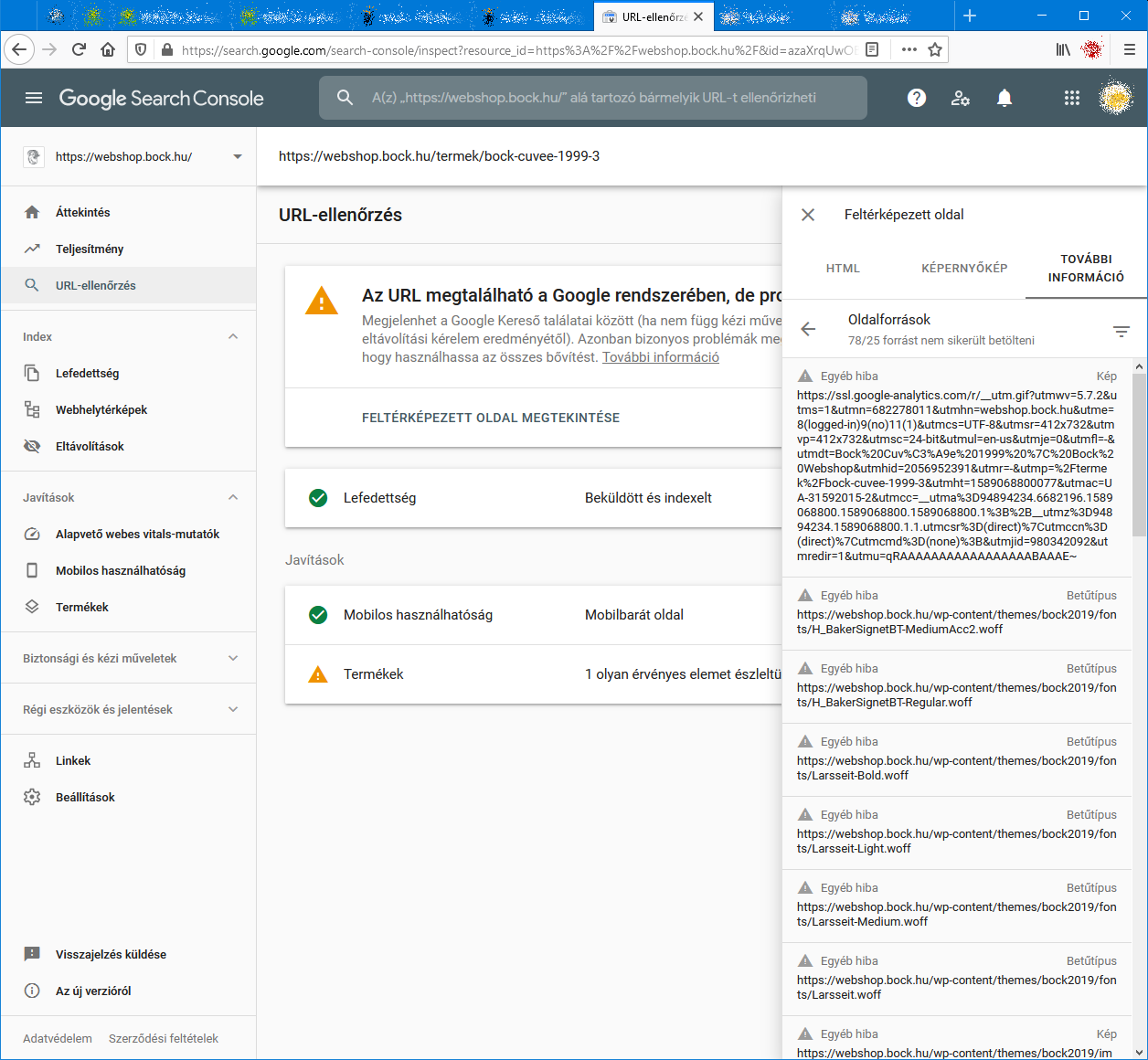
          When I check an URL with Search Console it cannot load some page resources, even from other domains (like: ssl.google-analytics.com, www.facebook.com and www.google-analytics.com).
          Have any of you experienced this issue?
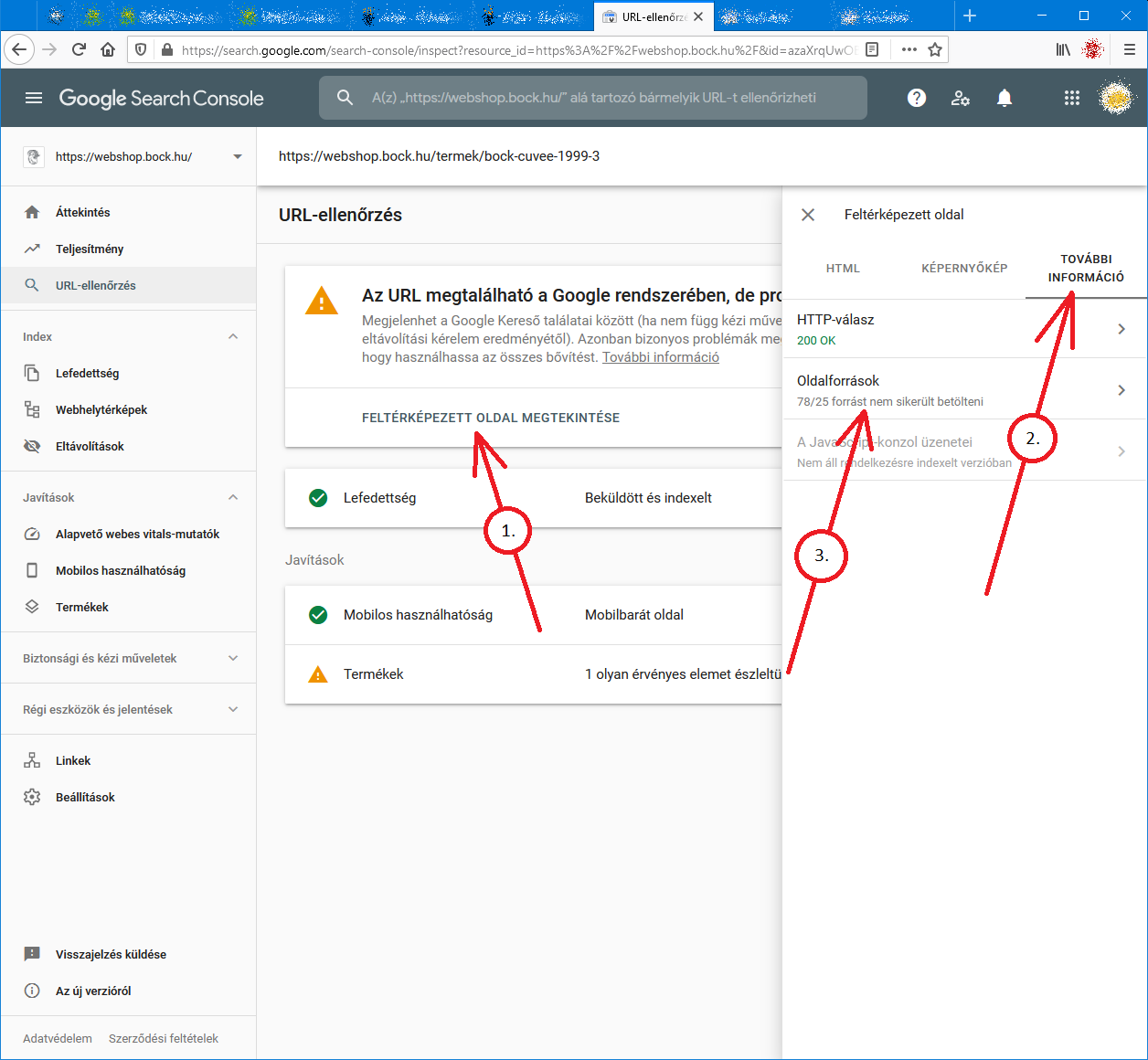
          Steps to reproduce:

          1. open Google Search Console
          2. check an URL
          3. click "View crawled page" link
          4. select "More info" tab
          5. click "Page resources" {?}/{?} couldn't be loaded

          When I check the listed resources, all of them can be loaded from a web browser.
          So I do not understand why Google cannot load them.
          And there is no additional info why the resources could not be loaded.
          Any ideas?

          google-search-console-other-error-1.png google-search-console-other-error-2.png

          1 Reply Last reply Reply Quote 0
          • Anushka_Sen
            Anushka_Sen last edited by

            I am facing issue for my https://jobdekho247.com site, web stories are not loading in search console, Refused to load the stylesheet. How can i fix it?

            Currently I am using premium version of GeneratePress theme.

            1 Reply Last reply Reply Quote 0
            • taqiahmed17
              taqiahmed17 last edited by

              Google Search Console Pages Not Loading properly since a week

              Google search console for my two websites is taking too much time to load. Although I have very good internet connection. When I reload the same page 2nd time then it loads quickly. What is this issue and how to resolve this?

              • Can someone help?

              383e42ff-e12c-418d-9d74-6e1224a5873d-image.png

              1 Reply Last reply Reply Quote 0
              • MonaLisa4
                MonaLisa4 last edited by

                I also facing this issue, for my https://www.uaeadvise.com/ site,  Google Search Index Tool isn't showing for my website.  Does anyone know how to fix it? - Thanks in Advance!!

                1 Reply Last reply Reply Quote 1
                • AnushayMaan
                  AnushayMaan Banned last edited by

                  I am also facing the issue, for my https://www.darsaal.com/ site,  Google Search Index Tool isn't showing for my website.  Does anyone know how to fix it?

                  1 Reply Last reply Reply Quote -1
                  • TottiataHUN
                    TottiataHUN Subscriber last edited by

                    The internal resources are not disallowed.
                    The other resources are very important. Google Analytics has to work.
                    The original question is still unanswered.

                    1 Reply Last reply Reply Quote 0
                    • seoelevated
                      seoelevated Subscriber last edited by

                      While I can't read the language in your screenshots, I can recommend that if those resources are on your own domain, make sure they are not disallowed by the robots.txt file. If they are on external domains, ones which you don't control, then there's really not anything for you to do, and you may as well ignore.

                      1 Reply Last reply Reply Quote -1
                      • 1 / 1
                      • First post
                        Last post

                      Browse Questions

                      Explore more categories

                      • Moz Tools

                        Chat with the community about the Moz tools.

                      • SEO Tactics

                        Discuss the SEO process with fellow marketers

                      • Community

                        Discuss industry events, jobs, and news!

                      • Digital Marketing

                        Chat about tactics outside of SEO

                      • Research & Trends

                        Dive into research and trends in the search industry.

                      • Support

                        Connect on product support and feature requests.

                      • See all categories

                      Related Questions

                      • ahirai

                        Whatstuffwherebot user agent messing up Google Analytics

                        Starting yesterday, Aug 26, 2020, I noticed a new bot crawling our site with user agent whatstuffwherebot. Google Analytics is counting these hits as human traffic, completely throwing off my numbers - yesterday, Analytics reported nearly triple my typical number of visitors. As of now, Search Console only shows data through Aug 25 so I don't know if Search Console is also affected. Is anybody else seeing something similar? Does anybody know what the whatstuffwherebot bot is? I don't get any results when I search on Google or Bing. For what it's worth, the traffic is coming from Columbus, OH, running over Amazon AWS via 278 different IP addresses so far. Also, WordFence (my WordPress security plugin) correctly identifies these hits as bot traffic.

                        Reporting & Analytics | | ahirai
                        0
                      • BradsDeals

                        Conflicting average position data from Google Search Console?

                        I'm looking at Google Search Console data in Google Analytics, specifically Average Position as given in the Landing Page report, and the same metric broken out by mobile and desktop in the Devices report. In the Landing Page report, I see an aggregated average position that's much higher/worse than an actual average of what is reported for mobile, desktop and tablet traffic under the Device reporting. For example: Mobile: 5 Desktop: 5 Tablet: 5 So the average still should be roughly 5, right? Why would the Landing Page then show an aggregate Average Position of 8? I wouldn't expect to see a precisely same average given that different device types have different proportions that could render differently when the buckets are combined, but this is a huge swing. In fact, the aggregate Average Position as given in the top level Devices report is closer to 5 than to the 8 shown in the Landing Pages report. (These aren't actual numbers, but are illustrative of what I'm seeing, by the way.) Unless I'm missing some vital difference in the way that Average Position is reporting for the Landing Page report versus the Device reports, it doesn't seem like this should be possible. What am I missing?

                        Reporting & Analytics | | BradsDeals
                        0
                      • Armen-SEO

                        Tracking 301 redirect traffic in Google Analytics

                        if I 301 redirect www.mywebsite.com to go to www.yourwebsite.com, how can I track the traffic in Google Analytics that is coming from mywebsite.com??  I don't think that's a referral traffic, is it?

                        Reporting & Analytics | | Armen-SEO
                        0
                      • Dan-Lawrence

                        Google Search Console (new GWT) - Does a language specific sub folder need its own GSC profile

                        HI I've got a clients site set which targets 3 language/countries: English via the main site on the domain.com Turkish via a Turkish language site on a subfolder domain.com/tr/ And German via domain.de The devs have set up .com and .de in GSC and is reporting data in both However there's no data in the domain/com/tr GSC profile ! Is that because its on a subfolder so data pertaining to it is being reported in the main domain.com GSC account ? Or does something more need to be done to set up the Turkish subfolder in GSC ? If so what ? All Best Dan

                        Reporting & Analytics | | Dan-Lawrence
                        0
                      • Cocoonfxmedia

                        Google Analytics - Average Position

                        Hi Just trying to get some clarity on Google Analytics Average Positions in "Aquistions/Search Engine Optimisation". For a very competitive keyword Google Analytics is saying i am on average position of 6.  Is this Page 6?  I am assuming position six would be 1.6?

                        Reporting & Analytics | | Cocoonfxmedia
                        0
                      • KarlMarxTheBear

                        Google Analytics Real Time Not Working! :(

                        Hello Everyone, Today, the real time feature in my google analytics stopped working. I am able to see that traffic is visiting my site, but not in real time. The real time count is usually at 0. But, there are some instances where real time will come back online, but there will be only 1 unique visitor.  At any given time, our website usually has 20 visitors or so..Has anyone encountered this issue? Where should i start looking for fixes? What are the possible problems? Thanks!

                        Reporting & Analytics | | KarlMarxTheBear
                        0
                      • EcommerceSite

                        How does switching to HTTPS effect Google Analytics?

                        We are looking at making our site HTTPS. We have been using the same Google Analytics account for years and I like having the historical data. All of our pages will be the same, we are just going to redirect from the http to https. Does anything need to be done with Google Analytics? What about other addons such as Optimizely, Crazy Egg, or Share this?

                        Reporting & Analytics | | EcommerceSite
                        0
                      • johnshearer

                        AW Stats vs Google Analytics

                        Hey Moz Community, I am looking to get opinions on the best practice for analytics/traffic analysis. From experience I know that AW Stats reads high and Google Analytics reads low for traffic for reason in this article http://www.smartz.com/blog/2009/01/23/analytic-confusion-%E2%80%93-awstats-vs-google-analytics/ It drives me a little nuts how far off both are for some pages.  I have one article that shows 100 views (GA) and AW stats shows 5 times that number of views. Any suggestions or systems you recommend? Thanks

                        Reporting & Analytics | | johnshearer
                        0

                      Get started with Moz Pro!

                      Unlock the power of advanced SEO tools and data-driven insights.

                      Start my free trial
                      Products
                      • Moz Pro
                      • Moz Local
                      • Moz API
                      • Moz Data
                      • STAT
                      • Product Updates
                      Moz Solutions
                      • SMB Solutions
                      • Agency Solutions
                      • Enterprise Solutions
                      • Digital Marketers
                      Free SEO Tools
                      • Domain Authority Checker
                      • Link Explorer
                      • Keyword Explorer
                      • Competitive Research
                      • Brand Authority Checker
                      • Local Citation Checker
                      • MozBar Extension
                      • MozCast
                      Resources
                      • Blog
                      • SEO Learning Center
                      • Help Hub
                      • Beginner's Guide to SEO
                      • How-to Guides
                      • Moz Academy
                      • API Docs
                      About Moz
                      • About
                      • Team
                      • Careers
                      • Contact
                      Why Moz
                      • Case Studies
                      • Testimonials
                      Get Involved
                      • Become an Affiliate
                      • MozCon
                      • Webinars
                      • Practical Marketer Series
                      • MozPod
                      Connect with us

                      Contact the Help team

                      Join our newsletter
                      Moz logo
                      © 2021 - 2026 SEOMoz, Inc., a Ziff Davis company. All rights reserved. Moz is a registered trademark of SEOMoz, Inc.
                      • Accessibility
                      • Terms of Use
                      • Privacy

                      Looks like your connection to Moz was lost, please wait while we try to reconnect.