Moz Q&A is closed.
After more than 13 years, and tens of thousands of questions, Moz Q&A closed on 12th December 2024. Whilst we’re not completely removing the content - many posts will still be possible to view - we have locked both new posts and new replies. More details here.
Google Search Console not loading some resources
-
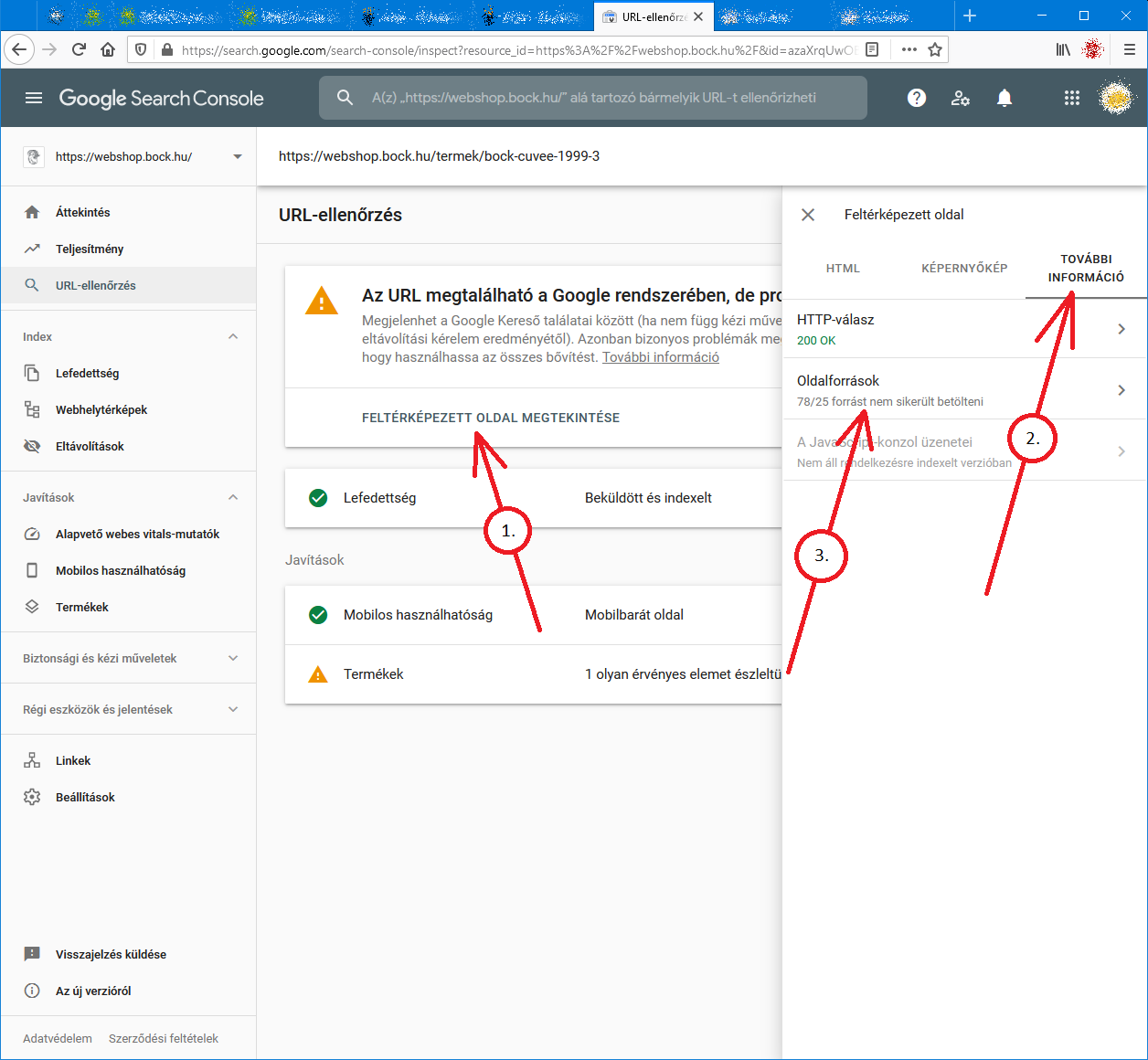
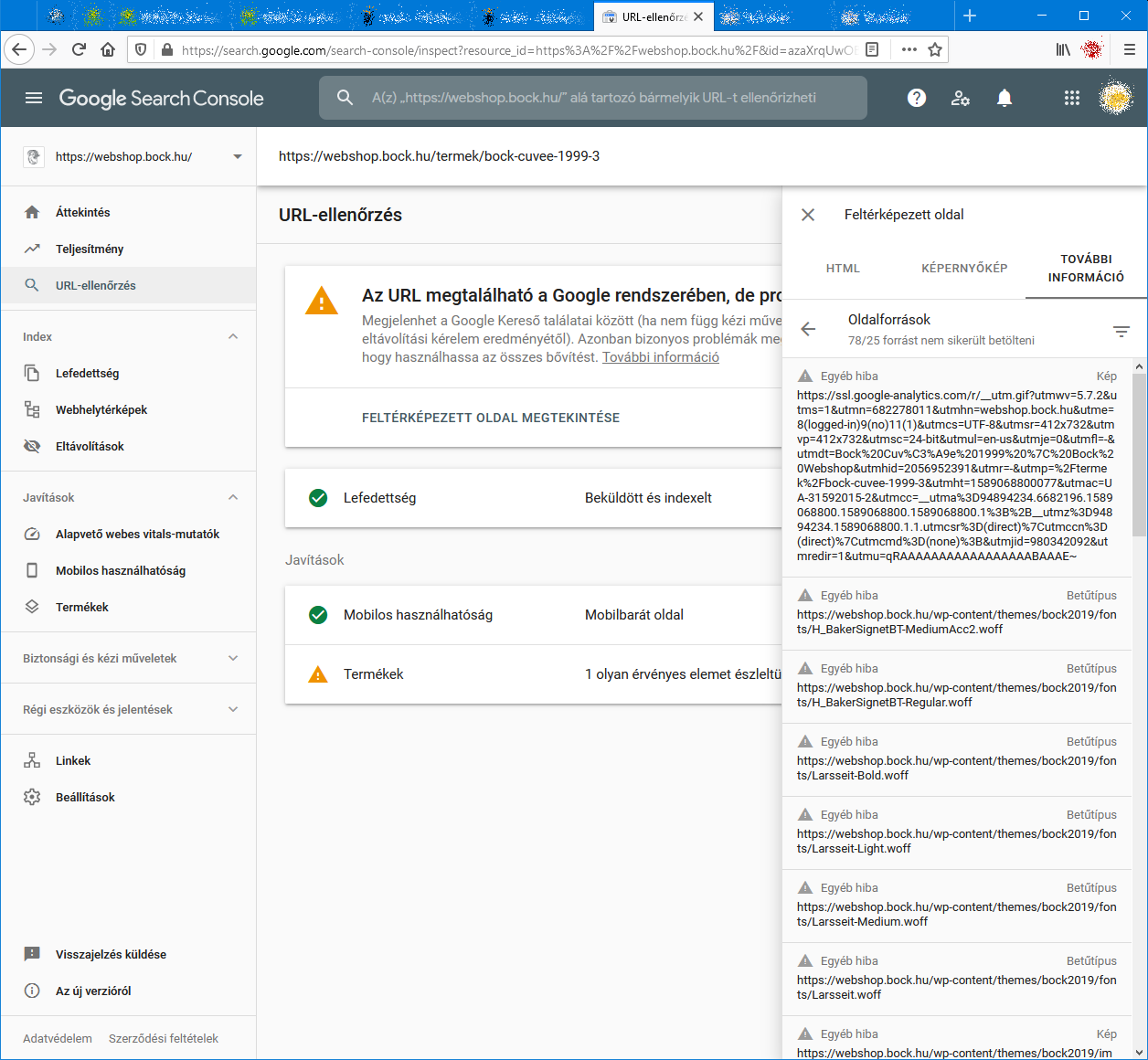
When I check an URL with Search Console it cannot load some page resources, even from other domains (like: ssl.google-analytics.com, www.facebook.com and www.google-analytics.com).
Have any of you experienced this issue?
Steps to reproduce:- open Google Search Console
- check an URL
- click "View crawled page" link
- select "More info" tab
- click "Page resources" {?}/{?} couldn't be loaded
When I check the listed resources, all of them can be loaded from a web browser.
So I do not understand why Google cannot load them.
And there is no additional info why the resources could not be loaded.
Any ideas?google-search-console-other-error-1.png google-search-console-other-error-2.png
-
I am facing issue for my https://jobdekho247.com site, web stories are not loading in search console, Refused to load the stylesheet. How can i fix it?
Currently I am using premium version of GeneratePress theme.
-
Google Search Console Pages Not Loading properly since a week
Google search console for my two websites is taking too much time to load. Although I have very good internet connection. When I reload the same page 2nd time then it loads quickly. What is this issue and how to resolve this?
- Can someone help?

-
I also facing this issue, for my https://www.uaeadvise.com/ site, Google Search Index Tool isn't showing for my website. Does anyone know how to fix it? - Thanks in Advance!!
-
I am also facing the issue, for my https://www.darsaal.com/ site, Google Search Index Tool isn't showing for my website. Does anyone know how to fix it?
-
The internal resources are not disallowed.
The other resources are very important. Google Analytics has to work.
The original question is still unanswered. -
While I can't read the language in your screenshots, I can recommend that if those resources are on your own domain, make sure they are not disallowed by the robots.txt file. If they are on external domains, ones which you don't control, then there's really not anything for you to do, and you may as well ignore.
Got a burning SEO question?
Subscribe to Moz Pro to gain full access to Q&A, answer questions, and ask your own.
Browse Questions
Explore more categories
-
Moz Tools
Chat with the community about the Moz tools.
-
SEO Tactics
Discuss the SEO process with fellow marketers
-
Community
Discuss industry events, jobs, and news!
-
Digital Marketing
Chat about tactics outside of SEO
-
Research & Trends
Dive into research and trends in the search industry.
-
Support
Connect on product support and feature requests.
Related Questions
-
Moz reports way fewer backlinks than google search?
My site is only 11 months old but has steadily (if not slowly) been gaining backlinks. My question, is why Moz shows me at 303 backlinks and Google search console is showing at 1,237? I am more than a little suspicious that this could highlight the reason Moz shows such an unfavorable DA ranking for our site at a DA12. Other competitors that rank for similar keywords to mine are DA 42, DA 65, DA 73, etc. If the largest ranking factor is links, and they have mine reported incorrectly - is this the issue with DA as it relates to sites like mine? Any answer from someone who has experienced similar, or has a definitive answer is more than welcome to chime in! Thanks, Kevin
Reporting & Analytics | | kvncrll0 -
How to Diagnose "Crawled - Currently Not Indexed" in Google Search Console
The new Google Search Console gives a ton of information about which pages were excluded and why, but one that I'm struggling with is "crawled - currently not indexed". I have some clients that have fallen into this pit and I've identified one reason why it's occurring on some of them - they have multiple websites covering the same information (local businesses) - but others I'm completely flummoxed. Does anyone have any experience figuring this one out?
Reporting & Analytics | | brettmandoes2 -
How to track google auto search suggestion click?
Hello Guys, In google.co.uk when I search SEL and google gives me option of different different sites and when I click on any one site then that click tracking I need. I have attached the screenshot to understand easily. Is it possible to track such things or possible via server logs etc? TV99h
Reporting & Analytics | | micey1231 -
Impression and click discrepancies in Search Console when filtering by date
I recently filtered query information by week and day. The impression and click totals were different depending on whether I looked at totals by a full weeks or by day. So for example, the impression and click totals when I choose a date range of monday-sunday are different when I look at impressions and clicks that same week by day and then add up the click and impression numbers to get a weekly total. At first i was expecting a slight difference since I know the data is heavily sampled but the totals were very different. Any explanations for this? Thanks
Reporting & Analytics | | znotes0 -
Google Analytics - Keywords (not set) or ( not provided) WHY???
In Analytics, most of my visitors are landing on my home page, but when trying to see wich keywords they use, most of them are: (not set) or ( not provided) See screencast: http://screencast.com/t/AKwPW76qLVsN Can you tell why? What is going on? Is there a way to solve this? Thank you, BigBlaze
Reporting & Analytics | | BigBlaze2050 -
What is s.ytimg.com in google analytics?
My clients GA reports 273 visits from s.ytimg.com. I go to the site, it doesn't exist. I googled it, there were some code with s.ytimg.com in it, but nothing I could understand. Anybody have an idea where this comes from?
Reporting & Analytics | | endlessrange0 -
Comparing % Change, Google Analytics
Hey Mozzers, Is there a simple way to compare the "% Change" in traffic when comparing two separate time periods in a single Google Analytics report? When comparing data from two separate time periods, an exported CSV doesn't include the % Change (booo!), and there's no option to sort by % Change within the GA report, essentially forcing you to scroll through all the results to pinpoint the major movers and shakers. I'm not averse to using spreadsheets to sort this data, but I'm thinking that I'd likely need a macro to make this work, something like this. However, none of the macros on that page are working (possibly because they were designed for a previous version of Analytics). All suggestions are appreciated. Thanks!
Reporting & Analytics | | dangaul0 -
500 errors and impact on google rankings
Since the launch of our newly designed website about 6 months ago, we are experiencing a high number of 500 server errors (>2000). Attempts to resolve these errors have been unsuccessful to date. We have just started to notice a consistent and sustained drop in rankings despite our hard sought efforts to correct. Two questions... can very high levels of 500 errors adversely effect our google rankings? And, if this is the case, what type of specialist (what are they called) has expertise to investigate and fix this issue. I should also mention that the sitemap also goes down on a regular basis, which some have stated is due to the size of the site (>500 pages). Don't know if they're part of the same problem? Thanks.
Reporting & Analytics | | ahw0