Moz Q&A is closed.
After more than 13 years, and tens of thousands of questions, Moz Q&A closed on 12th December 2024. Whilst we’re not completely removing the content - many posts will still be possible to view - we have locked both new posts and new replies. More details here.
How to index e-commerce marketplace product pages
-
Hello!
We are an online marketplace that submitted our sitemap through Google Search Console 2 weeks ago. Although the sitemap has been submitted successfully, out of ~10000 links (we have ~10000 product pages), we only have 25 that have been indexed.
I've attached images of the reasons given for not indexing the platform.

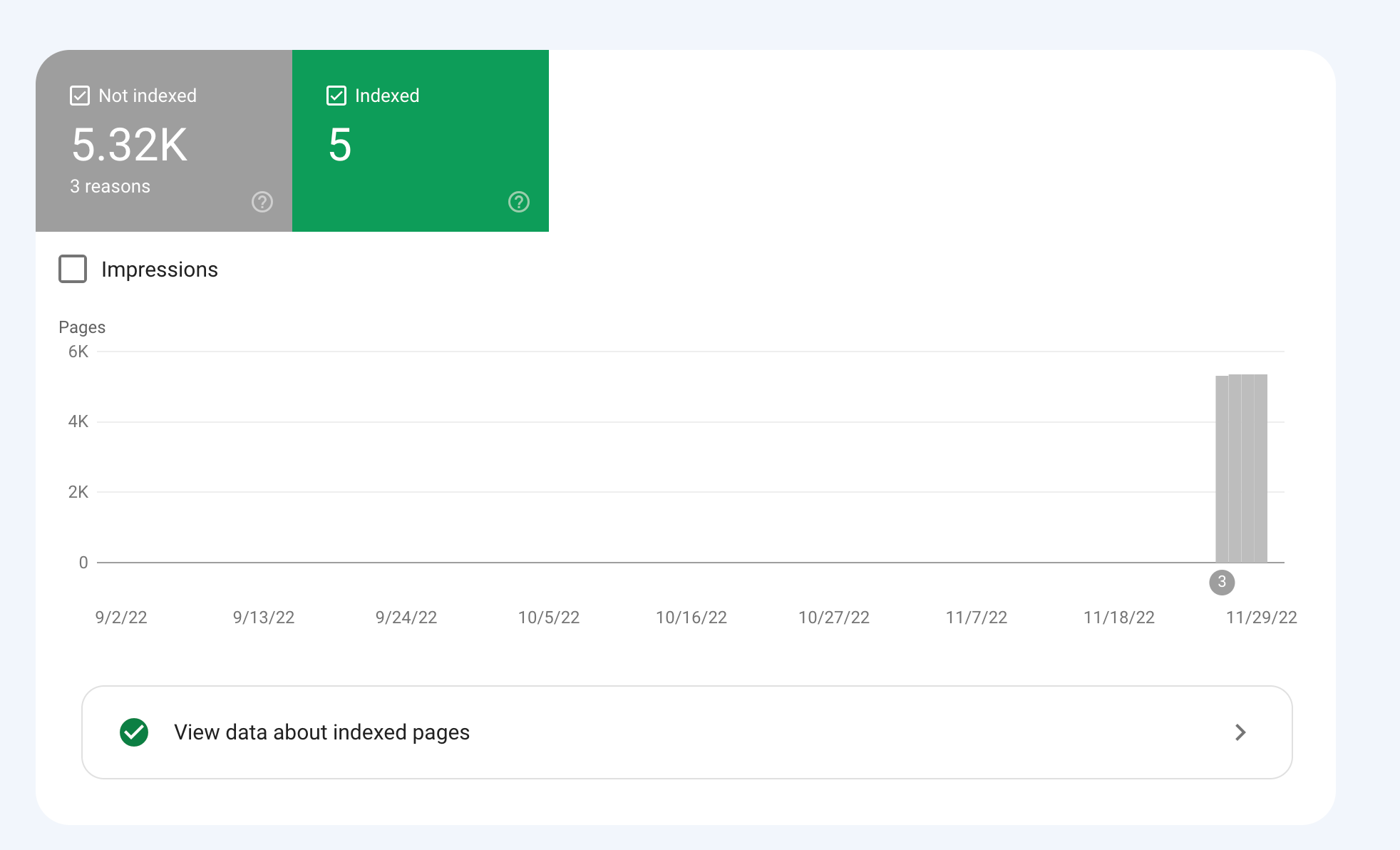
How would we go about fixing this?
-
To get your e-commerce marketplace product pages indexed, make sure your pages include unique and descriptive titles, meta descriptions, relevant keywords, and high-quality images. Additionally, optimize your URLs, leverage schema markup, and prioritize user experience for increased search engine visibility.
-
@fbcosta i hve this problem but its so less in my site
پوشاک پاپیون -
I'd appreciate if someone who faced the same indexing issue comes forward and share the case study with fellow members. Pin points steps a sufferer should do to overcome indexing dilemma. What actionable steps to do to enable quick product indexing? How we can get Google's attention so it can start indexing pages at a quick pace? Actionable advice please.
-
There could be several reasons why only 25 out of approximately 10,000 links have been indexed by Google, despite successfully submitting your sitemap through Google Search Console:
Timing: It is not uncommon for indexing to take some time, especially for larger sites with many pages. Although your sitemap has been submitted, it may take several days or even weeks for Google to crawl and index all of your pages. It's worth noting that not all pages on a site may be considered important or relevant enough to be indexed by Google.
Quality of Content: Google may not index pages that it considers low-quality, thin or duplicate content. If a significant number of your product pages have similar or duplicate content, they may not be indexed. To avoid this issue, make sure your product pages have unique, high-quality content that provides value to users.
Technical issues: Your site may have technical issues that are preventing Google from crawling and indexing your pages. These issues could include problems with your site's architecture, duplicate content, or other issues that may impact crawling and indexing.
Inaccurate Sitemap: There is also a possibility that there are errors in the sitemap you submitted to Google. Check the sitemap to ensure that all the URLs are valid, the sitemap is up to date and correctly formatted.
To troubleshoot this issue, you can check your site's coverage report on Google Search Console, which will show you which pages have been indexed and which ones haven't. You can also check your site's crawl report to see if there are any technical issues that may be preventing Google from crawling your pages. Finally, you can also run a site audit to identify and fix any technical issues that may be impacting indexing.
-
@fbcosta As per my experience, if your site is new it will take some time to index all of the URLs, and the second thing is, if you have Hundreds of URLs, it doesn't mean Google will index all of them.
You can try these steps which will help in fast indexing:
- Sharing on Social Media
- Interlinking from already indexed Pages
- Sitemap
- Share the link on the verified Google My Business Profile (Best way to index fast). You can add by-products or create a post and link it to the website.
- Guest post
I am writing here for the first time, I hope it will help

Got a burning SEO question?
Subscribe to Moz Pro to gain full access to Q&A, answer questions, and ask your own.
Browse Questions
Explore more categories
-
Moz Tools
Chat with the community about the Moz tools.
-
SEO Tactics
Discuss the SEO process with fellow marketers
-
Community
Discuss industry events, jobs, and news!
-
Digital Marketing
Chat about tactics outside of SEO
-
Research & Trends
Dive into research and trends in the search industry.
-
Support
Connect on product support and feature requests.
Related Questions
-
GoogleBot still crawling HTTP/1.1 years after website moved to HTTP/2
Whole website moved to https://www. HTTP/2 version 3 years ago. When we review log files, it is clear that - for the home page - GoogleBot continues to only access via HTTP/1.1 protocol Robots file is correct (simply allowing all and referring to https://www. sitemap Sitemap is referencing https://www. pages including homepage Hosting provider has confirmed server is correctly configured to support HTTP/2 and provided evidence of accessing via HTTP/2 working 301 redirects set up for non-secure and non-www versions of website all to https://www. version Not using a CDN or proxy GSC reports home page as correctly indexed (with https://www. version canonicalised) but does still have the non-secure version of website as the referring page in the Discovery section. GSC also reports homepage as being crawled every day or so. Totally understand it can take time to update index, but we are at a complete loss to understand why GoogleBot continues to only go through HTTP/1.1 version not 2 Possibly related issue - and of course what is causing concern - is that new pages of site seem to index and perform well in SERP ... except home page. This never makes it to page 1 (other than for brand name) despite rating multiples higher in terms of content, speed etc than other pages which still get indexed in preference to home page. Any thoughts, further tests, ideas, direction or anything will be much appreciated!
Technical SEO | | AKCAC1 -
How to Increase Website Visibility on Google and Bing?
I am working on an e-commerce niche website and I aim to rank higher on Google to drive more traffic to my website. Any suggestions?
Link Building | | digitalenginehub0 -
Unsolved Question about a Screaming Frog crawling issue
Hello, I have a very peculiar question about an issue I'm having when working on a website. It's a WordPress site and I'm using a generic plug in for title and meta updates. When I go to crawl the site through screaming frog, however, there seems to be a hard coded title tag that I can't find anywhere and the plug in updates don't get crawled. If anyone has any suggestions, thatd be great. Thanks!
Technical SEO | | KyleSennikoff0 -
Why Product pages are throwing Missing field "image" and Missing field "price" in Wordpress Woocommerce
I have a wordpress wocommerce website where I have uploaded 100s of products but it's giving me error in GSC under merchant listing tab. When I tested it show missing field image and missing field price. I have done everything according to https://developers.google.com/search/docs/appearance/structured-data/product#merchant-listing-experiences and applied fixed i.e. images are 800x800 and price range is also there. What else can be done here?!merchant listing.jpg
Technical SEO | | Ravi_Rana0 -
Removed Product page on our website, what to do
We just removed an entire product category on our website, (product pages still exist, but will be removed soon as well) Should we be setting up re-directs, or can we simply delete this category and product
Technical SEO | | DutchG
pages and do nothing? We just received this in Google Webmasters tools: Google detected a significant increase in the number of URLs that return a 404 (Page Not Found) error. We have not updated the sitemap yet...Would this be enough to do or should we do more? You can view our website here: http://tinyurl.com/6la8 We removed the entire "Spring Planted Category"0 -
How to change the woocommerce product page permalink
Sorry Posting it again. How I can change the product URL structure. Please let me know how to fix woocommerce permalink in wordpress. My current URL is http://www.ayurjeewan.com/product/divya-ashmarihar-kwath and I want to like (only post name) http://www.ayurjeewan.com/divya-ashmarihar-kwath Attached is the screenshot of option available. qa2hZMP.jpg
Technical SEO | | JordanBrown0 -
How do I handle duplicate content of the same product in Multiple product categories?
I am building a BigCommerce store for selling framed art. Many of the pieces of art will fall in more than one product category. Let's say I have a framed print of a photograph of a western landscape. This piece of art would fit into these categories; "western", "landscape", and "photography". I would have three pages with duplicate content for just this one framed print. Will google give me less page rank due to this? Can all the link juice be given to just one of the three categories by use of rel=canonical? If so, does anyone know how to do this for a bigcommerce site? I would appreciate any feedback. Thanks, Kelly
Technical SEO | | Kelly_S0