Moz Q&A is closed.
After more than 13 years, and tens of thousands of questions, Moz Q&A closed on 12th December 2024. Whilst we’re not completely removing the content - many posts will still be possible to view - we have locked both new posts and new replies. More details here.
Unsolved The Moz.com bot is overloading my server
-
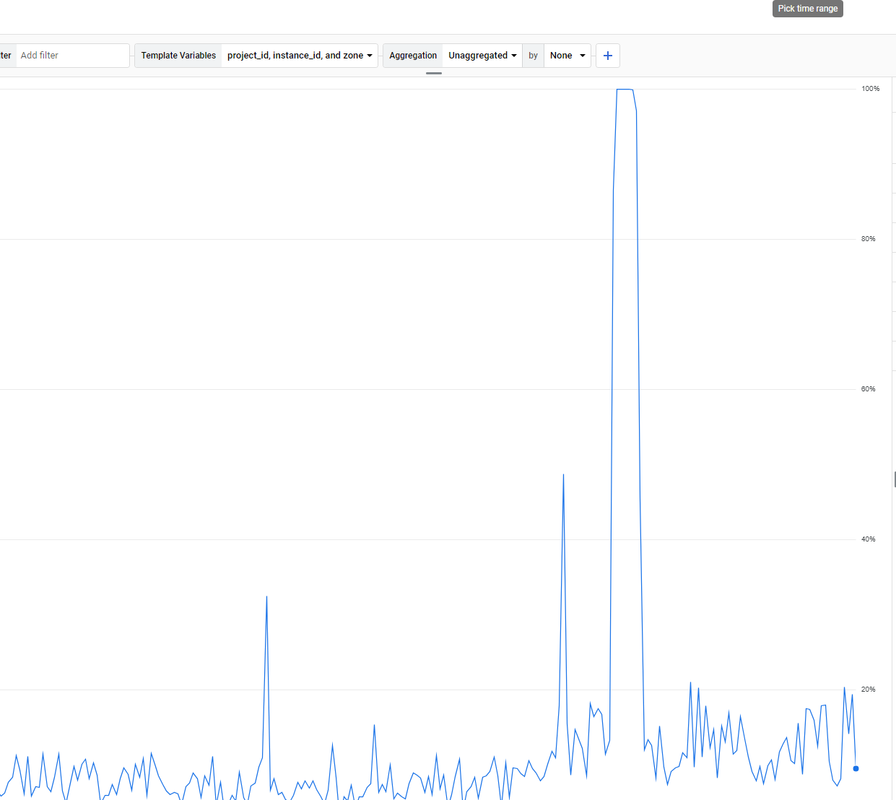
. How to solve it? -
For a step-by-step guide on setting up the tool, check out the solara executor download tutorial.
-
maybe crawl delay will help.
-
@paulavervo
Hi,
We do! The best way to chat with us is via our contact form or direct email. We also have chat within Moz Pro.
Please contact us via [email protected] or https://a-moz.groupbuyseo.org/help/contact
We will be happy to help.
Cheers,
Kerry. -
very nice brother i like it very good keep it up !
-
very nice !
-
does the moz team even monitor this forum?
-
If the Moz.com bot is overloading your server, there are several steps you can take to manage and mitigate the issue effectively. First, you can adjust the crawl rate in your
robots.txtfile by specifying a crawl delay for the Moz bot using directives likeUser-agent: rogerbotandUser-agent: dotbot, followed byCrawl-delay: 10to make the bot wait 10 seconds between requests. If this does not suffice, you can temporarily block the bot by disallowing it in yourrobots.txtfile. Additionally, it's a good idea to contact Moz’s support team to explain the issue, as they may offer solutions to adjust the crawl rate for your site. Implementing server-side rate limiting is another effective strategy. For Apache servers, you can add rules in your.htaccessfile to return a 429 Too Many Requests status code to the Moz bots, while for Nginx servers, you can set up rate limiting in your configuration file to control the number of requests per second from a single user or IP address. Monitoring your server’s performance and log files can help identify specific patterns or peak times, allowing you to fine-tune your settings. Furthermore, using a Content Delivery Network (CDN) can help distribute the load by caching content and serving it from multiple locations, reducing the direct impact on your server caused by crawlers. By taking these steps, you can manage the load from the Moz.com bot and maintain your server’s stability and responsiveness.
Browse Questions
Explore more categories
-
Moz Tools
Chat with the community about the Moz tools.
-
SEO Tactics
Discuss the SEO process with fellow marketers
-
Community
Discuss industry events, jobs, and news!
-
Digital Marketing
Chat about tactics outside of SEO
-
Research & Trends
Dive into research and trends in the search industry.
-
Support
Connect on product support and feature requests.
Related Questions
-
Moz crawler is not able to crawl my website
Hi, i need help regarding Moz Can't Crawl Your Site i also share screenshot that Moz was unable to crawl your site on Mar 26, 2022. Our crawler was not able to access the robots.txt file on your site. This often occurs because of a server error from the robots.txt. Although this may have been caused by a temporary outage, we recommend making sure your robots.txt file is accessible and that your network and server are working correctly. Typically errors like this should be investigated and fixed by the site webmaster.
Technical SEO | | JasonTorney
my robts.txt also ok i checked it
Here is my website https://whiskcreative.com.au
just check it please as soon as possibe0 -
What are Keywordbasket.com & Keyword-suggest-tool.com. Competitors have Tons of these
My client is in the Custom Scale Model industry. They build Custom Aircraft Models, Custom Ship Models and more. Their competitor's Backlinks reports have a Ton of metrics coming from: http://www.keywordbasket.com and https://www.keyword-suggest-tool.com There is line after line of these entries in the backlink report. As much as 50 line entries. what exactly is happening here? Are they manually using these tools to generate search entries and caching this data in the form of Backlinks? Please explain. is this a Gray Hat Tactic?
Moz Pro | | chachakhota0 -
What's the best way to search keywords for Youtube using Moz Keyword explorer?
I want to optimize my youtube channel using identified keywords, but I'm concerned that the keywords I'm identifying work well for SERP's but might not be how people search in Youtube. How do a distinguish my keywords to be targeted for Youtube?
Moz Pro | | Dustless0 -
GOOGLE ANALYTIC SKEWED DATA BECAUSE OF GHOST REFERRAL SPAM ND CRAWL BOTS
Hi Guys, We are having some major problems with our Google Analytics and MOz account. Due to the large number of ghost/referral spam and crawler bots we have added some heavy filtering to GA. This seems to be working protecting the data from all these problems but also filtering out much needed data that is not coming through. In example, we used to get a hundred visitors a day at the least and now we are down to under ten. ANYBODY PLEASE HELP. HAVE READ THROUGH MANY ARTICLES WITH NO FIND TO PERMANENT SOLID SOLUTION (even willing to go with paid service instead of GA) Thank You so Much, S.M.
Moz Pro | | KristyKK0 -
MoZ vs SEMRush - Keyword Difficulty and Keyword With Low Competition.
Hi, My question is very focussed regarding these 2 tools. Is it correct to understand that MoZ tells keyword difficulty and not which keyword is easy to compete. And SEMRush tells which keyword is easy to compete but does not tell which keywords are difficult to compete? I mean one (Moz) misses the one part and the other (SEMRush) misses the other part. Hope some will enlighten me to the point. Best
Moz Pro | | Sequelmed0 -
Block Moz (or any other robot) from crawling pages with specific URLs
Hello! Moz reports that my site has around 380 duplicate page content. Most of them come from dynamic generated URLs that have some specific parameters. I have sorted this out for Google in webmaster tools (the new Google Search Console) by blocking the pages with these parameters. However, Moz is still reporting the same amount of duplicate content pages and, to stop it, I know I must use robots.txt. The trick is that, I don't want to block every page, but just the pages with specific parameters. I want to do this because among these 380 pages there are some other pages with no parameters (or different parameters) that I need to take care of. Basically, I need to clean this list to be able to use the feature properly in the future. I have read through Moz forums and found a few topics related to this, but there is no clear answer on how to block only pages with specific URLs. Therefore, I have done my research and come up with these lines for robots.txt: User-agent: dotbot
Moz Pro | | Blacktie
Disallow: /*numberOfStars=0 User-agent: rogerbot
Disallow: /*numberOfStars=0 My questions: 1. Are the above lines correct and would block Moz (dotbot and rogerbot) from crawling only pages that have numberOfStars=0 parameter in their URLs, leaving other pages intact? 2. Do I need to have an empty line between the two groups? (I mean between "Disallow: /*numberOfStars=0" and "User-agent: rogerbot")? (or does it even matter?) I think this would help many people as there is no clear answer on how to block crawling only pages with specific URLs. Moreover, this should be valid for any robot out there. Thank you for your help!0 -
Why is MOZ and Google search Volume so different?
A search term in MOZ shows the monthly search volume to be 49K. In Google, the same term shows the search volume at only 1300 monthly searches. Which do I trust? Thanks, Don
Moz Pro | | rcman0 -
In alt tag of a image can we use #hashtag or domain.com ? Is that good SEO or not allowed ?
Some of the Google Search shows a title has a hashtag of an article, which contain keyword and while tweeting them, the title which has a hashtag automatically very good used for getting traffic to the blog. And other one, can we use the hash tag inside the alt attribute ? Or our domain name with .com in it. Like Google.com or #Google ?
Moz Pro | | Esaky0