Moz Q&A is closed.
After more than 13 years, and tens of thousands of questions, Moz Q&A closed on 12th December 2024. Whilst we’re not completely removing the content - many posts will still be possible to view - we have locked both new posts and new replies. More details here.
Wrong Category Displaying Google Business Page?
-
Our firm keeps displaying "bankruptcy attorney" on google business page. Granted, we do that, as well as a variety of other services, but our primary category is "Personal Injury Attorney". I was told the categories are randomly selected, but I don't think that's true. Every time I've looked (or had other people look for us) on local, it displays as "bankruptcy attorney." What should I do? Is there a way to lock in the "Personal Injury Attorney" category, so it's the one that displays? Should I get rid of all the other categories except for "personal injury attorney?" Any other suggestion?
Thanks,
Ruben
-
I know it's not any bankruptcy related directories or poor citation building, because we've just started building out for this location a few months ago. And, we've never stressed bankruptcy, but thank you for the suggestions. Those are definitely sold point to consider.
It's starting to look like I may just have to delete the other categories, but I worry because, if I do that, I won't have a "complete" profile and that could cost me in google's eyes as well.
-
We went through a similar issue when Google migrated their local services to G+. Several of our clients had correct categories and when the platform switched they arbitrarily set new categories. Some were way off. If the personal injury is the most important category, I would delete the others temporarily and try reintroducing the other categories later. It could also be a situation where you have citations outside of Google in Bankruptcy related directories or with data related to it. Doing a citation building campaign focused on the personal injury category may also help.


Browse Questions
Explore more categories
-
Moz Tools
Chat with the community about the Moz tools.
-
SEO Tactics
Discuss the SEO process with fellow marketers
-
Community
Discuss industry events, jobs, and news!
-
Digital Marketing
Chat about tactics outside of SEO
-
Research & Trends
Dive into research and trends in the search industry.
-
Support
Connect on product support and feature requests.
Related Questions
-

Why is a Google Listing Showing Up in a Different Town Than Its Address?
I have a client who runs a dental office on the outskirts of Racine, WI. His address specifically shows up as being in Racine, however, his GMB profile has always showed with the category of "Dentist in Mount Pleasant, WI" displaying below the photos. (Mount Pleasant is the next town over and his office straddles the line between the two towns in Google's overlay map of the town.) Obviously this is frustrating and I'm concerned that his location is hurting his ability to rank in the larger, more populous town of Racine. Have any other SEOs ever encountered this? And if so, how have you approached the issue? Location pages? Mentions of the location more often on the pages? tsLvH2B
Local Listings | | formandfunctionagency1 -

Seasonal Setting Options for Google My Business
Hi there, Not sure if anyone will have any insight but I have a seasonal business that I am closed for from September to March. I don't want to mark my business as "permanently closed" through Google My Business as I don't want my customers to think I've gone out of business. I've seen a few times through forums that you can change your business to temporarily closed, but I can't find the specifics on how to do this. Any insight, suggestion or resources would be great! Thanks!
Local Listings | | MainstreamMktg1 -

Google My Business pages for New Construction Communities
I have a number of builders of new homes as clients. Typically, they build out a whole neighborhood at once and give the neighborhood a fancy name. We were planning to create Google My Business pages for these communities but then ran into some potential challenges. As new communities, they are sometimes not on Google's radar yet Some of them have model homes where you might take a tour with a realtor that serves the community exclusively but many don't. So here come the questions... Is there a way to make Google speed up its process of recognizing new addresses? I have to choose an address to associate with the GMB page, probably the address of model home. Is this going to create annoying problems for a buyer who someday buys that model home? Since some communities don't have a model home, I could arbitrarily assign an address of one of the neighborhood homes to the GMB page, but this leads to the same question about creating a GMB page that will exist after the builder has sold all the houses in the community. Will it be weird to have the GMB referring to someone's private residence down the road? My assumption is that claiming a GMB page would help with local ranking if someone searches for something like "new homes" in addition to providing easy driving directions to someone who has done a bit of research and Googles the name of the new home community while out driving and searching for homes. These seem to be the main benefits, but are the challenges associated with questions 1-3 even worth the trouble of trying to claim listings for these communities?
Local Listings | | TheKatzMeow0 -

Improve Google Business ranking
While my client's websites have been ranking well in SERP for their keyterms I'm at a lost on what I can do to improve their Google business/map presence. I'm referring to their listing where the top three come up or when you search on Google Maps.
Local Listings | | FPK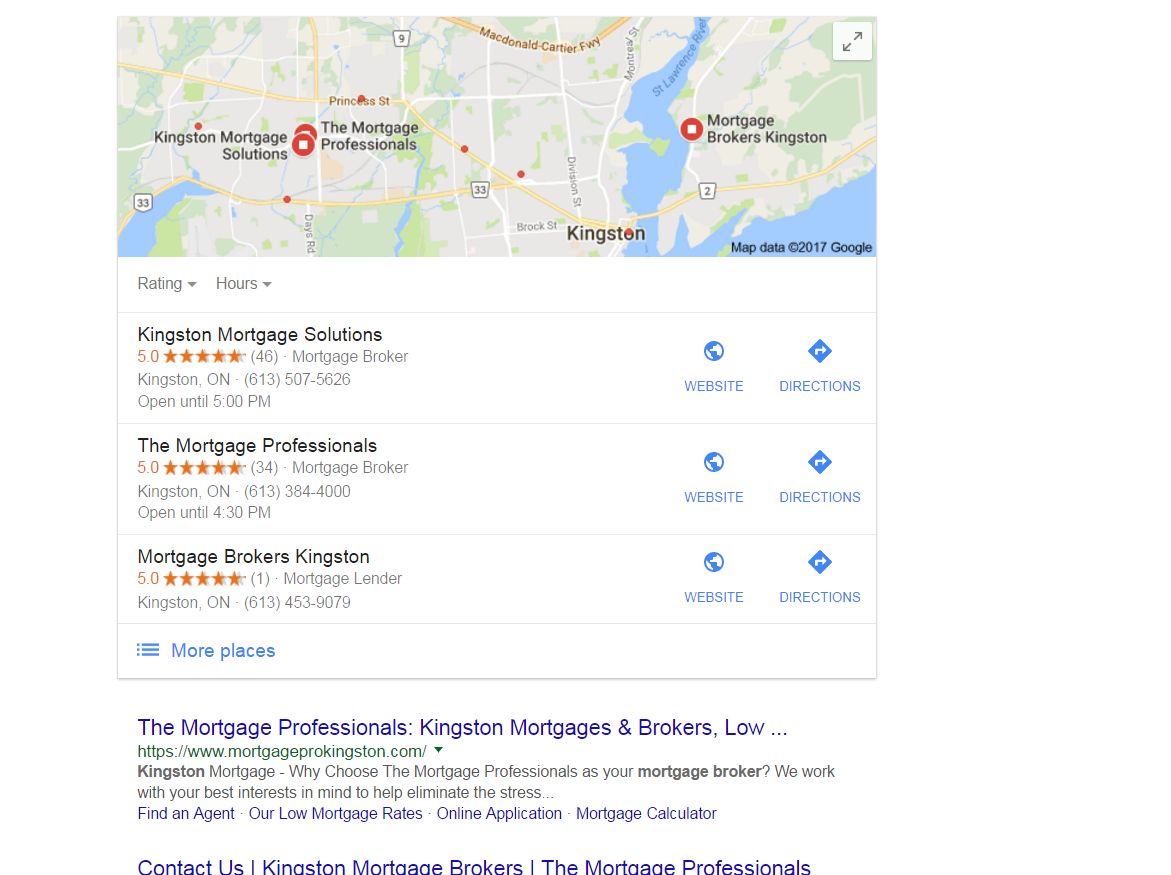
https://gyazo.com/26ec78ed7f712157ec72492199545431 Ex 1. Several months ago my client was ranked #1 both for SERP and maps until they dropped to 2nd on maps. Now they're ranked 1st in search yet 2nd for local business rankings as you can see from the screenshot above. At one point my client's business did have more reviews than the 1st ranking business yet they still weren't 1st. Ex. 2. Client(s) is ranked 4th in search and doesn't show in the top 3 map listings for their search term. If you click on More places to view Google Maps they're listed all the way down as the 15th listing or worse can't even be found when searching by their main SEO key term . Of course they are found by searching for their business name so it's not like there is a problem with the listing. I make sure to: Completely fill out their Google Business profile(NAP, hours and add pictures) Have my client try to gain positive reviews Manage and respond to reviews(mainly the negative ones) Add map and Google business link to their website Can anyone offer any other insight on what else can be done to improve their local presence on maps that I might be missing?0 -

Local SEO business name issue due to aggregator
So I work for a college and we have multiple locations. My tactic has been always to keep the name the same for all of them (no city name), and then change the address and phone number for each. But there is 1000s of college listings websites out there that aggregate college and school data from the same source: the US government. Now the way that they have most, if not all, multi-location colleges listed is: "college name-city name". I can see the value in that, but I guess I'm just wondering what to do since it obviously can't be changed. Should I revert all of our listings as "college name-city name" to match the 1000s of listings that have it that way? I've been under the impression that I should leave the city/town name out of the name, but I'm just wondering what you think best practices would be? Thanks
Local Listings | | TomBinga1125
Tom0 -

My Evernote Notes showing up on Google Search page ?
I may just be living under a rock here in Reno, but tonight while doing a search (on desktop) for a phone number of a restaurant in Tahoe, Google served me a bunch of my Evernote notes along with my SERPS After the initial "WTFriday" moment, I realized that there was an "Evernote" bar above a series of images of what Google must think are related notes --- for example in a few weeks I am planning to take friends to Bliss & Rubicon - and I had saved the map in Evernote. Next to the map image were two notes related to daughters upcoming swim meet in South Tahoe. I did a similar search and this time a listing for hours at a local pool (near Tahoe) and two other documents came up. Since I live in Reno I thought it was odd to get all those Tahoe activities - but the fact that my Evernote on "Tahoe" things was there caught me off guard. The results were locate on the right hand where local business maps usually are -- the map and business info about the restaurant I was looking for appeared below that. ... while the left hand column features traditionals SERPs. . I am just trying to find out if I am late to the party on this ... or if serving data saved in my Evernote files is new... If anyone else has seen this, let me know. I could just be late to this. ...
Local Listings | | AJFanter0 -

Local citations from business directories in other countries
Hi all, I normally work for clients in my home county (The Netherlands) and with local citation building I focus on Dutch websites or well know .com websites in the Netherlands. My rule of thumb kinda was, if it’s not known in the Netherlands it isn’t worth getting mentioned there. Since The Netherlands are pretty small and I think Google ain’t perfect I was wondering if it makes sense to list a Dutch business on any .com business listings that are internationally big, but aren’t well known in the Netherlands. Two reasons that got me thinking this direction: A big well known Dutch company offers a service such as Moz local and did integrate their service with several international business listing websites that I never heard off, since these business directories focus themselves on other parts of the world. Google ain’t perfect and I think they got more budget to identify trustworthy business directories with an international focus or a focus on America then with a focus on The Netherlands. So I’m wondering if it makes any sense to list a Dutch business on let’s say the top 20 international business directories (although these directories don’t have any brand recognition in The Netherlands).
Local Listings | | Bob_van_Biezen0 -
How to remove a former business location from Google Places?
I've received a strange response from Google Places on local listings for a home builder. Google's rep suggested that we not list the new home sales center (a model home) since at some point it will change from being a business listing to a residential listing. That is just wrong. It will be a place of business for the next 3 years and then will flip to being a private residence. These days it is uncommon, but not that rare to turn over ownership from public to private or vice versa (A residence becoming a law or other commercial establishment. Or a whole office building becoming condos.) The issue is, when it does happen, how do we get Google and others to recognize that a business is no longer a business location? I've had trouble bringing down the address of former former model home sales centers on Google Places much to the chagrin of the residents.
Local Listings | | BlairKuhnen0
