Moz Q&A is closed.
After more than 13 years, and tens of thousands of questions, Moz Q&A closed on 12th December 2024. Whilst we’re not completely removing the content - many posts will still be possible to view - we have locked both new posts and new replies. More details here.
Schema Markup Warning "Missing field "url" (optional)"
-
Hello Moz Team, I hope everyone is doing well & good,
I need bit help regarding Schema Markup, I am facing issue in my schema markup specifically with my blog posts,
In my majority of the posts I find error "Missing field "url" (optional)"
As this schema is generated by Yoast plugin, I haven't applied any custom steps.Recently I published a post
https://dailycontributors.com/kisscartoon-alternatives-and-complete-review/
and I tested it at two platforms of schema test
1, Validator.Schema.org
2. Search.google.com/test/rich-resultsSo the validator generate results as follows and shows no error
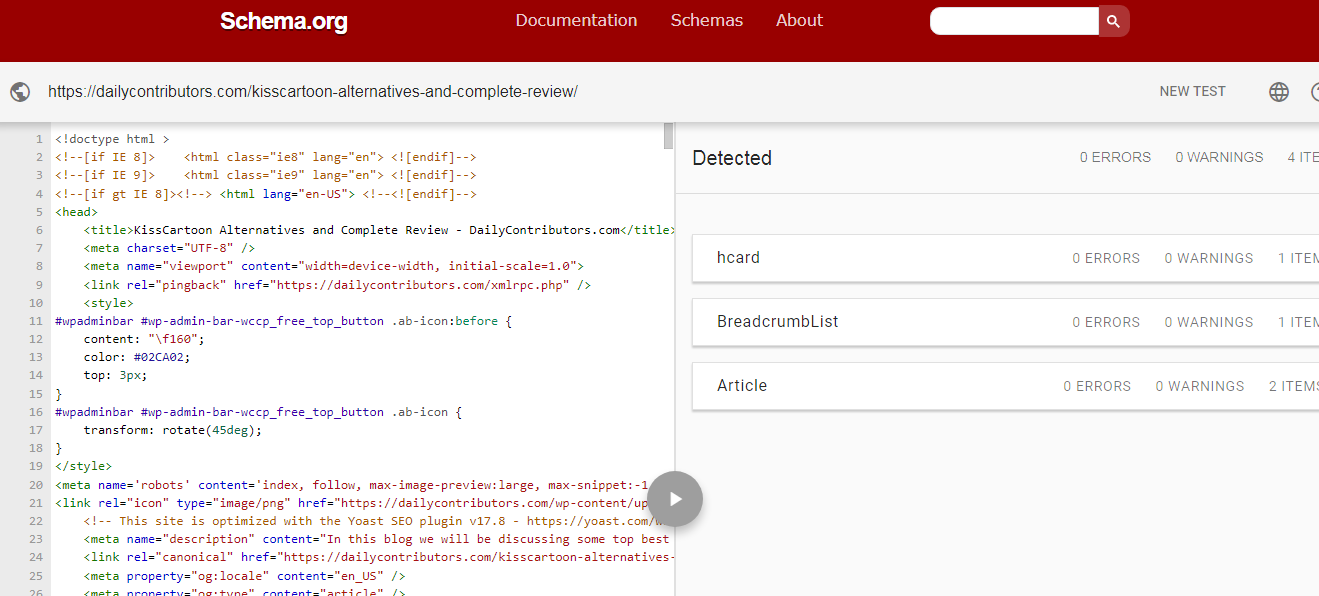
It shows no error
But where as
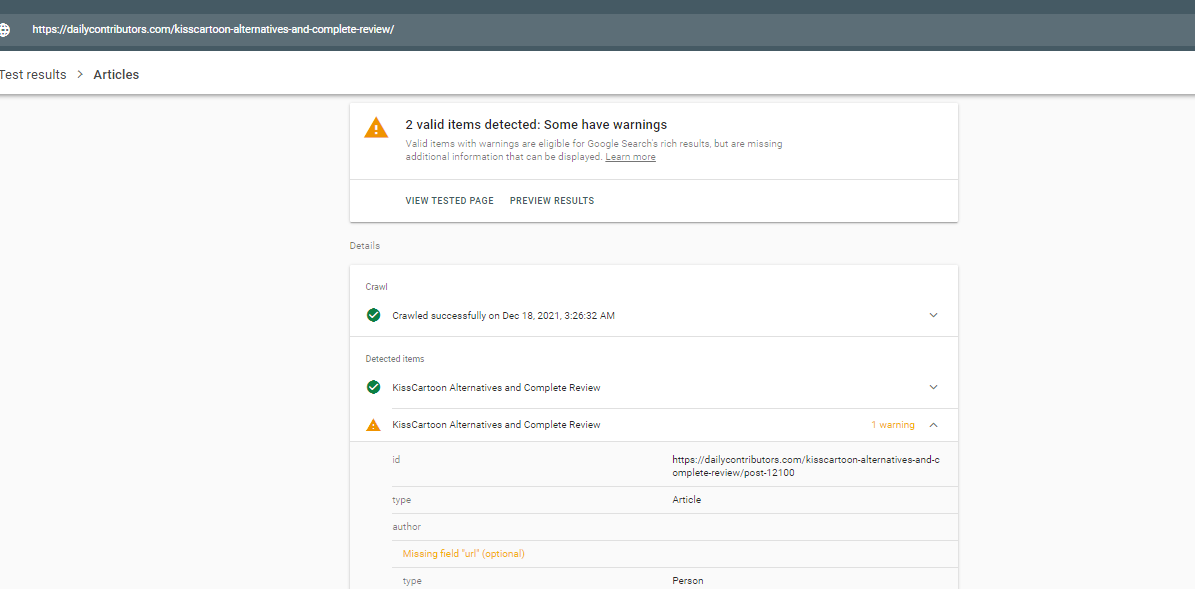
in search central results it gives me a warning "Missing field "url" (optional)".
So is this really be going to issue for my ranking ? Please help thanks!
-
@JoeySolicitor I thinks , My website sam with your issue


Browse Questions
Explore more categories
-
Moz Tools
Chat with the community about the Moz tools.
-
SEO Tactics
Discuss the SEO process with fellow marketers
-
Community
Discuss industry events, jobs, and news!
-
Digital Marketing
Chat about tactics outside of SEO
-
Research & Trends
Dive into research and trends in the search industry.
-
Support
Connect on product support and feature requests.
Related Questions
-

Unsolved Duplicate LocalBusiness Schema Markup
Hello! I've been having a hard time finding an answer to this specific question so I figured I'd drop it here. I always add custom LocalBusiness markup to clients' homepages, but sometimes the client's website provider will include their own automated LocalBusiness markup. The codes I create often include more information. Assuming the website provider is unwilling to remove their markup, is it a bad idea to include my code as well? It seems like it could potentially be read as spammy by Google. Do the pros of having more detailed markup outweigh that potential negative impact?
Local Website Optimization | | GoogleAlgoServant0 -

What do we know about the "Shops" SERP Feature?
I came across this SERP Feature in a search today on a mobile device. It does not show for the same search query on desktop. What do we know about this "Shops" SERP feature? shops-blur.jpg
SERP Trends | | seoelevated0 -

What is the difference between "Referring Pages" and "Total Backlinks" [on Ahrefs]?
I always thought they were essentially the same thing myself but appears there may be a difference? Any one care to help me out? Cheers!
Technical SEO | | Webrevolve0 -

How valuable is content "hidden" behind a JavaScript dropdown really?
I've come across a method implemented by some SEO agencies to fill up pages with somehow relevant text and hide it behind a javascript dropdown. Does Google fall for such cheap tricks? You can see this method used on these pages for example (just scroll down to the bottom) - it's all in German, but you get the idea I guess: http://www.insider-boersenbrief.de/ http://www.deko-und-kerzenshop.de/ How is you experience with this way of adding content to a site? Do you think it is valuable or will it get penalised?
Technical SEO | | jfkorn0 -

Old URL redirect to New URL
Alright I did something dumb a year a go and I'm still paying for it. I changed my hyphenated URL to the non-hyphenated version when I redesigned my website. I say it was dumb because I lost most of my link juice even though I did 301 redirects (via the htaccess file) for almost all of the pages I could find in Google's index. Here's my problem. My new site took a huge hit in traffic (down 60%) when I made the change and even though I've done thousands of redirects my old site is still showing up in the SERPS and send much if not most of my traffic. I don't want to take the old site down in fear it will kill all of my traffic. What should I do? Is there a better method I should explore then 301 redirects? Could the other site be affecting my current rank since it's still there? (FYI...both sites are built on the WP platform). Any help or ideas are greatly appreciated. Thank you! Joe
Technical SEO | | kaje0 -

301 for "index.php" in Web.config?
Hi there, I'm trying to create a 301 redirect for the file "index.php" but I keep getting a "fail to redirect" message in Firefox whenever I insert it into the Web.config file. <location path="index.php"></location> Is there anyway around this? Thanks for any help According to Open Site Explorer, there are about 500 links to my index file but it only has a 302 status so will not be passing link juice.
Technical SEO | | tdsnet0 -

Meta tag "noindex,nofollow" by accident
Hi, 3 weeks ago I wanted to release a new website (made in WordPress), so I neatly created 301 redirects for all files and folders of my old html website and transferred the WordPress site into the index folder. Job well done I thought, but after a few days, my site suddenly disappeared from google. I read in other Q&A's that this could happen so I waited a little longer till I finally saw today that there was a meta robots added on every page with "noindex, nofollow". For some reason, the WordPress setting "I want to forbid search engines, but allow normal visitors to my website" was selected, although I never even opened that section called "Privacy". So my question is, will this have a negative impact on my pagerank afterwards? Thanks, Sven
Technical SEO | | Zitana0 -

Which pages to "noindex"
I have read through the many articles regarding the use of Meta Noindex, but what I haven't been able to find is a clear explanation of when, why or what to use this on. I'm thinking that it would be appropriate to use it on: legal pages such as privacy policy and terms of use
Technical SEO | | mmaes
search results page
blog archive and category pages Thanks for any insight of this.0