Moz Q&A is closed.
After more than 13 years, and tens of thousands of questions, Moz Q&A closed on 12th December 2024. Whilst we’re not completely removing the content - many posts will still be possible to view - we have locked both new posts and new replies. More details here.
WordPress Sub-directory for SEO
-
Hi There,
I'm working on a WordPress site that includes a premium content blog with approx 900 posts.
As part of the project, those 900 posts and other membership functionality will be moved from the main site to another site built specifically for content/membership.
Ideally, we want the existing posts to remain on the root domain to avoid a loss in link juice/domain authority.
We initially began setting up a WordPress Multisite using the sub-directory option. This allows for the main site to be at www.website.com and the secondary site to be at www.website.com/secondary.
Unfortunately, the themes and plugins we need for the platform do not play nicely with WordPress Multisite, so we started seeking a new solution, and, discovered that a second instance of WordPress can be installed in a subdirectory on the server. This would give us the same subdirectory structure while bypassing WordPress Multisite and instead, having two separate single-site installs.
Do you foresee any issues with this WordPress subdirectory install? Does Google care/know these are two separate WordPress installs and do we risk losing any link juice/domain authority?
-
@himalayaninstitute said in WordPress Sub-directory for SEO:
WordPress can be installed in a subdirectory
I have done this a lot and I mean a lot what you want to do is set up a reverse proxy on your subdomain and this will allow you to not only bypass having to use multisite for subfolder but if you want to power it separately you can you do not have to it all. You should probably use your same server and power through Fastly our CloudFlare
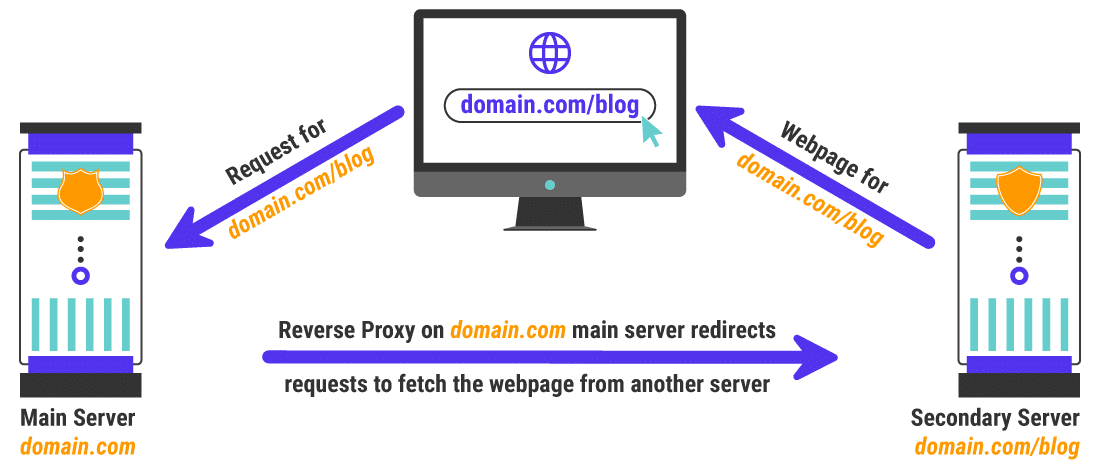
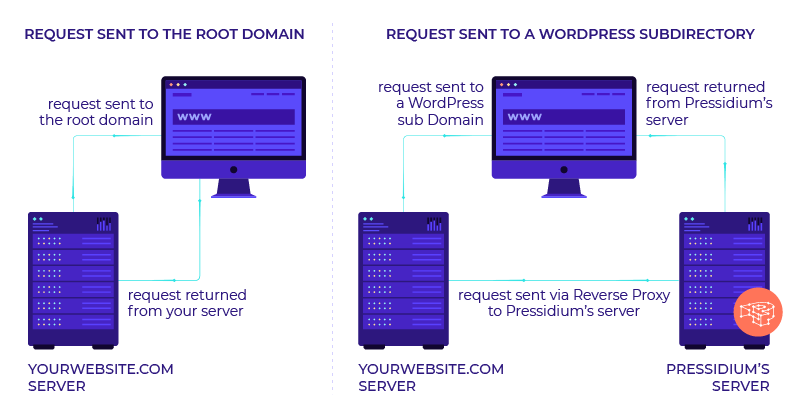
once you set this up it is super easy to keep it running in your entire site will be much faster as a result as well
my response to someone else that needed a subfolder
https://a-moz.groupbuyseo.org/community/q/topic/69528/using-a-reverse-proxy-and-301-redirect-to-appear-sub-domain-as-sub-directory-what-are-the-seo-risksplease also look at it explained by these hosting companies is unbelievable easy to implement compared to how it looks and you can do so with Fastly or cloudflare in a matter of minutes
-
https://servebolt.com/help/article/cloudflare-workers-reverse-proxy/
-
https://support.pagely.com/hc/en-us/articles/213148558-Reverse-Proxy-Setup
-
https://wpengine.com/support/using-a-reverse-proxy-with-wp-engine/
-
https://thoughtbot.com/blog/host-your-blog-under-blog-on-your-www-domain
-
https://crate.io/blog/fastly_traffic_spike
*https://support.fastly.com/hc/en-us/community/posts/4407427792397-Set-a-request-condition-to-redirect-URL -
https://coda.io/@matt-varughese/guide-how-to-reverse-proxy-with-cloudflare-workers
-
https://www.cloudflare.com/learning/cdn/glossary/reverse-proxy/
-
https://gist.github.com/LimeCuda/18b88f7ad9cdf1dccb01b4a6bbe398a6
I hope this was of help
tom
-
-
@nmiletic The content section of the site requires a unique UI Design and other robust functionality, so having a separate theme/plugins in its own directory is going to be the way we go here. Thanks for your assistance!
-
@himalayaninstitute Have you thought about adding a page and making all of this new content a subpage? Or changing your permalink structure to include a category in the URL? You can then add all of these posts under that category and have the URL show up as www.example.com/category/page-or-post-name
-
The website at the subdirectory will be an online learning platform with a blog, online courses, memberships, gated content, etc. The content currently lives on the main site, so, it's great that we can move it into the subdirectory without taking a hit from Google.
Since these are fundamentally two separate websites, we're not concerned about needing to manage them independently.
Thanks again for your input and advice, we greatly appreciate it!
-
@amitydigital said in WordPress Sub-directory for SEO:
Google will view it as one site so you shouldn't have any issues from that perspective. The Google bot is just looking at pages and won't know/care that the underlying CMS that is running some pages is a different install than other pages. The downside is you now have two websites to maintain, two themes, two sets of files, etc... That may result in a bit of a headache in the future.
As @amitydigital put it, the issue with your approach would be repetitive tasks. You will not loose any DA nor PA (being that you implement a correct 301 redirection). What is going to be on the subdirectory?
-
Google will view it as one site so you shouldn't have any issues from that perspective. The Google bot is just looking at pages and won't know/care that the underlying CMS that is running some pages is a different install than other pages. The downside is you now have two websites to maintain, two themes, two sets of files, etc... That may result in a bit of a headache in the future.
Got a burning SEO question?
Subscribe to Moz Pro to gain full access to Q&A, answer questions, and ask your own.
Browse Questions
Explore more categories
-
Moz Tools
Chat with the community about the Moz tools.
-
SEO Tactics
Discuss the SEO process with fellow marketers
-
Community
Discuss industry events, jobs, and news!
-
Digital Marketing
Chat about tactics outside of SEO
-
Research & Trends
Dive into research and trends in the search industry.
-
Support
Connect on product support and feature requests.
Related Questions
-
Unsolved Google URL inspection live test rendering issue.
Hi Everyone, This is my first post on Moz. I have been trying to get this thing sorted and have read everywhere and everyone just says don't worry about it. I would really like some advice/suggestions on this it will be really helpful. When I use the Google URL inspection tool from the Google search console the page rendering is completely broken. The tool refuses to load resources each time. At end of the day that's how the website is rendered in Google cache. I have already tried disabling cache plugins and Cloudflare but nothing works. site - nationalcarparts.co.nz
Support | | caitlinrolex789
This is how it renders when using URL inspection tool -
https://prnt.sc/7XKHtEU01gEl and if you check cache:https://nationalcarparts.co.nz this is how Google is caching it. Plugins I am using - Elementor Version 3.6.1, Elementor Pro Version 3.6.4, Exclusive Addons Elementor Version 2.5.4, Exclusive Addons Elementor Pro Version 1.4.6, WP- rocket, Cloudflare Pro plan with the plugin. Please if someone has fixed this issue and has a possible solution for it. Thanks cacheissue1.PNG1 -
Will critical error in wordpress for memory limit affect seo rankings?
will critical error in wordpress to increase memory limit affect seo rankings?
Intermediate & Advanced SEO | | gamstopbet0 -
Using a Reverse Proxy and 301 redirect to appear Sub Domain as Sub Directory - what are the SEO Risks?
We’re in process to move WordPress blog URLs from subdomains to sub-directory. We aren’t moving blog physically, but using reverse proxy and 301 redirection to do this. Blog subdomain URL is https://blog.example.com/ and destination sub-directory URL is https://www.example.com/blog/ Our main website is e-commerce marketplace which is YMYL site. This is on Windows server. Due to technical reasons, we can’t physically move our WordPress blog to the main website. Following is our Technical Setup Setup a reverse proxy at https://www.example.com/blog/ pointing to https://blog.example.com/ Use a 301 redirection from https://blog.example.com/ to https://www.example.com/blog/ with an exception if a traffic is coming from main WWW domain then it won’t redirect. Thus, we can eliminate infinite loop. Change all absolute URLs to relative URLs on blog Change the sitemap URL from https://blog.example.com/sitemap.xml to https://www.example.com/blog/sitemap.xml and update all URLs mentioned within the sitemap. SEO Risk Evaluation We have individual GA Tracking ID and individual Google Search Console Properties for main website and blog. We will not merge them. Keep them separate as they are. Keeping this in mind, I am evaluating SEO Risks factors Right now when we receive traffic from main website to blog (or vice versa) then it is considered as referral traffic and new cookies are set for Google Analytics. What’s going to happen when its on the same domain? Which type of settings change should I do in Blog’s Google Search Console? (A). Do I need to request “Change of Address” in the Blog’s search console property? (B). Should I re-submit the sitemap? Do I need to re-submit the blog sitemap from the https://www.example.com/ Google Search Console Property? Main website is e-commerce marketplace which is YMYL website, and blog is all about content. So does that impact SEO? Will this dilute SEO link juice or impact on the main website ranking because following are the key SEO Metrices. (A). Main website’s Avg Session Duration is about 10 minutes and bounce rate is around 30% (B). Blog’s Avg Session Duration is 33 seconds and bounce rate is over 92%
Intermediate & Advanced SEO | | joshibhargav_200 -
Gallery maintenance and the effect on SEO
Basically we get a lot of users uploading photos as part of their review, but many photos aren't moderated into our pages and therefore are never displayed. Things like selfies rather than photos of the product or just random google images that are completely unrelated to our products or services. Is there any benefit in cleaning up the gallery since some images we don't use are just sat there in admin?
Intermediate & Advanced SEO | | Fubra
when a page loads, would it be quicker if we had less content in the gallery? With our SEO hat on.
or does it not matter since it's not loading that content (photos) anyway?0 -
SEO for multiple languages [Arabic]
Hello all, I am currently managing a Marketplace that comes in two different languages: English & Arabic. The English website is, fortunately, doing quite well in terms of SEO performances but, not the Arabic one. The website has two kinds of content: Static content: controlled by me. It includes menu items, navigation, static pages etc which is properly translated among the two languages User-uploaded content: It includes ads/news posted by the user which may not be translated to Arabic if they chose not to do it. Now if somebody goes to the Arabic website and check a news item that doesn't have an Arabic translation, it will show the English title. I am assuming, serving content in a different language that is specified in the hreflang is a straight no, right?
Intermediate & Advanced SEO | | MozammilStorat0 -
Does having a different sub domain for your Landing Page and Blog affect your overall SEO benefits and Ranking?
We have a domain www.spintadigital.com that is hosted with dreamhost and we also have a seperate subdomain blog.spintadigital.com which is hosted in the Ghost platform and we are also using Unbounce landing pages with the sub domain get.spintadigital.com. I wanted to know whether having subdomain like this would affect the traffic metric and ineffect affect the SEO and Rankings of our site. I think it does not affect the increase in domain authority, but in places like similar web i get different traffic metrics for the different domains. As far as i can see in many of the metrics these are considered as seperate websites. We are currently concentrating more on our blogs and wanted to make sure that it does help in the overall domain. We do not have the bandwidth to promote three different websites, and hence need the community's help to understand what is the best option to take this forward.
Intermediate & Advanced SEO | | vinodh-spintadigital0 -
Onsite SEO vs Offsite SEO
Hey I know the importance of both onsite & offsite, primarily with regard to outreach/content/social. One thing I am trying to determine at the moment, is how much do I invest in offsite. My current focus is to improve our onpage content on product pages, which is taking some time as we have a small team. But I also know our backlinks need to improve. I'm just struggling on where to spend my time. Finish the onsite stuff by section first, or try to do a bit of both onsite/offsite at the same time?
Intermediate & Advanced SEO | | BeckyKey1