After more than 13 years, and tens of thousands of questions, Moz Q&A closed on 12th December 2024. Whilst we’re not completely removing the content - many posts will still be possible to view - we have locked both new posts and new replies. More details here.
Staging website got indexed by google
-
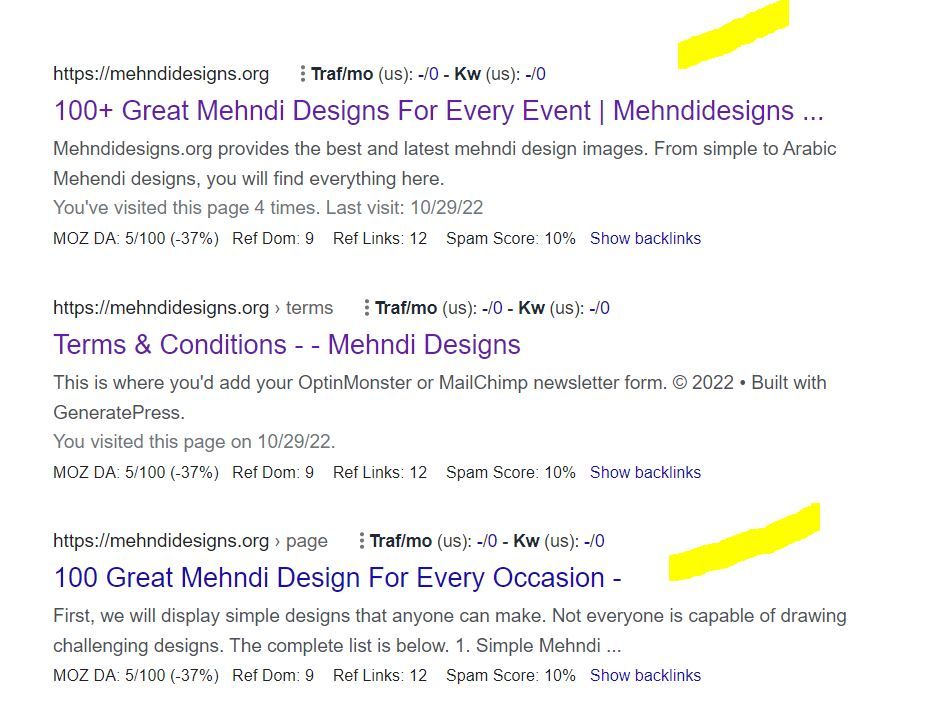
Our staging website got indexed by google and now MOZ is showing all inbound links from staging site, how should i remove those links and make it no index.
Note- we already added Meta NOINDEX in head tag
-
Hi Dera Moz My Domain Is 18 Years Old But Da is don't increased i don't know why can you please help me and check my url cigars please check sir
#mozda
-
Its good that you already put the Meta NOINDEX.
Now, you can ask to remove the url of website from google index. Visit the google search console and request the url removal.

You can use the URL Removal Tool in Google Search Console to request the removal of specific URLs from Google's index.
To use the URL Removal Tool, you can:
- Open the Removals tool.
- Select the Temporary Removals tab.
- Click New Request.
- Select Next to complete the process.
Warm Regards
Rahul Gupta
Suvidit Academy -
Sydney's Best Chauffeur Car Service | A1 Corporate Cars Au
Sydney's Best Chauffeur Car Service is a premier provider of corporate chauffeured cars in Sydney, Australia. We offer top-of [url=https://a1corporatecars.com.au/]corporate cars Australia[/url] transportation solutions for business professionals, executives, and VIP clients who demand the highest service and comfort. With a fleet of luxury vehicles and experienced professional chauffeurs, we ensure a seamless and luxurious travel experience for our esteemed customers.
-
If your staging website has been indexed by Google, it means that Google's web crawlers have discovered and added your staging site's pages to their search index. This is typically not desirable because staging websites are meant for testing and development purposes and often contain incomplete or confidential content.
To address this issue, you can take several steps. Firstly, ensure that your staging website has a "robots.txt" file configured properly. This file tells search engines which parts of your website to crawl and index. In the case of a staging site, you can disallow all web crawlers from indexing it by using a "robots.txt" file.
Another effective measure is to include a "noindex" meta tag in the HTML of your staging website's pages. This tag instructs search engines not to index the page, adding an extra layer of protection.
Consider password-protecting your staging website using HTTP authentication. This adds an additional layer of security and ensures that only authorized users can access the site.
To further mitigate indexing issues, you can set up your staging website on a subdomain or a subdirectory instead of a separate domain. Google is less likely to index staging content if it's located in a subdomain or subdirectory.
If your staging site is already indexed, you can request the removal of specific URLs from Google's index using the Google Search Console's URL Removal Tool. This is a more proactive approach to remove already indexed content.
Lastly, regularly monitor your staging website to ensure it remains hidden from search engines and that any changes to the robots.txt file or meta tags are being followed. It's a good practice to implement these measures before you create or launch a staging website to prevent it from being indexed in the first place.
Remember that it may take some time for Google to update its index and remove your staging site's pages. Be patient and continue to monitor the situation closely to ensure the desired results are achieved.
-
If a staging website (a non-production or testing version) gets indexed by Google, it can lead to privacy, user experience, and SEO issues. To address this, use methods like robots.txt, "noindex" meta tags, or password protection to prevent indexing. If already indexed, request removal through Google Search Console to ensure only the production site is visible in search results.
-
If your staging website has been indexed by Google, it means that Google's search engine has discovered and included your staging site in its search results. This is not an ideal situation since staging websites are usually intended for testing and development purposes, and you may not want them publicly accessible.
To address this issue, you can take a few steps:
Use a robots.txt file: Create a robots.txt file on your staging website and instruct search engines not to index it. This file specifies which areas of your site search engines should or should not crawl.
Add a noindex meta tag: Insert a "noindex" meta tag in the head section of your staging website's HTML. This tag tells search engines not to index that specific page.
Password protect your staging website: Implement password protection on your staging environment to ensure that only authorized users can access it. This can be done through various authentication methods, depending on your setup.
Remember that these steps can help prevent further indexing, but they may not immediately remove your staging site from the search results. It might take some time for search engines to re-crawl your site and recognize the changes you made.
-
If your staging website gets indexed by Google, you should take these steps:
( Atlantic Immigration Pilot Program application form)
Use a robots.txt file to disallow indexing.
Request removal of indexed pages via Google Search Console.
Canada PR
Add a "noindex, nofollow" meta tag to staging pages.
Consider password protecting the staging site.
Ensure canonical URLs point to the production site.
These actions will help prevent your incomplete or sensitive staging content from appearing in Google search results.
Best digital marketing agency -
If your staging website has been indexed by Google, it means that Google's search engine has crawled and added your staging site's pages to its search index. This is typically not desired because staging websites are not meant for public access and may contain incomplete or sensitive content.
To address this issue, you should take the following steps:
Disallow indexing: Use a robots.txt file to instruct search engines not to crawl and index your staging website. You can add the following lines to your robots.txt file to disallow all search engines:
makefile
Copy code
User-agent: *
Disallow: /
Place this robots.txt file in the root directory of your staging website.Remove indexed pages: You can request Google to remove indexed pages from its search results by using the Google Search Console's "Remove URLs" tool. Log in to your Google Search Console account, select your property, go to the "Index" section, and choose "Removals." From there, you can temporarily hide specific URLs from Google search results.
Use noindex meta tags: On your staging website's pages, you can add a meta tag to indicate that the page should not be indexed. Add the following meta tag within the HTML <head> section of each page you want to exclude:
html
Copy code
<meta name="robots" content="noindex, nofollow">
This tag tells search engines not to index the page or follow any links on it.Password protection: Consider adding password protection to your staging website, so only authorized users can access it. This adds an additional layer of security and privacy.
Update canonical URLs: Ensure that your staging website's canonical URLs (if used) point to the production website, not the staging one. This helps search engines understand the preferred version of your content.
After taking these steps, monitor your staging website to ensure it's no longer being indexed by Google. Keep in mind that it may take some time for changes to take effect and for Google to de-index your staging content.
-
@Asmi-Ta said in Staging website got indexed by google:
Our staging website got indexed by google and now MOZ is showing all inbound links from staging site, how should i remove those links and make it no index.
Note- we already added Meta NOINDEX in head tagTo remove indexed staging site links and prevent further indexing, take these steps: Add a "Disallow" rule for the staging site in your
robots.txtfile, use 301 redirects for indexed staging URLs to point to production, update all internal links to production URLs, request URL removals through Google Search Console's "Fetch as Google" and URL Removal Tool, submit an updated production sitemap, and monitor Google Search Console for updates. Be patient, as it may take time for search engines to de-index staging URLs and re-crawl your site. Ensure the staging site has a "noindex" tag in its<head>section.






Explore more categories
-
Chat with the community about the Moz tools.
-
Discuss the SEO process with fellow marketers
-
Discuss industry events, jobs, and news!
-
Chat about tactics outside of SEO
-
Dive into research and trends in the search industry.
-
Support
Connect on product support and feature requests.
-
-
 118959
-
 04493
04493
-
 06584
06584
-
 04382
04382
-
 071.8k
-
 031.4k
-
 021.3k
-
 052.0k