Last Updated: March 2024
This may sound obvious, but before you can start digging into an SEO competitor analysis, you need to know who your SEO competitors actually are. You may think you know, but until you dive into the data, it's not always apparent.
Enter your target keyword in Google
Export the results to a spreadsheet
Identify which domains are ranking
To get more accurate results for a topic, repeat steps 1-3 for three to five keywords per cluster
Combine the results into one spreadsheet
Calculate which domains appear in which positions and the most frequently
You’ll need to repeat the above steps for every product, service, and content topic on your website.
Phew, talk about exhausting!
This process is laborious and really only possible if you rank for a handful of keywords. But realistically, most sites rank for far more. What about hundreds of keywords, thousands, or tens of thousands? The most popular sites on the web can even rank for millions of keyword phrases! Checking rankings by hand becomes a cumbersome - and often inaccurate - process.
To make your life easier, various SEO tool solutions can automatically look at all of the keywords you rank for in their databases, and accurately tell you who your true search competitors are.
Beware of guessing!
Your true search rivals aren't who you think they are. Learn how to find (and outrank) them in our SEO Accelerator webinar. Zero fluff, all strategy.
Find competing sites in 3 steps
Your SEO competitors are brands that are organically ranking in the top spots for your target keywords. Moz's True Competitor tool makes identifying your competitors and simple and quick task:
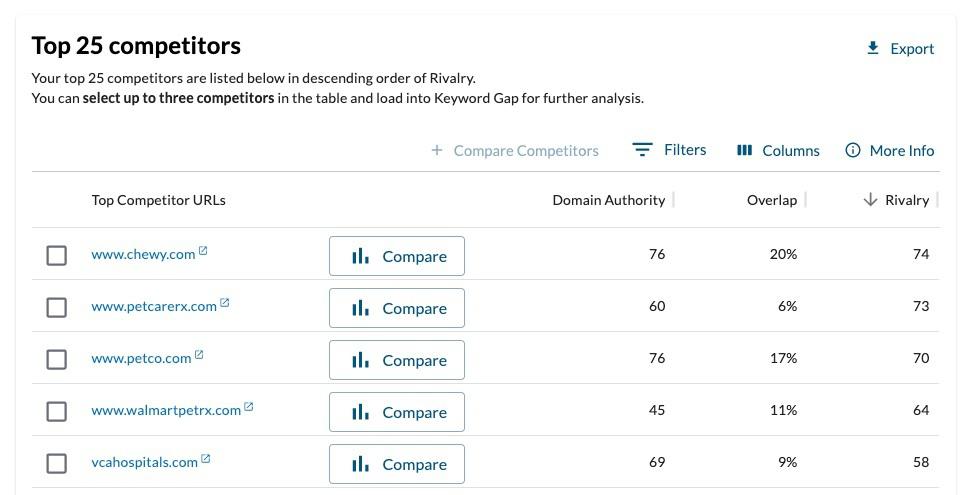
1. Enter your domain or subdomain in True Competitor. You’ll see a list of your top 25 competitors:
2. Analyze your competitors’ metrics:
Domain Authority® (DA) is a score, on a scale of 1-100, that predicts how likely a website is to rank in the SERPs based on data from our Link Explorer web index.
Overlap is the percentage of keywords we analyzed that you share with a given competitor. (Both of you ranked in the top 10.)
Rivalry is on a scale of 1-100, and it combines your DA, your competitor’s DA, keyword overlap, keyword volume, and your rankings to give you one powerful way of identifying your competitors. The higher the Rivalry score, the bigger the rival.
Identify your competitors in seconds!
With Moz Pro, you can identify your top 25 competitors with the click of a button.

Do you already know who your competitors are? That doesn’t mean you should skip this step! This tool can also validate your own competitor choices. If you have competitors in mind, run your site through this tool and see what comes up. It's crucial to have metrics that substantiate your assumptions.
Don’t forget: In the SEO Competitor Analysis Template, add your competitors to the True Competitors tab.
How to Find Your SEO Competitors - Whiteboard Friday
How do you know who your true search competitors are? Check out this Whiteboard Friday for Lidia Infante's top-down and bottom-up approaches for identifying your competitors.
Explore your brand’s diverse verticals
Oftentimes, a brand’s offering covers a wide span of products, services, and content. This can result in your competitors differing across the various verticals. You may find your competitors differ due to:
A diverse group of products
Multiple service categories
A wide range of content topics
Seasonal products
Local aspects of your business
Various customer personas you serve
One practical way to think about it is this: if the content on your website is organized by subfolders or subdomains, there’s a chance that each subfolder has a different set of competitors. Let’s take a look at an example. PetSmart, a pet product retailer, offers a range of products for different animals, various in-store services, and a blog where they regularly post informational articles.
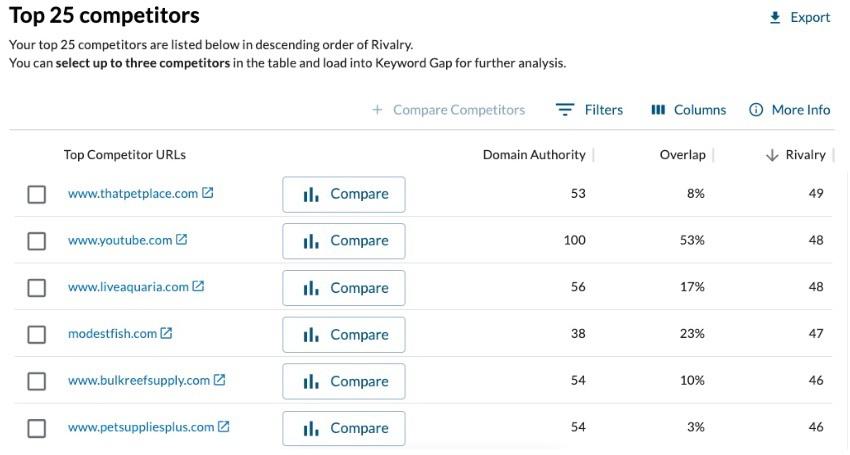
We can search for a wide span of competitors in the True Competitor tool:
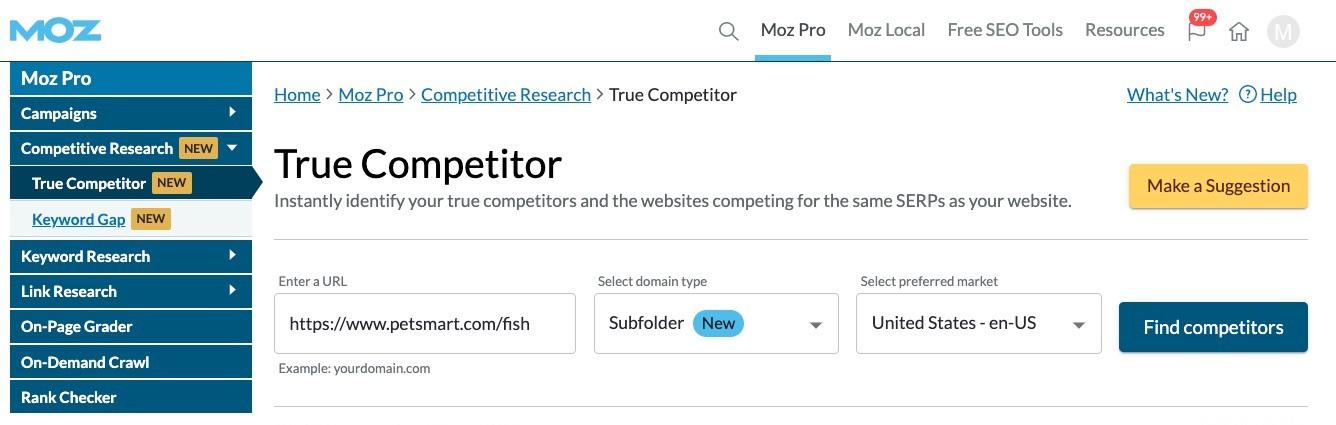
1. Enter your subfolder or subdomain. In this example, I’ve entered PetSmart’s Fish product subfolder (petsmart.com/fish), and selected Subfolder from the dropdown menu.
2. For the sake of comparison, let’s look at another PetSmart vertical. I’ve entered PetSmart’s Bird product subfolder (petsmart.com/bird), and selected Subfolder from the dropdown menu. Scroll down, and we can see a list of competitors in this pet bird vertical:
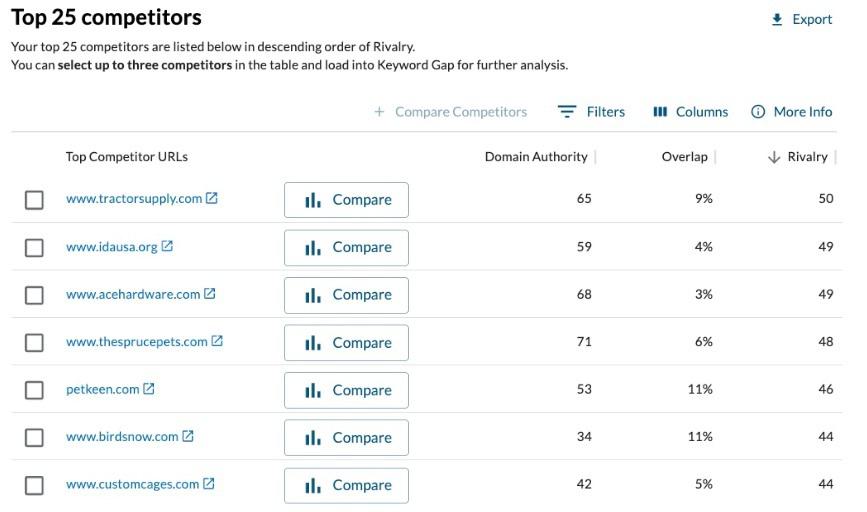
We could keep going with PetSmart’s dog, cat, and reptile subfolders, as well as their dog training and veterinary service subfolders. Additionally, petsmart.com publishes advice on their blog - such as the best dog food for small breeds - which means they’re competing with magazine and informational sites like nymag.com and akc.org.
You’ve now discovered a whole new way to think about your SEO competitors!