• BBgmoro

        See all notifications

        Skip to content
        Moz logo Menu open Menu close
        • Products
          • Moz Pro
          • Moz Pro Home
          • Moz Local
          • Moz Local Home
          • STAT
          • Moz API
          • Moz API Home
          • Compare SEO Products
          • Moz Data
        • Free SEO Tools
          • Domain Analysis
          • Keyword Explorer
          • Link Explorer
          • Competitive Research
          • MozBar
          • More Free SEO Tools
        • Learn SEO
          • Beginner's Guide to SEO
          • SEO Learning Center
          • Moz Academy
          • MozCon
          • Webinars, Whitepapers, & Guides
        • Blog
        • Why Moz
          • Digital Marketers
          • Agency Solutions
          • Enterprise Solutions
          • Small Business Solutions
          • The Moz Story
          • New Releases
        • Log in
        • Log out
        • Products
          • Moz Pro

            Your all-in-one suite of SEO essentials.

          • Moz Local

            Raise your local SEO visibility with complete local SEO management.

          • STAT

            SERP tracking and analytics for enterprise SEO experts.

          • Moz API

            Power your SEO with our index of over 44 trillion links.

          • Compare SEO Products

            See which Moz SEO solution best meets your business needs.

          • Moz Data

            Power your SEO strategy & AI models with custom data solutions.

          Turn SEO data into actionable content briefs

          Turn SEO data into actionable content briefs

          Learn more
        • Free SEO Tools
          • Domain Analysis

            Get top competitive SEO metrics like DA, top pages and more.

          • Keyword Explorer

            Find traffic-driving keywords with our 1.25 billion+ keyword index.

          • Link Explorer

            Explore over 40 trillion links for powerful backlink data.

          • Competitive Research

            Uncover valuable insights on your organic search competitors.

          • MozBar

            See top SEO metrics for free as you browse the web.

          • More Free SEO Tools

            Explore all the free SEO tools Moz has to offer.

          Let your business shine with Listings AI

          Let your business shine with Listings AI

          Get found
        • Learn SEO
          • Beginner's Guide to SEO

            The #1 most popular introduction to SEO, trusted by millions.

          • SEO Learning Center

            Broaden your knowledge with SEO resources for all skill levels.

          • On-Demand Webinars

            Learn modern SEO best practices from industry experts.

          • How-To Guides

            Step-by-step guides to search success from the authority on SEO.

          • Moz Academy

            Upskill and get certified with on-demand courses & certifications.

          • MozCon

            Save on Early Bird tickets and join us in London or New York City

          Access 20 years of data with flexible pricing
          Moz API

          Access 20 years of data with flexible pricing

          Find your plan
        • Blog
        • Why Moz
          • Digital Marketers

            Simplify SEO tasks to save time and grow your traffic.

          • Small Business Solutions

            Uncover insights to make smarter marketing decisions in less time.

          • Agency Solutions

            Earn & keep valuable clients with unparalleled data & insights.

          • Enterprise Solutions

            Gain a competitive edge in the ever-changing world of search.

          • The Moz Story

            Moz was the first & remains the most trusted SEO company.

          • New Releases

            Get the scoop on the latest and greatest from Moz.

          Surface actionable competitive intel
          New Feature

          Surface actionable competitive intel

          Learn More
        • Log in
          • Moz Pro
          • Moz Local
          • Moz Local Dashboard
          • Moz API
          • Moz API Dashboard
          • Moz Academy
        • Avatar
          • Moz Home
          • Notifications
          • Account & Billing
          • Manage Users
          • Community Profile
          • My Q&A
          • My Videos
          • Log Out

        The Moz Q&A Forum

        • Forum
        • Questions
        • My Q&A
        • Users
        • Ask the Community

        Welcome to the Q&A Forum

        Browse the forum for helpful insights and fresh discussions about all things SEO.

        1. Home
        2. SEO Tactics
        3. Technical SEO
        4. MBG Tracker...how to use it?

        Moz Q&A is closed.

        After more than 13 years, and tens of thousands of questions, Moz Q&A closed on 12th December 2024. Whilst we’re not completely removing the content - many posts will still be possible to view - we have locked both new posts and new replies. More details here.

        MBG Tracker...how to use it?

        Technical SEO
        4
        5
        1452
        Loading More Posts
        • Watching

          Notify me of new replies.
          Show question in unread.

        • Not Watching

          Do not notify me of new replies.
          Show question in unread if category is not ignored.

        • Ignoring

          Do not notify me of new replies.
          Do not show question in unread.

        • Oldest to Newest
        • Newest to Oldest
        • Most Votes
        Reply
        • Reply as question
        Locked
        This topic has been deleted. Only users with question management privileges can see it.
        • Stroll
          Stroll last edited by

          So I am a new blogger that has been submitting guest blog posts to a number of different blogs. It was recommended that I use the MBG Tracker so I can track the back links. The problem is that I am totally lost on how to use this tool. As I said before I am new to this whole thing and I am not really sure what constitutes a "base link" and a "back link." In the author bylines we are linking to different pages within a larger website. If anyone can help me I would really appreciate it!

          1 Reply Last reply Reply Quote 0
          • KeriMorgret
            KeriMorgret @AnnSmarty last edited by

            Thanks for the reply Ann! David, SEOmoz and MyBlogGuest are different products, you'll probably find the best help for MBG talking with Ann or using her support forums.

            1 Reply Last reply Reply Quote 0
            • AnnSmarty
              AnnSmarty last edited by

              Let me try to be very clear. Please email if you have more questions (I got both of your emails, so feel free to use the email)

              When guest blogging, are you promoting ONE site in your byline in each of the guest posts? There can be different pages from one site, but one and the same domain.

              For example:

              • Project name: SEOmoz
              • Base domain: seomoz.org

              Then when you decide to upload this page, for example: http://www.geekwire.com/2012/seomoz-secret-startup-success-rand-fishkins-tips/ - the tracker will automatically identify the backlink to track - http://www.seomoz.org/dp/seattle-startup-marketing - because it has seomoz.org base domain.

              By providing the base domain, you make your own job easier because you don't have to manually provide the tool with the backlink to track!

              KeriMorgret 1 Reply Last reply Reply Quote 1
              • Stroll
                Stroll @Mark_Jay_Apsey_Jr. last edited by

                So the base link would be the link to the blog post and the back link is the link that goes back to my site? Is this correct? I had seen the site that you suggested but like I said I was confused by the base link and the back link.

                1 Reply Last reply Reply Quote 0
                • Mark_Jay_Apsey_Jr.
                  Mark_Jay_Apsey_Jr. last edited by

                  Base link is a normal submission with a link. Back link has more value with guest blogging.

                  HOW DOES THE BACKLINK MONITORING TOOL WORK?

                  This is the cheapest and simplest alternative I am aware of:

                  • Receive instant emails if any of your links were removed or nofollowed;
                  • Track your guest post social popularity (Likes and Tweets)
                  • Measure traffic from each of your guest posts (for that you’ll need to install a tracking code)
                  • Identify most efficient backlink sources (for example, to find places where you canguest post again).
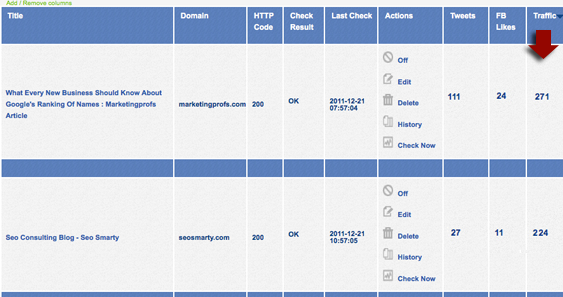
                  backlink tracker 02 Meet MBG Tracker: The Simplest and Cheapest Way to Monitor Your Backlinks

                  To start tracking your guest posts or links, you’ll need to create a new project and specify your base URL. For all pages you add within one project, this very base URL will be monitored automatically (even if you don’t specify which link within a given page you want to track).

                  You can add / remove columns from the table (to adjust a clearer view) and sort by each column. You will also receive weekly summaries of your missing links and most popular link sources.

                  Handy url for more info.....   http://www.seosmarty.com/meet-mbg-tracker-the-simplest-and-cheapest-way-to-monitor-your-backlinks/


                  Stroll 1 Reply Last reply Reply Quote 1
                  • 1 / 1
                  • First post
                    Last post

                  Browse Questions

                  Explore more categories

                  • Moz Tools

                    Chat with the community about the Moz tools.

                  • SEO Tactics

                    Discuss the SEO process with fellow marketers

                  • Community

                    Discuss industry events, jobs, and news!

                  • Digital Marketing

                    Chat about tactics outside of SEO

                  • Research & Trends

                    Dive into research and trends in the search industry.

                  • Support

                    Connect on product support and feature requests.

                  • See all categories

                  Related Questions

                  • andrewddc

                    Does the use of a unicode character high up on page adversely affect SEO?

                    I work for a company in the travel industry and we are currently in the process of building out a 360-degree video landing page to inspire travel to our destination. There is some desire from individuals on my team to use the unicode degree symbol ( ° ) after 360 to ensure clarity. We currently have the ° symbol in the Page Title and H1 tag. Does the use of a unicode character adversely affect SEO? Our concern is that it is very unlikely that people are searching for 360-degree videos using the unicode symbol. We also have it fully written out as well. Just want to make sure we won't get dinged for this. Thanks!

                    Technical SEO | | andrewddc
                    1
                  • MattWatts

                    Can you use multiple videos without sacrificing load times?

                    We're using a lot of videos on our new website (www.4com.co.uk), but our immediate discovery has been that this has a negative impact on load times. We use a third party (Vidyard) to host our videos but we also tried YouTube and didn't see any difference. I was wondering if there's a way of using multiple videos without seeing this load speed issue or whether we just need to go with a different approach. Thanks all, appreciate any guidance! Matt

                    Technical SEO | | MattWatts
                    1
                  • Dan-Lawrence

                    Custom hreflang tags in WP & using with Yoast

                    Hi My clients dev has added custom fields for adding hreflang tags to head of pages such as: "Rel Type", "The URL", and "Language Code" Am i right in thinking that until a different language/country version of the site is created these can remain empty or should they still be populated once added say with some sort of global reference or best left blank since will leave the head content global by default ? Also how important is it to add charset to the language code ? since seems optional ? Also this set up is on WP multi-site with Yoast and devs asked me the below: _One thing to note is that Yoast generates its own "canonical" tags - so if _
                    _you are going to use hreflang tags and canonical tags then you don't need to _
                    _add a canonical using the custom fields I have set up - Yoast has that _
                    sorted. _But if you are going down the route of NOT having any canonical tags - and _
                    _using a x-defult for the hreflang tags, I will need to try and suppress the _
                    _Yoast canonical tag so you can do this. Much depends on your approach and _
                    what you think is best. So how do i know if using canonicals or x-default, i take it best simplest to leverage Yoast and hence not add canonicals to custom fields ? Isnt x-default just for indicating language selectors/redirector not specific to 1 region? So long as havnt got those then good to proceed with Yoasts generated canonicals ? Cheers dan

                    Technical SEO | | Dan-Lawrence
                    0
                  • Seiyav

                    What are the potential SEO downsides of using a service like unbounce for content pages?

                    I'm thinking of using unbounce.com to create some content driven pages. Unbounce is simple, easy-to-use, and very easy for non-devs at my company to create variations on pages. I know they allow adding meta descriptions, title tags, etc and allow it to be indexable by Google, but I was wondering if there were any potential downsides to using unbounce as opposed to hosting it myself. Any help would be appreciated!

                    Technical SEO | | Seiyav
                    0
                  • AndreVanKets

                    OK to block /js/ folder using robots.txt?

                    I know Matt Cutts suggestions we allow bots to crawl css and javascript folders (http://www.youtube.com/watch?v=PNEipHjsEPU) But what if you have lots and lots of JS and you dont want to waste precious crawl resources? Also, as we update and improve the javascript on our site, we iterate the version number ?v=1.1... 1.2... 1.3... etc. And the legacy versions show up in Google Webmaster Tools as 404s. For example: http://www.discoverafrica.com/js/global_functions.js?v=1.1
                    http://www.discoverafrica.com/js/jquery.cookie.js?v=1.1
                    http://www.discoverafrica.com/js/global.js?v=1.2
                    http://www.discoverafrica.com/js/jquery.validate.min.js?v=1.1
                    http://www.discoverafrica.com/js/json2.js?v=1.1 Wouldn't it just be easier to prevent Googlebot from crawling the js folder altogether? Isn't that what robots.txt was made for? Just to be clear - we are NOT doing any sneaky redirects or other dodgy javascript hacks. We're just trying to power our content and UX elegantly with javascript. What do you guys say: Obey Matt? Or run the javascript gauntlet?

                    Technical SEO | | AndreVanKets
                    0
                  • SoftzSolutions

                    How Can I Block Archive Pages in Blogger when I am not using classic/default template

                    Hi, I am trying to block all the archive pages of my blog as Google is indexing them. This could lead to duplicate content issue. I am not using default blogger theme or classic theme and therefore, I cannot use this code therein: Please suggest me how I can instruct Google not to index archive pages of my blog? Looking for quick response.

                    Technical SEO | | SoftzSolutions
                    0
                  • James77

                    Is using a Href in Div OK?

                    Hi, I was just wondering what your thoughts are on using a Href in a Div, which contains anchor text. We currently use the Href on the div, as opposed to just the anchor text as I want the whole div to be clickable as opposed to just the anchor text. So currently I have: Keword 1
                    Keyword 2 Is this perfectly fine to do it like this as opposed to using <a tags="" ???<br="">I suppose there are various alternatives - if you must use the</a><a tag="" like:<="" p=""></a> <a tag="" like:<="" p=""></a> Keword 1
                    Keyword 2 However I would assume a search engine is smart enought to know its the same thing??? Thanks

                    Technical SEO | | James77
                    0
                  • elephantseo

                    What tool do you use to check for URLs not indexed?

                    What is your favorite tool for getting a report of URLs that are not cached/indexed in Google & Bing for an entire site? Basically I want a list of URLs not cached in Google and a seperate list for Bing. Thanks, Mark

                    Technical SEO | | elephantseo
                    3

                  Get started with Moz Pro!

                  Unlock the power of advanced SEO tools and data-driven insights.

                  Start my free trial
                  Products
                  • Moz Pro
                  • Moz Local
                  • Moz API
                  • Moz Data
                  • STAT
                  • Product Updates
                  Moz Solutions
                  • SMB Solutions
                  • Agency Solutions
                  • Enterprise Solutions
                  • Digital Marketers
                  Free SEO Tools
                  • Domain Authority Checker
                  • Link Explorer
                  • Keyword Explorer
                  • Competitive Research
                  • Brand Authority Checker
                  • Local Citation Checker
                  • MozBar Extension
                  • MozCast
                  Resources
                  • Blog
                  • SEO Learning Center
                  • Help Hub
                  • Beginner's Guide to SEO
                  • How-to Guides
                  • Moz Academy
                  • API Docs
                  About Moz
                  • About
                  • Team
                  • Careers
                  • Contact
                  Why Moz
                  • Case Studies
                  • Testimonials
                  Get Involved
                  • Become an Affiliate
                  • MozCon
                  • Webinars
                  • Practical Marketer Series
                  • MozPod
                  Connect with us

                  Contact the Help team

                  Join our newsletter
                  Moz logo
                  © 2021 - 2026 SEOMoz, Inc., a Ziff Davis company. All rights reserved. Moz is a registered trademark of SEOMoz, Inc.
                  • Accessibility
                  • Terms of Use
                  • Privacy

                  Looks like your connection to Moz was lost, please wait while we try to reconnect.