Moz Q&A is closed.
After more than 13 years, and tens of thousands of questions, Moz Q&A closed on 12th December 2024. Whilst we’re not completely removing the content - many posts will still be possible to view - we have locked both new posts and new replies. More details here.
Should I "no-index" two exact pages on Google results?
-
Hello everyone,
I recently started a new wordpress website and created a static homepage.
I noticed that on Google search results, there are two different URLs landing on same content page.
I've attached an image to explain what I saw.
Should I "no-index" the page url?
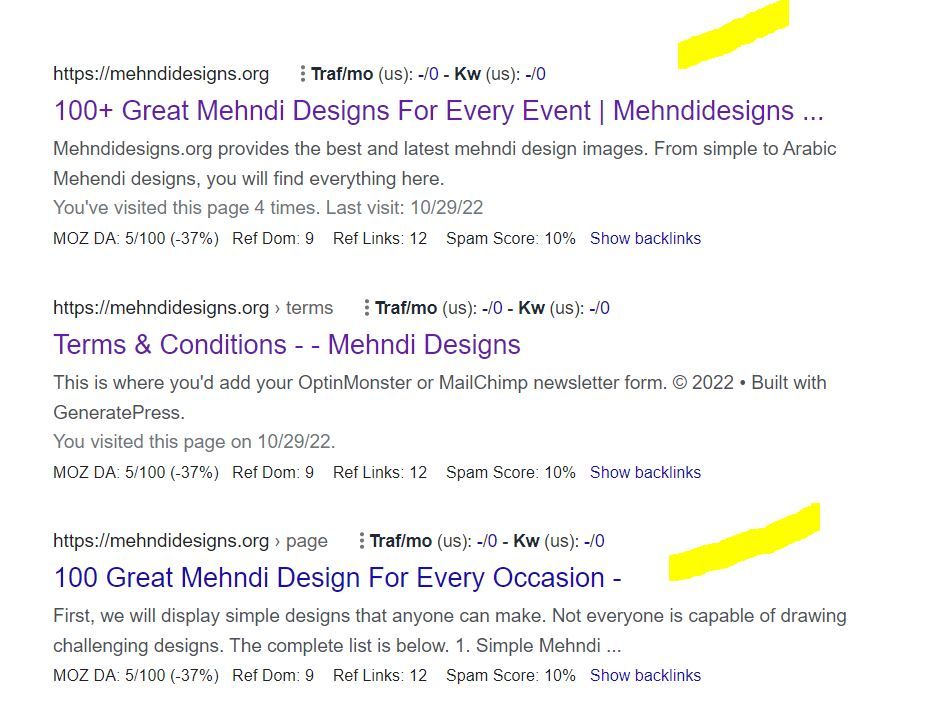
In this picture, the first result is the homepage and I try to rank for that page. The last result is landing on same content with different URL.
So, should I no-index last result as shown in image?
-
In any SEO plugin, you can go to edit the secondary article and in canonical URL you put the link to the home page.
-
@amanda5964 You can use canonical meta tag to tell google that those are the exact same pages. Google will index one of them which google choose best for the SERP.
-
Hi @amanda5964 actually could I ask if there is a reason for having these identical pages? You might want to consider simply combining the pages - i.e. deleting your sub page and redirecting to home if the content is identical.
-
I would not no-index. Typically it is more effective to use a canonical link from the secondary content to the main page you want the traffic directed to.
Got a burning SEO question?
Subscribe to Moz Pro to gain full access to Q&A, answer questions, and ask your own.
Browse Questions
Explore more categories
-
Moz Tools
Chat with the community about the Moz tools.
-
SEO Tactics
Discuss the SEO process with fellow marketers
-
Community
Discuss industry events, jobs, and news!
-
Digital Marketing
Chat about tactics outside of SEO
-
Research & Trends
Dive into research and trends in the search industry.
-
Support
Connect on product support and feature requests.
Related Questions
-
Shopify SEO - Double Filter Pages
Hi Experts, Single filter page: /collections/dining-chairs/black
Technical SEO | | williamhuynh
-- currently, canonical the same: /collections/dining-chairs/black
-- currently, index, follow Double filter page: /collections/dining-chairs/black+fabric
-- currently, canonical the same: /collections/dining-chairs/black+fabric
-- currently, noindex, follow My question is about double filter page above:
if noindexing is the better option OR should I change the canonical to /collections/dining-chairs/black Thank you0 -
Looking for an SEO expert.
We have been struggling with SEO for a while now. We are looking for an expert who can help us on the journey? Any leads?
Jobs and Opportunities | | Matthew.wainaina1 -
Page Title Displaying Wrong Company Name in Google Search Results
Currently, in some of our keyword search results, the wrong company name is showing up in the page title. We are a family of companies that all provide different modes of transportation. When we search up "Herc Air Charters" in Google Search Engine, the wrong operating company shows up in the page title (see screenshot, second result: "Lynden Transport" is our trucking company, and does not offer any air charter, this should say "Lynden Air Cargo"). Google decides what is best to put in these titles, so what would be the best way to ensure the correct company name is being displayed? Google Search Issue.PNG
Community | | RyanD.0 -
Pages are Indexed but not Cached by Google. Why?
Hello, We have magento 2 extensions website mageants.com since 1 years google every 15 days cached my all pages but suddenly last 15 days my websites pages not cached by google showing me 404 error so go search console check error but din't find any error so I have cached manually fetch and render but still most of pages have same 404 error example page : - https://www.mageants.com/free-gift-for-magento-2.html error :- http://webcache.googleusercontent.com/search?q=cache%3Ahttps%3A%2F%2Fwww.mageants.com%2Ffree-gift-for-magento-2.html&rlz=1C1CHBD_enIN803IN804&oq=cache%3Ahttps%3A%2F%2Fwww.mageants.com%2Ffree-gift-for-magento-2.html&aqs=chrome..69i57j69i58.1569j0j4&sourceid=chrome&ie=UTF-8 so have any one solutions for this issues
Technical SEO | | vikrantrathore0 -
What is the difference between "Referring Pages" and "Total Backlinks" [on Ahrefs]?
I always thought they were essentially the same thing myself but appears there may be a difference? Any one care to help me out? Cheers!
Technical SEO | | Webrevolve0 -
Unnecessary pages getting indexed in Google for my blog
I have a blog dapazze.com and I am suffering from a problem for a long time. I found out that Google have indexed hundreds of replytocom links and images attachment pages for my blog. I had to remove these pages manually using the URL removal tool. I had used "Disallow: ?replytocom" in my robots.txt, but Google disobeyed it. After that, I removed the parameter from my blog completely using the SEO by Yoast plugin. But now I see that Google has again started indexing these links even after they are not present in my blog (I use #comment). Google have also indexed many of my admin and plugin pages, whereas they are disallowed in my robots.txt file. Have a look at my robots.txt file here: http://dapazze.com/robots.txt Please help me out to solve this problem permanently?
Technical SEO | | rahulchowdhury0 -
How to block "print" pages from indexing
I have a fairly large FAQ section and every article has a "print" button. Unfortunately, this is creating a page for every article which is muddying up the index - especially on my own site using Google Custom Search. Can you recommend a way to block this from happening? Example Article: http://www.knottyboy.com/lore/idx.php/11/183/Maintenance-of-Mature-Locks-6-months-/article/How-do-I-get-sand-out-of-my-dreads.html Example "Print" page: http://www.knottyboy.com/lore/article.php?id=052&action=print
Technical SEO | | dreadmichael0