Moz Q&A is closed.
After more than 13 years, and tens of thousands of questions, Moz Q&A closed on 12th December 2024. Whilst we’re not completely removing the content - many posts will still be possible to view - we have locked both new posts and new replies. More details here.
Sudden Drop in Mobile Core Web Vitals
-

For some reason, after all URLs being previously classified as Good, our Mobile Web Vitals report suddenly shifted to the above, and it doesn't correspond with any site changes on our end.
Has anyone else experience something similar or have any idea what might have caused such a shift?
Curiously I'm not seeing a drop in session duration, conversion rate etc. for mobile traffic despite the seemingly sudden change.
-
I can’t understand their algorithm for core web vitals. I have made some technical updates to our website for speed optimization, but the thing that happened in the search console is very confusing for my site.
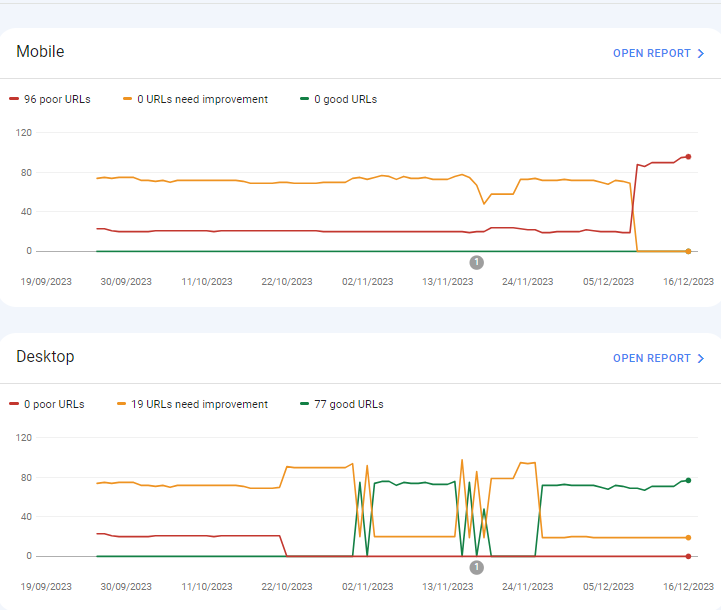
For desktops, pages are indexed as good URLs
while mobile-indexed URLs are displayed as poor URLs.
Our website is the collective material for people looking for Canada immigration (PAIC), and 70% of the portion is filled with text only. We are using webp images for optimization, still it is not passing Core Web Vitals.I am looking forward to the expert’s suggestion to overcome this problem.
-
I can’t understand their algorithm for core web vitals. I have made some technical updates to our website for speed optimization, but the thing that happened in the search console is very confusing for my site.
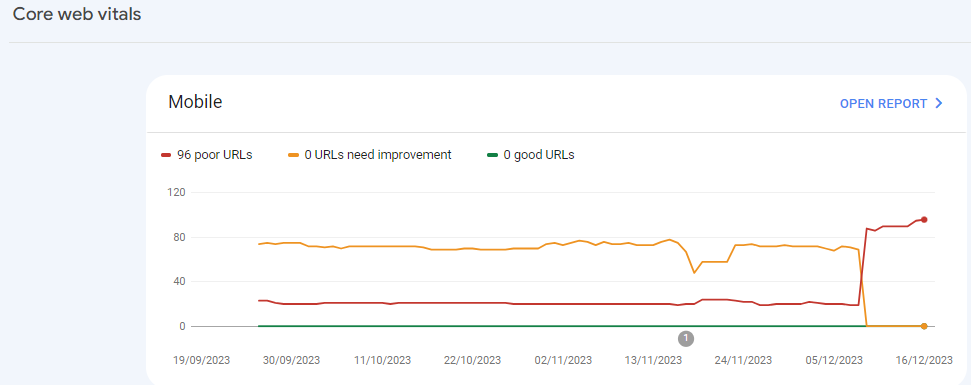
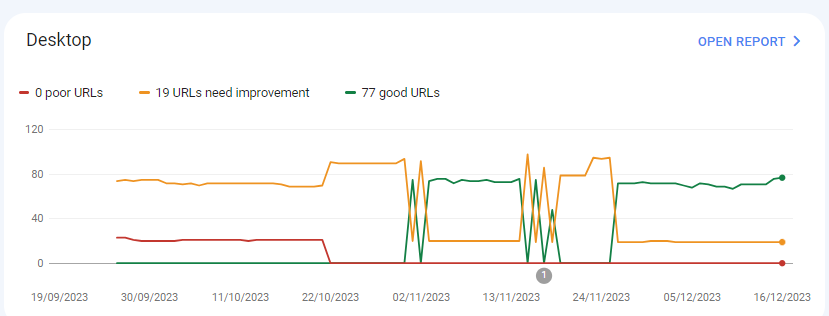
For desktops, pages are indexed as good URLs
while mobile-indexed URLs are displayed as poor URLs.
Our website is the collective material for people looking for Canadian immigration (PAIC), and 70% of the portion is filled with text only. We are using webp images for optimization, still it is not passing Core Web Vitals.I am looking forward to the expert’s suggestion to overcome this problem.
-
@rwat Hi, did you find a solution?
-
Yes, I am also experiencing the same for one of my websites, but most of them are blog posts and I am using a lot of images without proper optimization, so that could be the reason. but not sure.
It is also quite possible that Google maybe adding some more parameters to their main web critical score.
Got a burning SEO question?
Subscribe to Moz Pro to gain full access to Q&A, answer questions, and ask your own.
Browse Questions
Explore more categories
-
Moz Tools
Chat with the community about the Moz tools.
-
SEO Tactics
Discuss the SEO process with fellow marketers
-
Community
Discuss industry events, jobs, and news!
-
Digital Marketing
Chat about tactics outside of SEO
-
Research & Trends
Dive into research and trends in the search industry.
-
Support
Connect on product support and feature requests.
Related Questions
-
How to Boost Your WordPress Website Speed to 95+ (Without Premium Plugins)
I'm reaching out for some advice on improving my WordPress website's speed. I'm currently using a free theme for this fusion magazine and aiming for a score of 95+ on Google PageSpeed Insights. I'm aware that premium plugins can significantly enhance performance, but I'm hoping to achieve similar results using primarily free solutions and manual optimizations.
Technical SEO | | mohammadrehanseo0 -
Unsolved Why My site pages getting video index viewport issue?
Hello, I have been publishing a good number of blogs on my site Flooring Flow. Though, there's been an error of the video viewport on some of my articles. I have tried fixing it but the error is still showing in Google Search Console. Can anyone help me fix it out?
Technical SEO | | mitty270 -
Unsolved IP Address Indexed on Google along with Domain
My website is showing/indexed on Google search results twice, with IP address and domain name
Other SEO Tools | | mupetra
I'm using AWS LightSail
I don't know how to fix this, beside I'm afraid this duplicate can harm my website0 -
Solved How to solve orphan pages on a job board
Working on a website that has a job board, and over 4000 active job ads. All of these ads are listed on a single "job board" page, and don’t obviously all load at the same time. They are not linked to from anywhere else, so all tools are listing all of these job ad pages as orphans. How much of a red flag are these orphan pages? Do sites like Indeed have this same issue? Their job ads are completely dynamic, how are these pages then indexed? We use Google’s Search API to handle any expired jobs, so they are not the issue. It’s the active, but orphaned pages we are looking to solve. The site is hosted on WordPress. What is the best way to solve this issue? Just create a job category page and link to each individual job ad from there? Any simpler and perhaps more obvious solutions? What does the website structure need to be like for the problem to be solved? Would appreciate any advice you can share!
Reporting & Analytics | | Michael_M2 -
Sudden Indexation of "Index of /wp-content/uploads/"
Hi all, I have suddenly noticed a massive jump in indexed pages. After performing a "site:" search, it was revealed that the sudden jump was due to the indexation of many pages beginning with the serp title "Index of /wp-content/uploads/" for many uploaded pieces of content & plugins. This has appeared approximately one month after switching to https. I have also noticed a decline in Bing rankings. Does anyone know what is causing/how to fix this? To be clear, these pages are **not **normal /wp-content/uploads/ but rather "index of" pages, being included in Google. Thank you.
Technical SEO | | Tom3_150 -
Why has my search traffic suddenly tanked?
On 6 June, Google search traffic to my Wordpress travel blog http://www.travelnasia.com tanked completely. There are no warnings or indicators in Webmaster Tools that suggest why this happened. Traffic from search has remained at zero since 6 June and shows no sign of recovering. Two things happened on or around 6 June. (1) I dropped my premium theme which was proving to be not mobile friendly and replaced it with the ColorMag theme which is responsive. (2) I relocated off my previous hosting service which was showing long server lag times to a faster host. Both of these should have improved my search performance, not tanked it. There were some problems with the relocation to the new web host which resulted in a lot of "out of memory" errors on the website for 3-4 days. The allowed memory was simply not enough for the complexity of the site and the volume of traffic. After a few days of trying to resolve these problems, I moved the site to another web host which allows more PHP memory and the site now appears reliably accessible for both desktop and mobile. But my search traffic has not recovered. I am wondering if in all of this I've done something that Google considers to be a cardinal sin and I can't see it. The clues I'm seeing include: Moz Pro was unable to crawl my site last Friday. It seems like every URL it tried to crawl was of the form http://www.travelnasia.com/wp-login.php?action=jetpack-sso&redirect_to=http://www.travelnasia.com/blog/bangkok-skytrain-bts-mrt-lines which resulted in a 500 status error. I don't know why this happened but I have disabled the Jetpack login function completely, just in case it's the problem. GWT tells me that some of my resource files are not accessible by GoogleBot due to my robots.txt file denying access to /wp-content/plugins/. I have removed this restriction after reading the latest advice from Yoast but I still can't get GWT to fetch and render my posts without some resource errors. On 6 June I see in Structured Data of GWT that "items" went from 319 to 1478 and "items with errors" went from 5 to 214. There seems to be a problem with both hatom and hcard microformats but when I look at the source code they seem to be OK. What I can see in GWT is that each hcard has a node called "n [n]" which is empty and Google is generating a warning about this. I see that this is because the author vcard URL class now says "url fn n" but I don't see why it says this or how to fix it. I also don't see that this would cause my search traffic to tank completely. I wonder if anyone can see something I'm missing on the site. Why would Google completely deny search traffic to my site all of a sudden without notifying any kind of penalty? Note that I have NOT changed the content of the site in any significant way. And even if I did, it's unlikely to result in a complete denial of traffic without some kind of warning.
Technical SEO | | Gavin.Atkinson1 -
Web config redirects not working where a trailing slash is involved
I'm having real trouble with getting working redirects in place to use on a site we're re-launching with a modified url structure. Old URL: http://www.example.com/example_folder/ New URL: http://www.example.com/example-of-new-folder/ Now, where the old URL's have a trailing slash the web.config simply will not accept it. It says the URL can start with a slash, but not end with a slash. However, many of my URL's do end with a slash so I need a workaround. These are the rules I'm putting in place: <location path="example_folder/"></location> Thanks
Technical SEO | | AndrewAkesson0