Moz Q&A is closed.
After more than 13 years, and tens of thousands of questions, Moz Q&A closed on 12th December 2024. Whilst we’re not completely removing the content - many posts will still be possible to view - we have locked both new posts and new replies. More details here.
MBG Tracker...how to use it?
-
So I am a new blogger that has been submitting guest blog posts to a number of different blogs. It was recommended that I use the MBG Tracker so I can track the back links. The problem is that I am totally lost on how to use this tool. As I said before I am new to this whole thing and I am not really sure what constitutes a "base link" and a "back link." In the author bylines we are linking to different pages within a larger website. If anyone can help me I would really appreciate it!
-
Thanks for the reply Ann! David, SEOmoz and MyBlogGuest are different products, you'll probably find the best help for MBG talking with Ann or using her support forums.
-
Let me try to be very clear. Please email if you have more questions (I got both of your emails, so feel free to use the email)
When guest blogging, are you promoting ONE site in your byline in each of the guest posts? There can be different pages from one site, but one and the same domain.
For example:
- Project name: SEOmoz
- Base domain: seomoz.org
Then when you decide to upload this page, for example: http://www.geekwire.com/2012/seomoz-secret-startup-success-rand-fishkins-tips/ - the tracker will automatically identify the backlink to track - http://www.seomoz.org/dp/seattle-startup-marketing - because it has seomoz.org base domain.
By providing the base domain, you make your own job easier because you don't have to manually provide the tool with the backlink to track!
-
So the base link would be the link to the blog post and the back link is the link that goes back to my site? Is this correct? I had seen the site that you suggested but like I said I was confused by the base link and the back link.
-
Base link is a normal submission with a link. Back link has more value with guest blogging.
HOW DOES THE BACKLINK MONITORING TOOL WORK?
This is the cheapest and simplest alternative I am aware of:
- Receive instant emails if any of your links were removed or nofollowed;
- Track your guest post social popularity (Likes and Tweets)
- Measure traffic from each of your guest posts (for that you’ll need to install a tracking code)
- Identify most efficient backlink sources (for example, to find places where you canguest post again).
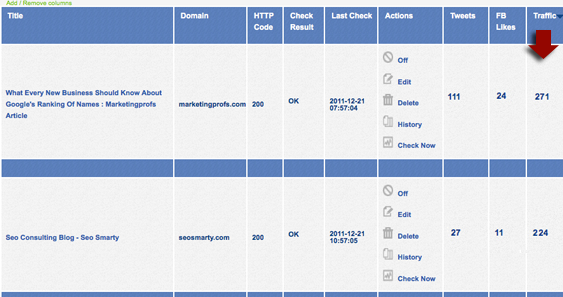
To start tracking your guest posts or links, you’ll need to create a new project and specify your base URL. For all pages you add within one project, this very base URL will be monitored automatically (even if you don’t specify which link within a given page you want to track).
You can add / remove columns from the table (to adjust a clearer view) and sort by each column. You will also receive weekly summaries of your missing links and most popular link sources.
Handy url for more info..... http://www.seosmarty.com/meet-mbg-tracker-the-simplest-and-cheapest-way-to-monitor-your-backlinks/




Browse Questions
Explore more categories
-
Moz Tools
Chat with the community about the Moz tools.
-
SEO Tactics
Discuss the SEO process with fellow marketers
-
Community
Discuss industry events, jobs, and news!
-
Digital Marketing
Chat about tactics outside of SEO
-
Research & Trends
Dive into research and trends in the search industry.
-
Support
Connect on product support and feature requests.
Related Questions
-

What do you do with product pages that are no longer used ? Delete/redirect to category/404 etc
We have a store with thousands of active items and thousands of sold items. Each product is unique so only one of each. All products are pinned and pushed online ... and then they sell and we have a product page for a sold item. All products are keyword researched and often can rank well for longtail keywords Would you :- 1. delete the page and let it 404 (we will get thousands) 2. See if the page has a decent PA, incoming links and traffic and if so redirect to a RELEVANT category page ? ~(again there will be thousands) 3. Re use the page for another product - for example a sold ruby ring gets replaces with ta new ruby ring and we use that same page /url for the new item. Gemma
Technical SEO | | acsilver0 -

If I'm using a compressed sitemap (sitemap.xml.gz) that's the URL that gets submitted to webmaster tools, correct?
I just want to verify that if a compressed sitemap file is being used, then the URL that gets submitted to Google, Bing, etc and the URL that's used in the robots.txt indicates that it's a compressed file. For example, "sitemap.xml.gz" -- thanks!
Technical SEO | | jgresalfi0 -

Does the use of a unicode character high up on page adversely affect SEO?
I work for a company in the travel industry and we are currently in the process of building out a 360-degree video landing page to inspire travel to our destination. There is some desire from individuals on my team to use the unicode degree symbol ( ° ) after 360 to ensure clarity. We currently have the ° symbol in the Page Title and H1 tag. Does the use of a unicode character adversely affect SEO? Our concern is that it is very unlikely that people are searching for 360-degree videos using the unicode symbol. We also have it fully written out as well. Just want to make sure we won't get dinged for this. Thanks!
Technical SEO | | andrewddc1 -

Canonical Tag when using Ajax and PhantomJS
Hello, We have a site that is built using an AJAX application. We include the meta fragment tag in order to get a rendered page from PhantomJS. The URL that is rendered to google from PhantomJS then is www.oursite.com/?escaped_fragment= In the SERP google of course doesnt include the hashtag in the URL. So my question, with this setup, do i still need a canonical tag and if i do, would the canonical tag be the escaped fragment URL or the regular URL? Much Appreciated!
Technical SEO | | RevanaDigitalSEO0 -

Do I use /es/, /mx/ or /es-mx/ for my Spanish site for Mexico only
I currently have the Spanish version of my site under myurl.com/es/ When I was at Pubcon in Vegas last year a panel reviewed my site and said the Spanish version should be in /mx/ rather than /es/ since es is for Spain only and my site is for Mexico only. Today while trying to find information on the web I found /es-mx/ as a possibility. I am changing my site and was planning to change to /mx/ but want confirmation on the correct way to do this. Does anyone have a link to Google documentation that will tell me for sure what to use here? The documentation I read led me to the /es/ but I cannot find that now.
Technical SEO | | RoxBrock0 -

302 redirect used, submit old sitemap?
The website of a partner of mine was recently migrated to a new platform. Even though the content on the pages mostly stayed the same, both the HTML source (divs, meta data, headers, etc.) and URLs (removed index.php, removed capitalization, etc) changed heavily. Unfortunately, the URLs of ALL forum posts (150K+) were redirected using a 302 redirect, which was only recently discovered and swiftly changed to a 301 after the discovery. Several other important content pages (150+) weren't redirected at all at first, but most now have a 301 redirect as well. The 302 redirects and 404 content pages had been live for over 2 weeks at that point, and judging by the consistent day/day drop in organic traffic, I'm guessing Google didn't like the way this migration went. My best guess would be that Google is currently treating all these content pages as 'new' (after all, the source code changed 50%+, most of the meta data changed, the URL changed, and a 302 redirect was used). On top of that, the large number of 404's they've encountered (40K+) probably also fueled their belief of a now non-worthy-of-traffic website. Given that some of these pages had been online for almost a decade, I would love Google to see that these pages are actually new versions of the old page, and therefore pass on any link juice & authority. I had the idea of submitting a sitemap containing the most important URLs of the old website (as harvested from the Top Visited Pages from Google Analytics, because no old sitemap was ever generated...), thereby re-pointing Google to all these old pages, but presenting them with a nice 301 redirect this time instead, hopefully causing them to regain their rankings. To your best knowledge, would that help the problems I've outlined above? Could it hurt? Any other tips are welcome as well.
Technical SEO | | Theo-NL0 -

Using the word "FREE" in domain name
Hi, This may seem like a simple question but a new client of mine wishes to use a domain name with the word "free" in it. The website will offer free activity vouchers. I couldn't see this being a problem as there a lot of websites that do this although he was told it may present a problem with the search engines thinking the site was spammy. It won't be and will be offering information and vouchers on local sporting activities. I was wondering if anybody could clarify this please so I can give him a more definitive answer to his question. Thanks for your help.
Technical SEO | | malinkymedia0 -

Use webmaster tools "change of address" when doing rel=canonical
We are doing a "soft migration" of a website. (Actually it is a merger of two websites). We are doing cross site rel=canonical tags instead of 301's for the first 60-90 days. These have been done on a page by page basis for an entire site. Google states that a "change of address" should be done in webmaster tools for a site migration with 301's. Should this also be done when we are doing this soft move?
Technical SEO | | EugeneF0