Moz Q&A is closed.
After more than 13 years, and tens of thousands of questions, Moz Q&A closed on 12th December 2024. Whilst we’re not completely removing the content - many posts will still be possible to view - we have locked both new posts and new replies. More details here.
MBG Tracker...how to use it?
-
So I am a new blogger that has been submitting guest blog posts to a number of different blogs. It was recommended that I use the MBG Tracker so I can track the back links. The problem is that I am totally lost on how to use this tool. As I said before I am new to this whole thing and I am not really sure what constitutes a "base link" and a "back link." In the author bylines we are linking to different pages within a larger website. If anyone can help me I would really appreciate it!
-
Thanks for the reply Ann! David, SEOmoz and MyBlogGuest are different products, you'll probably find the best help for MBG talking with Ann or using her support forums.
-
Let me try to be very clear. Please email if you have more questions (I got both of your emails, so feel free to use the email)
When guest blogging, are you promoting ONE site in your byline in each of the guest posts? There can be different pages from one site, but one and the same domain.
For example:
- Project name: SEOmoz
- Base domain: seomoz.org
Then when you decide to upload this page, for example: http://www.geekwire.com/2012/seomoz-secret-startup-success-rand-fishkins-tips/ - the tracker will automatically identify the backlink to track - http://www.seomoz.org/dp/seattle-startup-marketing - because it has seomoz.org base domain.
By providing the base domain, you make your own job easier because you don't have to manually provide the tool with the backlink to track!
-
So the base link would be the link to the blog post and the back link is the link that goes back to my site? Is this correct? I had seen the site that you suggested but like I said I was confused by the base link and the back link.
-
Base link is a normal submission with a link. Back link has more value with guest blogging.
HOW DOES THE BACKLINK MONITORING TOOL WORK?
This is the cheapest and simplest alternative I am aware of:
- Receive instant emails if any of your links were removed or nofollowed;
- Track your guest post social popularity (Likes and Tweets)
- Measure traffic from each of your guest posts (for that you’ll need to install a tracking code)
- Identify most efficient backlink sources (for example, to find places where you canguest post again).
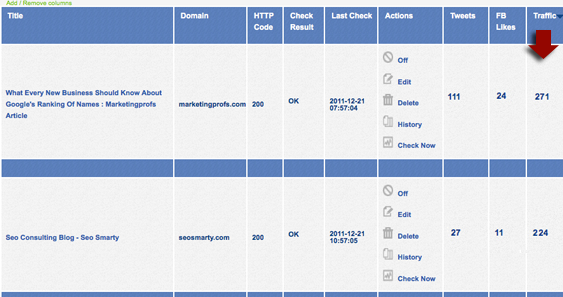
To start tracking your guest posts or links, you’ll need to create a new project and specify your base URL. For all pages you add within one project, this very base URL will be monitored automatically (even if you don’t specify which link within a given page you want to track).
You can add / remove columns from the table (to adjust a clearer view) and sort by each column. You will also receive weekly summaries of your missing links and most popular link sources.
Handy url for more info..... http://www.seosmarty.com/meet-mbg-tracker-the-simplest-and-cheapest-way-to-monitor-your-backlinks/



Browse Questions
Explore more categories
-
Moz Tools
Chat with the community about the Moz tools.
-
SEO Tactics
Discuss the SEO process with fellow marketers
-
Community
Discuss industry events, jobs, and news!
-
Digital Marketing
Chat about tactics outside of SEO
-
Research & Trends
Dive into research and trends in the search industry.
-
Support
Connect on product support and feature requests.
Related Questions
-

In writing the url, it is better to use the language used by the people of my country or English?
We speak Persian and all people search in Persian on Google. But I read in some sources that the url should be in English. Please tell me which language to use for url writing?
Technical SEO | | ghesta
For example, I brought down two models: 1fb0e134-10dc-4737-904f-bfdf07143a98-image.png https://ghesta.ir/blog/how-to-become-rich/
2)https://ghesta.ir/blog/چگونه-پولدار-شویم/0 -

Does using a reverse proxy to make a subdomain appear as a subdirectory affect SEO?
Using a reverse proxy only makes it appear that a subdomain is really a subfolder. However, links in the end remain the same. Does this have any negative (or positive) impact on SEO? Does it make it difficult from the blog's (subdomain's) sitemap or robots.txt file to be properly read by search engines?
Technical SEO | | rodelmo41 -

Can you force Google to use meta description?
Is it possible to force Google to use only the Meta description put in place for a page and not gather additional text from the page?
Technical SEO | | A_Q0 -

What punctuation can you use in meta tags? Are there any Google does not like?
So I know you can use dashes and | in meta tags, but can anyone tell me what other punctuation you can use? Also, it'd be great to know what punctuation you can't use. Thanks!
Technical SEO | | Trevorneo1 -

Blogger /blog Folder level redirect setup using .htaccess
We have a blog currently powered by the free blogger.com website. We have set it up as blog.example.com we wish to seti it up as example.com/blog how can we do this using .htaccess file? we understand how to update htacess, but we don't know what code we should enter to achieve what we want our website is hosted on Apache servers with plesk control panel
Technical SEO | | Direct_Ram0 -

Is there any benefit in using a subdomain redirected to a single page?
For example if we have a domain www.bobshardware.com.au and we setup a subdomain sydneysupplies.bobshardware.com.au and then brisbanescrewdrivers.bobshardware.com.au and used those in ad campaigns. Each subdomain being redirected back to a single page such as bobshardware.com.au/brisbane-screw-drivers etc. Is there a benefit ? Cheers
Technical SEO | | techdesign0 -

Using the Google Remove URL Tool to remove https pages
I have found a way to get a list of 'some' of my 180,000+ garbage URLs now, and I'm going through the tedious task of using the URL removal tool to put them in one at a time. Between that and my robots.txt file and the URL Parameters, I'm hoping to see some change each week. I have noticed when I put URL's starting with https:// in to the removal tool, it adds the http:// main URL at the front. For example, I add to the removal tool:- https://www.mydomain.com/blah.html?search_garbage_url_addition On the confirmation page, the URL actually shows as:- http://www.mydomain.com/https://www.mydomain.com/blah.html?search_garbage_url_addition I don't want to accidentally remove my main URL or cause problems. Is this the right way this should look? AND PART 2 OF MY QUESTION If you see the search description in Google for a page you want removed that says the following in the SERP results, should I still go to the trouble of putting in the removal request? www.domain.com/url.html?xsearch_... A description for this result is not available because of this site's robots.txt – learn more.
Technical SEO | | sparrowdog1 -

Using a non-visible H1
I have a developer that wants to use style="text-indent:-9999px" to make the H1 non-visible to the user. Being the conservative person I am, I've never tried this before and worry that Search Engines may think this is a form of cloaking. Am I worrying about nothing? And apologies if it's already been covered here. I couldn't find it. Thanks in advance!!!!
Technical SEO | | elytical0