Moz Q&A is closed.
After more than 13 years, and tens of thousands of questions, Moz Q&A closed on 12th December 2024. Whilst we’re not completely removing the content - many posts will still be possible to view - we have locked both new posts and new replies. More details here.
Sudden Drop in Mobile Core Web Vitals
-

For some reason, after all URLs being previously classified as Good, our Mobile Web Vitals report suddenly shifted to the above, and it doesn't correspond with any site changes on our end.
Has anyone else experience something similar or have any idea what might have caused such a shift?
Curiously I'm not seeing a drop in session duration, conversion rate etc. for mobile traffic despite the seemingly sudden change.
-
I can’t understand their algorithm for core web vitals. I have made some technical updates to our website for speed optimization, but the thing that happened in the search console is very confusing for my site.
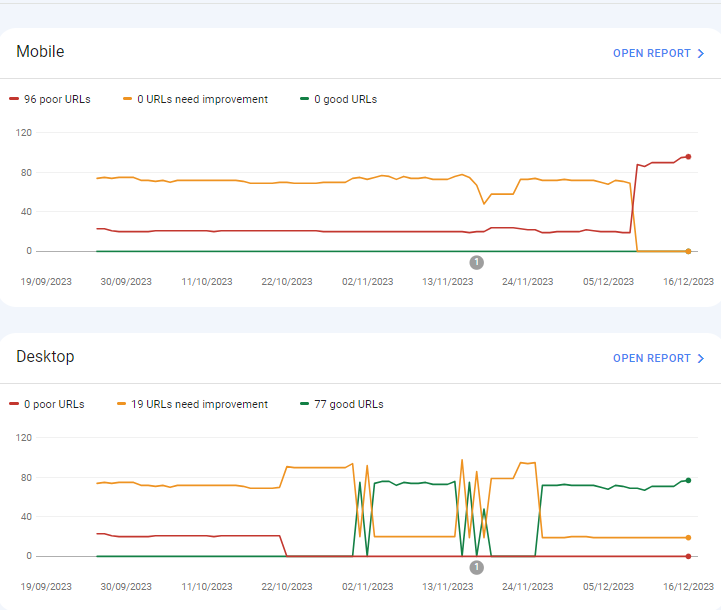
For desktops, pages are indexed as good URLs
while mobile-indexed URLs are displayed as poor URLs.
Our website is the collective material for people looking for Canada immigration (PAIC), and 70% of the portion is filled with text only. We are using webp images for optimization, still it is not passing Core Web Vitals.I am looking forward to the expert’s suggestion to overcome this problem.
-
I can’t understand their algorithm for core web vitals. I have made some technical updates to our website for speed optimization, but the thing that happened in the search console is very confusing for my site.
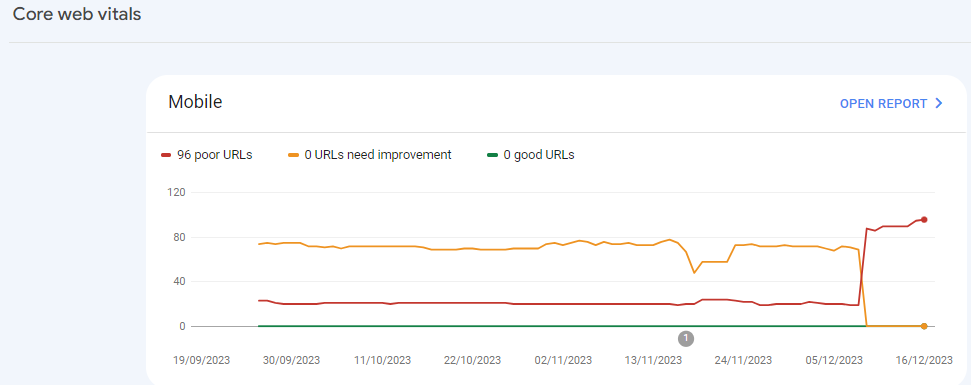
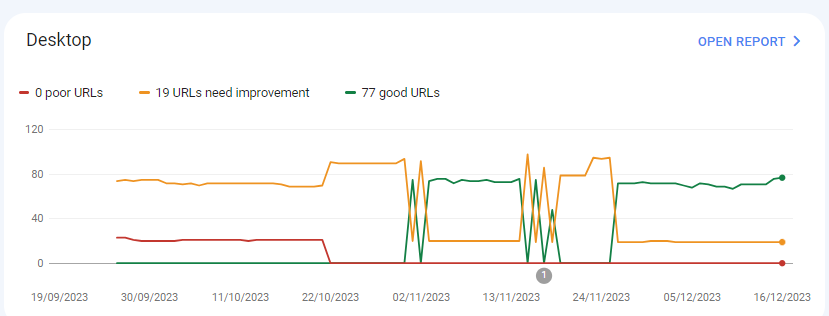
For desktops, pages are indexed as good URLs
while mobile-indexed URLs are displayed as poor URLs.
Our website is the collective material for people looking for Canadian immigration (PAIC), and 70% of the portion is filled with text only. We are using webp images for optimization, still it is not passing Core Web Vitals.I am looking forward to the expert’s suggestion to overcome this problem.
-
@rwat Hi, did you find a solution?
-
Yes, I am also experiencing the same for one of my websites, but most of them are blog posts and I am using a lot of images without proper optimization, so that could be the reason. but not sure.
It is also quite possible that Google maybe adding some more parameters to their main web critical score.
Browse Questions
Explore more categories
-
Moz Tools
Chat with the community about the Moz tools.
-
SEO Tactics
Discuss the SEO process with fellow marketers
-
Community
Discuss industry events, jobs, and news!
-
Digital Marketing
Chat about tactics outside of SEO
-
Research & Trends
Dive into research and trends in the search industry.
-
Support
Connect on product support and feature requests.
Related Questions
-
Unsolved IP Address Indexed on Google along with Domain
My website is showing/indexed on Google search results twice, with IP address and domain name
Other SEO Tools | | mupetra
I'm using AWS LightSail
I don't know how to fix this, beside I'm afraid this duplicate can harm my website0 -
Unsolved Capturing Source Dynamically for UTM Parameters
Does anyone have a tutorial on how to dynamically capture the referring source to be populated in UTM parameters for Google Analytics? We want to syndicate content and be able to see all of the websites that provided referral traffic for this specific objective. We want to set a specific utm_medium and utm_campaign but have the utm_source be dynamic and capture the referring website. If we set a permanent utm_source, it would appear the same for all incoming traffic. Thanks in advance!
Technical SEO | | peteboyd0 -
Unsolved Duplicate LocalBusiness Schema Markup
Hello! I've been having a hard time finding an answer to this specific question so I figured I'd drop it here. I always add custom LocalBusiness markup to clients' homepages, but sometimes the client's website provider will include their own automated LocalBusiness markup. The codes I create often include more information. Assuming the website provider is unwilling to remove their markup, is it a bad idea to include my code as well? It seems like it could potentially be read as spammy by Google. Do the pros of having more detailed markup outweigh that potential negative impact?
Local Website Optimization | | GoogleAlgoServant0 -
Best Web-site Structure/ SEO Strategy for an online travel agency?
Dear Experts! I need your help with pointing me in the right direction. So far I have found scattered tips around the Internet but it's hard to make a full picture with all these bits and pieces of information without a professional advice. My primary goal is to understand how I should build my online travel agency web-site’s (https://qualistay.com) structure, so that I target my keywords on correct pages and do not create a duplicate content. In my particular case I have very similar properties in similar locations in Tenerife. Many of them are located in the same villa or apartment complex, thus, it is very hard to come up with the unique description for each of them. Not speaking of amenities and pricing blocks, which are standard and almost identical (I don’t know if Google sees it as a duplicate content). From what I have read so far, it’s better to target archive pages rather than every single property. At the moment my archive pages are: all properties (includes all property types and locations), a page for each location (includes all property types). Does it make sense adding archive pages by property type in addition OR in stead of the location ones if I, for instance, target separate keywords like 'villas costa adeje' and 'apartments costa adeje'? At the moment, the title of the respective archive page "Properties to rent in costa adeje: villas, apartments" in principle targets both keywords... Does using the same keyword in a single property listing cannibalize archive page ranking it is linking back to? Or not, unless Google specifically identifies this as a duplicate content, which one can see in Google Search Console under HTML Improvements and/or archive page has more incoming links than a single property? If targeting only archive pages, how should I optimize them in such a way that they stay user-friendly. I have created (though, not yet fully optimized) descriptions for each archive page just below the main header. But I have them partially hidden (collapsible) using a JS in order to keep visitors’ focus on the properties. I know that Google does not rank hidden content high, at least at the moment, but since there is a new algorithm Mobile First coming up in the near future, they promise not to punish mobile sites for a collapsible content and will use mobile version to rate desktop one. Does this mean I should not worry about hidden content anymore or should I move the descirption to the bottom of the page and make it fully visible? Your feedback will be highly appreciated! Thank you! Dmitry
Technical SEO | | qualistay1 -
Mobile SERPS: how to optimize for call button
Hi, I have 2 questions about the "call" button on mobile google serps when doing a business name search: -since when is this button available in SERPS -is there anything specific you can do to actually have google display that call button (schema.org, ...) Kind regards Pieter
Technical SEO | | TruvoDirectories0 -
Google rankings dropped dramatically after 24 hrs of hosting suspension
Hi, One of my websites ( http://www.traveldestinationsearch.com/ ) dropped most of its Google rankings after 24 hours of hosting suspension (from April 26 until April 27, 2012). The hosting company suspended my website after exceeding the bandwidth limit: there was no unusual activity on my website, it just exceeded its bandwidth limit by 20-30MB for the previous month. Anyway, the website is back online since April 27 but the problem is that, following these 24 hrs of no service, I see a dramatic decrease of my website's Google rankings for its main keywords. Even today, April 29, I can't find my website anywhere in the first 100 results for most of its targeted keywords. Before the suspension, the website ranked #1 for its main keyword and somewhere in the first 2-3 pages of Google search results for other two main keywords. My question is: is it the hosting suspension the reason for the Google ranking drop, and (assuming this is a temporary problem) when do you think I should expect my website to regain the rankings it had before the hosting suspension? Thanks for your support. Regards, Adrian
Technical SEO | | AdrianBanu0 -
Sudden ranking drop, no manual action
Sort of a strange situation I'm having and I wanted to see if I could get some thoughts. Here's what has happened... Monday morning, I realized that my website, which had been showing up at the bottom of page 2 for a specific result, had now been demoted to the bottom of page 6 (roughly a 40 spot demotion). No other keyword searches were affected. I immediately figured that this was some sort of keyword-specific penalty that I had incurred. I had done a bit of link building over the weekend (two or three directory type sites and a bio link from a site I contribute to). I also changed some anchor text on another site to match my homepage's title tag (which just so happened to be the exact phrase match I had dropped in) - I assumed this was what got me. I was slowly beginning to climb up the rankings and just got a bit impatient/overzealous. Changed the anchor text back to what it originally was and submitted a reconsideration request on Tuesday. This morning, I get the automated response in Webmaster Tools that no manual action had been taken. So my question is, would this drop have been an automated deal? If that's the case, then it's going to be mighty hard to pinpoint what I did wrong, since there's no way to know when I did whatever it was to cause the drop. Any ideas/thoughts/suggestions to regain my modest original placement?
Technical SEO | | sandlappercreative0