Moz Q&A is closed.
After more than 13 years, and tens of thousands of questions, Moz Q&A closed on 12th December 2024. Whilst we’re not completely removing the content - many posts will still be possible to view - we have locked both new posts and new replies. More details here.
Sudden Drop in Mobile Core Web Vitals
-

For some reason, after all URLs being previously classified as Good, our Mobile Web Vitals report suddenly shifted to the above, and it doesn't correspond with any site changes on our end.
Has anyone else experience something similar or have any idea what might have caused such a shift?
Curiously I'm not seeing a drop in session duration, conversion rate etc. for mobile traffic despite the seemingly sudden change.
-
I can’t understand their algorithm for core web vitals. I have made some technical updates to our website for speed optimization, but the thing that happened in the search console is very confusing for my site.
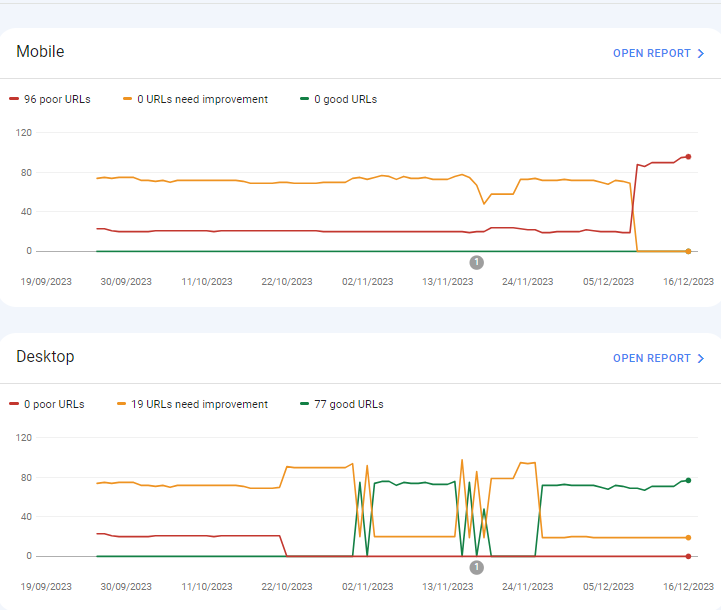
For desktops, pages are indexed as good URLs
while mobile-indexed URLs are displayed as poor URLs.
Our website is the collective material for people looking for Canada immigration (PAIC), and 70% of the portion is filled with text only. We are using webp images for optimization, still it is not passing Core Web Vitals.I am looking forward to the expert’s suggestion to overcome this problem.
-
I can’t understand their algorithm for core web vitals. I have made some technical updates to our website for speed optimization, but the thing that happened in the search console is very confusing for my site.
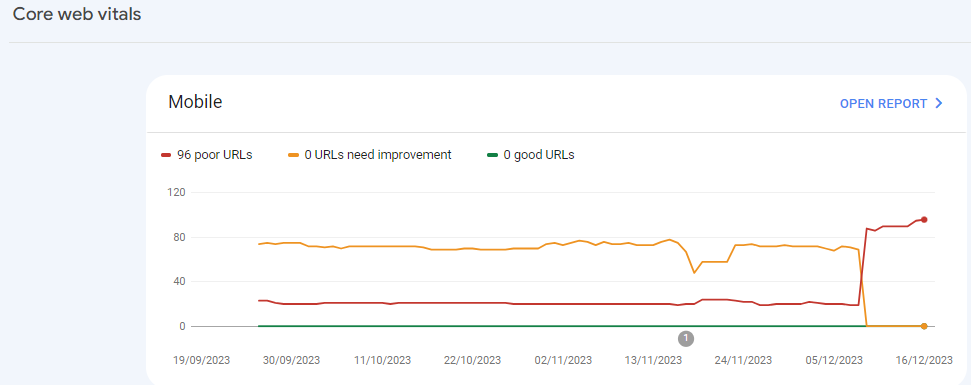
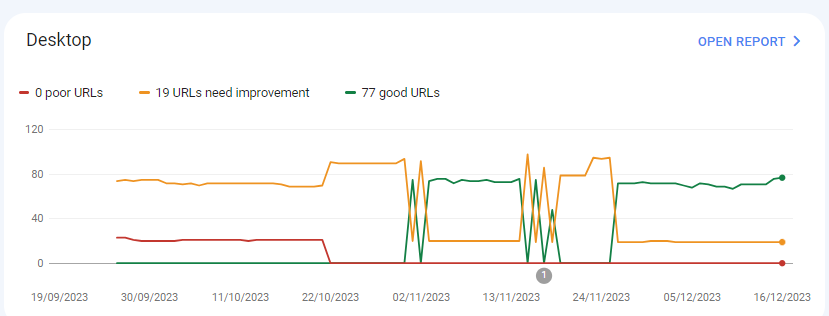
For desktops, pages are indexed as good URLs
while mobile-indexed URLs are displayed as poor URLs.
Our website is the collective material for people looking for Canadian immigration (PAIC), and 70% of the portion is filled with text only. We are using webp images for optimization, still it is not passing Core Web Vitals.I am looking forward to the expert’s suggestion to overcome this problem.
-
@rwat Hi, did you find a solution?
-
Yes, I am also experiencing the same for one of my websites, but most of them are blog posts and I am using a lot of images without proper optimization, so that could be the reason. but not sure.
It is also quite possible that Google maybe adding some more parameters to their main web critical score.



Browse Questions
Explore more categories
-
Moz Tools
Chat with the community about the Moz tools.
-
SEO Tactics
Discuss the SEO process with fellow marketers
-
Community
Discuss industry events, jobs, and news!
-
Digital Marketing
Chat about tactics outside of SEO
-
Research & Trends
Dive into research and trends in the search industry.
-
Support
Connect on product support and feature requests.
Related Questions
-

How to Boost Your WordPress Website Speed to 95+ (Without Premium Plugins)
I'm reaching out for some advice on improving my WordPress website's speed. I'm currently using a free theme for this fusion magazine and aiming for a score of 95+ on Google PageSpeed Insights. I'm aware that premium plugins can significantly enhance performance, but I'm hoping to achieve similar results using primarily free solutions and manual optimizations.
Technical SEO | | mohammadrehanseo0 -

Why Product pages are throwing Missing field "image" and Missing field "price" in Wordpress Woocommerce
I have a wordpress wocommerce website where I have uploaded 100s of products but it's giving me error in GSC under merchant listing tab. When I tested it show missing field image and missing field price. I have done everything according to https://developers.google.com/search/docs/appearance/structured-data/product#merchant-listing-experiences and applied fixed i.e. images are 800x800 and price range is also there. What else can be done here?!merchant listing.jpg
Technical SEO | | Ravi_Rana0 -

How to index e-commerce marketplace product pages
Hello! We are an online marketplace that submitted our sitemap through Google Search Console 2 weeks ago. Although the sitemap has been submitted successfully, out of ~10000 links (we have ~10000 product pages), we only have 25 that have been indexed. I've attached images of the reasons given for not indexing the platform. gsc-dashboard-1 gsc-dashboard-2 How would we go about fixing this?
Technical SEO | | fbcosta0 -

Do web design footer links of websites you build have value?
Hi everyone. I am trying to build up DA for my site and create linking opportunities with my clients sites but I am not seeing any link value. I just did a redesign with another firm and we built out www.denbow.com . We have links to our sites in the footer but for some reason it's not being indexed. Can someone help me understand if it is good to put built by a href link in the footer? I've built almost 12 sites in my first 1.5 years of being in business for myself and I thought the links would pass some sort of value. Thanks in advance for the help and education. Regards, Noob Gary
Technical SEO | | gdavey0 -

Mobile SERPS: how to optimize for call button
Hi, I have 2 questions about the "call" button on mobile google serps when doing a business name search: -since when is this button available in SERPS -is there anything specific you can do to actually have google display that call button (schema.org, ...) Kind regards Pieter
Technical SEO | | TruvoDirectories0 -

Do web pages have to be linked to a menu?
I have a situation where people search for terms like, say 1978 one dollar bill. Even though there never was a 1978 one dollar bill. I want to make a page to capture these searches but since there wasn't such a thing as a one dollar bill I don't want it connected to the rest of my content which is reality based. Does that make sense? Anyway, my question is, can I publish pages that aren't linked to my menu structure but that will be searchable or, am I going to have to figure out a way to make these oddball pages accessible through my menu?
Technical SEO | | Banknotes0 -

Web config redirects not working where a trailing slash is involved
I'm having real trouble with getting working redirects in place to use on a site we're re-launching with a modified url structure. Old URL: http://www.example.com/example_folder/ New URL: http://www.example.com/example-of-new-folder/ Now, where the old URL's have a trailing slash the web.config simply will not accept it. It says the URL can start with a slash, but not end with a slash. However, many of my URL's do end with a slash so I need a workaround. These are the rules I'm putting in place: <location path="example_folder/"></location> Thanks
Technical SEO | | AndrewAkesson0 -

How to Resolve Rankings Drop from a DDOS Attack?
Our rankings just plummeted on Tuesday across the board. There was a DDOS attack on Tuesday and since then the rankings went down and have stayed down, even though the DDOS attack has been resolved. Also, this is the 3rd or 4th attack they've encountered this year. How long could this last? How can we deal with this? Thanks
Technical SEO | | poolguy0